
Does the STM32F103 Blue Pill not supporting DMA2 ?
because i get an error error: ‘DMA2’ was not declared in this scope
basically from the 3 SPI TX pins PA7 , PB15 , PB5 i have to use the PB5 because the other ones are occupied.
#define SPI1_DMA_CH DMA_CH3// DMA chan for SPI1 DMA_CH3 PA7
#define SPI2_DMA_CH DMA_CH5 // DMA chan for SPI 2 DMA_CH5 PB15
#define SPI3_DMA_CH DMA2_CH2 // DMA chan for SPI 3 DMA_CH2 PB5
#define SPI_DMA DMA1 // DMA for SPI
#define SPI_DMA2 DMA2 // DMA for SPI
I get the above error in declaration of DMA2 error: ‘DMA2’ was not declared in this scope
So i want to call the dma_attach_interrupt for the PB5
dma_attach_interrupt(DMA2, SPI3_DMA_CH, &DMA_DO_SOMETHING);
PS i include the #include <SPI.h>
Please check the reference manual for details. Basically the MCU does not have the peripherals that would use DMA2, so I guess it didn’t make sense for STM to include a DMA controller only for M2M
i am trying to Data output using DMA SPI , can i change pin for DMA channel for SPI1 DMA_CH3
Not the PA7 because is occupied but with the PB5 or something else, is there any other way to map to a different pin?
We do have 3 spi correct?
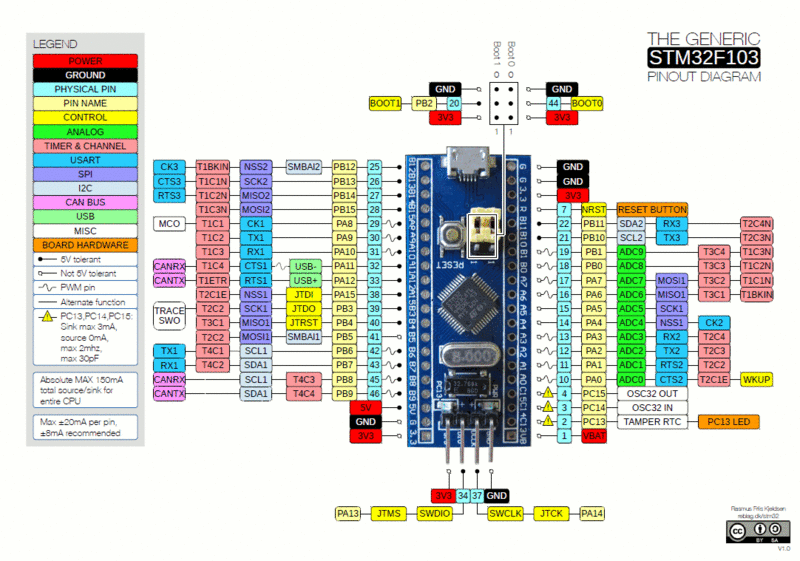
The diagram only shows 2 SPI devices, but it shows SPI1 on both its normal pins PA5,PS6 and PA7 and its alternative pins e.g. PB5
By default SPI1 is on PA5,6,7
Note. NSS (hardware device select) is very buggy in the STM32 hardware, so its not enabled by the libmaple core.
I’m not sure why you are messing around with DMA channels, you would need to read STM’s own 1000+ page reference manual to get the full details of DMA channels
the project Data outputs using DMA SPI
dma_setup_transfer
dma_set_num_transfers
dma_enable
SPI_dmaSend
dma_attach_interrupt
all those functions are fed with spiDmaDev (DMA1) , DmaChannel ( DMA_CH3,DMA_CH5,DMA_CH2)
When i use the DMA_CH3 my TX pin is PA7
When i use the DMA_CH5 my TX pin is PB15
but
When i use the DMA_CH2 Normally my TX pin is PB5(i want this particular pin) but it doesnt work because belongs to DMA2
My problem is that PA7 & PB15 are occupied by something else in my project
inside the Arduino_STM32/blob/master/STM32F1/libraries/SPI/src/SPI.cpp i see this part of the code
// Init things specific to each SPI device
// clock divider setup is a bit of hack, and needs to be improved at a later date.
_settings[0].spi_d = SPI1;
_settings[0].clockDivider = determine_baud_rate(_settings[0].spi_d, _settings[0].clock);
_settings[0].spiDmaDev = DMA1;
_settings[0].spiTxDmaChannel = DMA_CH3;
_settings[0].spiRxDmaChannel = DMA_CH2;
_settings[1].spi_d = SPI2;
_settings[1].clockDivider = determine_baud_rate(_settings[1].spi_d, _settings[1].clock);
_settings[1].spiDmaDev = DMA1;
_settings[1].spiTxDmaChannel = DMA_CH5;
_settings[1].spiRxDmaChannel = DMA_CH4;
#if BOARD_NR_SPI >= 3
_settings[2].spi_d = SPI3;
_settings[2].clockDivider = determine_baud_rate(_settings[2].spi_d, _settings[2].clock);
_settings[2].spiDmaDev = DMA2;
_settings[2].spiTxDmaChannel = DMA_CH2;
_settings[2].spiRxDmaChannel = DMA_CH1;
#endif
i also found those DMA examples , that using DMA2
http://www.stm32duino.com/viewtopic.php … 9&start=30
[rana – Thu Sep 14, 2017 7:33 am] –
….i also found those DMA examples , that using DMA2
http://www.stm32duino.com/viewtopic.php … 9&start=30
BTW.
You mean DMA1 Channel 2.
 dma_init(DMA2);

spi_tx_dma_enable(SPI3);

dma_attach_interrupt(DMA2, DMA_CH2, DMAEvent);
You don’t need to read completely every page of every section, but at least the sections that relate to peripherals you want to use so you understand them. It will save you a lot of time versus just trying to find and test code that may or may not work in the exact version of the MCU you are using.
DMA controller and channels have nothing to do with the pins. They are hardwired internally to different peripherals. Some peripherals pins can be remapped to different GPIO pins in the MCU, but when you remap a peripheral, it’s still connected to the same DMA controller and channel.
Of course all this is explained much better and in more detail in the reference manual, so there is no point trying to explain the whole subject in a post.
afio_cfg_debug_ports(AFIO_DEBUG_SW_ONLY); // release PB3 and PB5

afio_remap(AFIO_REMAP_SPI1); // remap SPI1

gpio_set_mode(GPIOB, 5, GPIO_AF_OUTPUT_PP);
[rana – Fri Sep 15, 2017 9:10 pm] –
i have also in my project a OLED SSD1306
SDA PB7
SCL PB6
You can check if i2c1 can be remapped to other pins, and otherwise try using I2C2 rather than I2C1. You would would have to change the declaration of the WIRE object to use the second port instead of the first one, it’s somewhere at the end of the wire library cpp files, either in wire.cpp or wirebase.cpp. I remember cause I was using that library the other day.
You mean at the end of the Wire.cpp there is this line HardWire Wire(1, I2C_FAST_MODE);;
i cant change the oleds pins it have to stay there
OLED SSD1306
SDA PB7
SCL PB6
What i dont understand is why is i2c1 affect the PB5
STM32F100xC STM32F100xD STM32F100xE ‘High-density value line, advanced ARM-based 32-bit MCU with 256 to 512 KB Flash, 16 timers, ADC, DAC & 11 comm interfaces
Doc ID 15081 Rev 7
default is I2C1_SMBA
google ‘I2C SMBA’
early result is Differences between I2C and SMBus
srp
![[Pending Enhancement] RTC values resetting](https://sparklogic.ru/wp-content/uploads/2019/11/nucleo-l476rg-zestaw-startowy-z-mikrokontrolerem-z-rodziny-stm32-stm32l476-90x90.jpg)