
Maybe you guys can recommend an IDE which is relative easy to install on OSXa d suppord Borg Arduino and stm32.
I’m just tired of the standard Arduino ide 
Eclipse ?
Micro studio?
There is a better way … Go off and find what you like and report back to the forum on why your selection works better for you than the stock ArduinoIDE. There is already ample discussion in the forum about alternate IDE’s.
Ray
it was a bit of a pain in the ass to get everything working (at least if you start adding usb serial & things like that, visualgdb misses some files it should include and other small annoyances).
But in the end it does work very nicely. full intellisense, uploading & debugging from stlink without issue (and having a full register map in the gui so you can immeately check all registers to see if everything is configured as expected when you hit a breakpoint ).
If the same could be done with the arduino framework, that would be a very nice development environment .
Any suggestions for something that is simple to set up or that has a good set of instructions?
I also happen to use Eclipse for work (sometimes, but not exclusively). It does the job well, but is far from perfect, and sometimes there too, I’ll just fire up vi, or hash together some grep/awk/sed stuff to grab data from some weird formatted source and squeeze it in to something more suitable for what I need. This is my choice (arguably in part because I’m and old fart, and stuck in my ways), and there are no doubt much more snazzy tools, and whizz bang APIs that would do the same thing (if I was prepared to take the time to learn them).
Have a play with the various offerings, and select the one that you feel most comfortable with. You will find that the ability to use Eclipse (and indeed vi) can be useful in a professional capacity. They are popular choices. The Arduino IDE generates quite a few snooty remarks for its look and feel, but to my mind it does its job reasonably well. I can think of far worse tools, and indeed have used, or attempted to use quite a number over the years.
An IDE is a tool, and as such it is useful for some tasks and not others. Eclipse is perhaps more of a complicated Swiss Army knife with a bunch of blades you use all the time, and some, you can only begin to guess the purpose of. The Arduino IDE is more a go to pocket knife. Not good for complex splicing of many files and in depth debugging, but easy to operate, and you wont confuse yourself or cut off a finger with it with it quite so easily. 
Perhaps the only real advice I can give is play with a bunch of IDEs, but also learn the rudiments of vi – not because it is the best, simply because it is available for pretty much any platform. You might like to have a play with this too – > http://www.scintilla.org/SciTE.html <- not saying it is the best, but it was a long time go to GUI tool at my previous employer.
Come back here and let us know how you got on.
http://docs.platformio.org/en/stable/us … _init.html
I have to say it does work quite well. If the IDE supports autocomplete it works, etc. I’ve coded in Qt at some point so I can generate QtCreator project. I’ve coded with Java so I can generate project for Eclipse .. and so on. And CodeBlocks of course, very fast IDE. You’ll have to play a little with the platformio.ini file to get some things right. Then it works quite nicely.
So.. I’ve used platformio now for a while but I know this sounds funny .. I’ve not used it for compiling and uploading because that does not seem to work. But only for generating IDE project files. For example in my current project platformio compiled the .bin over 64kB even though Arduino IDE compiles it in 35kB. I use Arduino IDE only for compiling and uploading
Well, I guess it is fair to say compiling works with platformio but it just generates too large .bin files and I have no extra time to debug that further.
I would like to use it also for compiling / uploading because it is somewhat faster that Arduino IDE
ahull: there also seems to be something for VIM users as well:
The Arduino UI is lacking a few things which seem to matter more as I add files to the project – simple stuff like an easy way to move back and forth between two files and to go to the declaration or definition of a function. Anything Eclipse based, or Atom, or even VS2015 community would be a big improvement. I’d rather not move from the Arduino/Maple libraries right now – I want to get the hardware up and running before I consider such changes.
I’m willing to do a bit of hacking but I would prefer to not spend time on a solution that won’t work, such as something that won’t build with the external libraries.
The Arduino UI is lacking a few things which seem to matter more as I add files to the project – simple stuff like an easy way to move back and forth between two files and to go to the declaration or definition of a function.
I use Notepad++ as well, if I’m doing anything complex in the Arduino IDE.
But its still lacking functions like “find definition” unless you load a plugin (and those plugin’s give warnings about unsigned dll’s, so are a bit risky)
I use Notepad++ as well, if I’m doing anything complex in the Arduino IDE.
But its still lacking functions like “find definition” unless you load a plugin (and those plugin’s give warnings about unsigned dll’s, so are a bit risky)
Do you write code in Notepad++ and then exit from it and start the Arduino GUI to compile it or is there some way to have both running without one stepping on the other?
I think platformuino has some way to automate this, and perhaps Arduino Builder does as well, but I’ve not used either of those
http://notepadqq.altervista.org/wp/
There are of course other alternatives. -> https://itsfoss.com/notepad-alternatives-for-linux/
I’m going to give notepadqq a whirl and see if it is any good..
I ran NPP on Linux using WINE and it seemed to work OK, but a native clone would be better
http://notepadqq.altervista.org/wp/
There are of course other alternatives. -> https://itsfoss.com/notepad-alternatives-for-linux/
I’m going to give notepadqq a whirl and see if it is any good..
I better bookmark this thread 
debian jessie
There is also some chat about using it for building for an Arduino target here -> https://forum.arduino.cc/index.php?topic=296960.0
There are quite a few themes there to choose from.
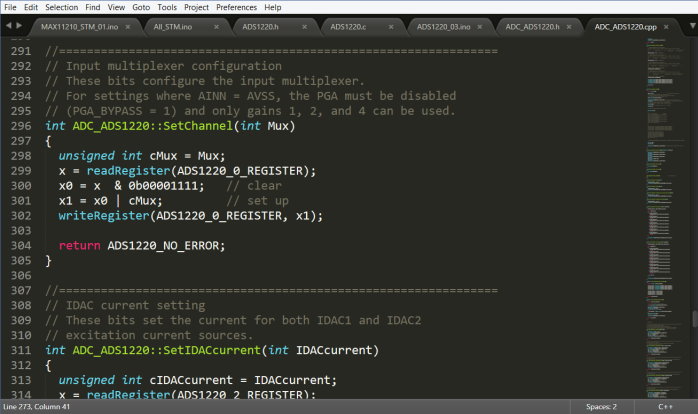
- subl_stm.jpg (58.46 KiB) Viewed 759 times
– platformio to generate IDE project for QtCreator. http://docs.platformio.org/en/stable/ide/qtcreator.html
– QtCreator as IDE. Quite fast with autocomplete and finds quickly declarations/methods and you can compile your project much much faster (platformio) than Arduino IDE to check for errors. http://www.stm32duino.com/viewtopic.php?t=1375
– for uploading I have to use Arduino IDE for now
– next thing is to try debugging with launching BMP GDB from QtCreator. QtCreator has nice debugging interface.
to generate project file with platformio:
pio init --ide=qtcreator --project-option="framework=arduino" -b bluepill_f103c8
![[Pending Enhancement] RTC values resetting](https://sparklogic.ru/wp-content/uploads/2019/11/nucleo-l476rg-zestaw-startowy-z-mikrokontrolerem-z-rodziny-stm32-stm32l476-90x90.jpg)
