
The HTML page requested by the client has 4 embedded pictures, the HTML site is loaded from the SD card and sent to the client.
As the page is loaded (almost) completely, the asserted pictures are being requested.
The problem: one of the pictures (randomly) is not loaded, the network analyzer of Google Chrome shows me the status: failed, ERR_CONNECTION_REFUSED.
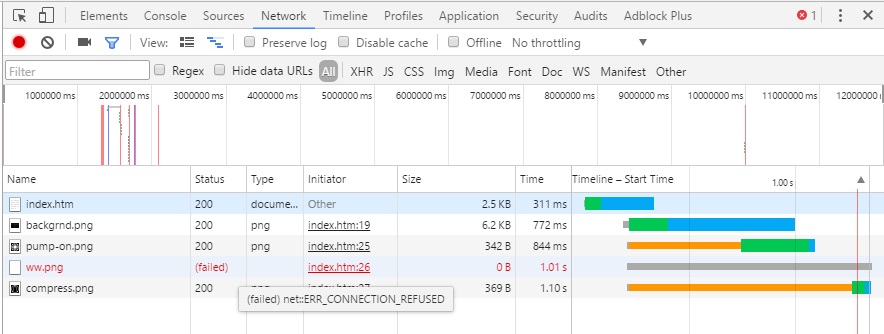
- W5500_network.jpg (80.37 KiB) Viewed 1306 times
Just a guess: can you check if the first request for the HTML file has the “connection-keepalive” field in its header? If yes, the client probably did not close the connection after loading the page and keeps one socket busy in the W5500.
But even if it would be so, it should still have plenty of free sockets till 8, shouldnt it?
Do you run as a DHCP client, maybe? That may also eat up another precious socket…
I suggest that you dump the status of each socket (Sn_SR register) to find out if this problem comes from left-over sockets.
void WIZCHIP_DUMP(void)

{

int i, j;
printf("\nCommon Register Block:\n");

for (i = MR; i <= VERSIONR; i += 256) {

printf("%02x ", WIZCHIP_READ(i));

if ((i & 0xf00) == (15 * 256)) {

printf("\n");

}

}

for (j = 0, j < 8, j++) {

printf("\nSocket %d Register Block:\n", j);

for (i = Sn_MR(j); i <= Sn_KPALVTR(j); i += 256) {

printf("%02x ", WIZCHIP_READ(i));

if ((i & 0xf00) == (15 * 256)) {

printf("\n");

}

}

printf("\n");

}

}
So there is not an unavailable socket problem.
Only up to 4 simultaneous requests over one socket are currently possible… Is this maybe limited by the W5500 hardware?
Or is my W5500 chip “tired”?
This is not a solution, but try a different browser, I recall a similar issue on the ESP8266 where it would work fine on Internet Explorer but wouldn’t work correctly on Chrome. As it may shed some light on the problem.
So there is not an unavailable socket problem.
Only up to 4 simultaneous requests over one socket are currently possible… Is this maybe limited by the W5500 hardware?
Or is my W5500 chip “tired”?
My server is replying with “connection close”, but still, you are right, the connection may be kept alive by the browser.
I tried with Firefox, it is better in the way that FF waits till end of HTML load, and requests the asserted images only afterwards. Means that at that moment there are 4 available “pipelines” for requests so that all 4 images are loaded. I have to try a HTML page with 5 images to see how the browser behaves.
Anyway, my server is not able to do multitasking. Meaning that only one request is served at a time.
But the problem is with issuing (or accepting?) more than 4 requests simultaneously. This seems to be somehow the limitation.
Here a snapshot of the server log output:
Current date and time: 17-01-06 11:17:05

---> request from: 192.168.100.51

--- Socket status ---

Socket 0 is ESTABLISHED, port: 80, D: 192.168.100.51(58222), RX: 420

Socket 1 is LISTEN, port: 80, D: 192.168.100.1(123), RX: 0

Socket 2 is CLOSED, port: 80, D: 192.168.100.51(57950), RX: 0

Socket 3 is CLOSED, port: 80, D: 192.168.100.51(58096), RX: 0

GET /web/index.htm HTTP/1.1

Checking request: web/index.htm

...processed in: 259

--- Socket status ---

Socket 0 is ESTABLISHED, port: 80, D: 192.168.100.51(58222), RX: 0

Socket 1 is ESTABLISHED, port: 80, D: 192.168.100.51(58223), RX: 371

Socket 2 is CLOSED, port: 80, D: 192.168.100.51(57950), RX: 0

Socket 3 is CLOSED, port: 80, D: 192.168.100.51(58096), RX: 0

<--- client end.

Current date and time: 17-01-06 11:17:05

---> request from: 192.168.100.51

--- Socket status ---

Socket 0 is LISTEN, port: 80, D: 192.168.100.51(58222), RX: 0

Socket 1 is ESTABLISHED, port: 80, D: 192.168.100.51(58223), RX: 371

Socket 2 is CLOSED, port: 80, D: 192.168.100.51(57950), RX: 0

Socket 3 is CLOSED, port: 80, D: 192.168.100.51(58096), RX: 0

GET /web/img/backgrnd.png HTTP/1.1

Checking request: web/img/backgrnd.png

...processed in: 596

--- Socket status ---

Socket 0 is ESTABLISHED, port: 80, D: 192.168.100.51(58224), RX: 370

Socket 1 is ESTABLISHED, port: 80, D: 192.168.100.51(58223), RX: 0

Socket 2 is CLOSED, port: 80, D: 192.168.100.51(57950), RX: 0

Socket 3 is CLOSED, port: 80, D: 192.168.100.51(58096), RX: 0

<--- client end.

Current date and time: 17-01-06 11:17:06

---> request from: 192.168.100.51

--- Socket status ---

Socket 0 is ESTABLISHED, port: 80, D: 192.168.100.51(58224), RX: 370

Socket 1 is LISTEN, port: 80, D: 192.168.100.51(58223), RX: 0

Socket 2 is CLOSED, port: 80, D: 192.168.100.51(57950), RX: 0

Socket 3 is CLOSED, port: 80, D: 192.168.100.51(58096), RX: 0

GET /web/img/pump-on.png HTTP/1.1

Checking request: web/img/pump-on.png

...processed in: 35

--- Socket status ---

Socket 0 is ESTABLISHED, port: 80, D: 192.168.100.51(58224), RX: 0

Socket 1 is LISTEN, port: 80, D: 192.168.100.51(58223), RX: 0

Socket 2 is CLOSED, port: 80, D: 192.168.100.51(57950), RX: 0

Socket 3 is CLOSED, port: 80, D: 192.168.100.51(58096), RX: 0

<--- client end.

Current date and time: 17-01-06 11:17:06

---> request from: 192.168.100.51

--- Socket status ---

Socket 0 is LISTEN, port: 80, D: 192.168.100.51(58224), RX: 0

Socket 1 is ESTABLISHED, port: 80, D: 192.168.100.51(58225), RX: 365

Socket 2 is CLOSED, port: 80, D: 192.168.100.51(57950), RX: 0

Socket 3 is CLOSED, port: 80, D: 192.168.100.51(58096), RX: 0

GET /web/img/ww.png HTTP/1.1

Checking request: web/img/ww.png

...processed in: 27

--- Socket status ---

Socket 0 is LISTEN, port: 80, D: 192.168.100.51(58224), RX: 0

Socket 1 is ESTABLISHED, port: 80, D: 192.168.100.51(58225), RX: 0

Socket 2 is CLOSED, port: 80, D: 192.168.100.51(57950), RX: 0

Socket 3 is CLOSED, port: 80, D: 192.168.100.51(58096), RX: 0

<--- client end.
Socket 0 is ESTABLISHED, port: 80, D: 192.168.100.51(58222), RX: 0
Socket 1 is ESTABLISHED, port: 80, D: 192.168.100.51(58223), RX: 371
Socket 2 is CLOSED, port: 80, D: 192.168.100.51(57950), RX: 0
Socket 3 is CLOSED, port: 80, D: 192.168.100.51(58096), RX: 0
<— client end.
After a brief look through the wiznet code, it seems like their socket API differs from the Unix socket API in one important way: Listening sockets are not held open after accepting a connection. From the paste above, it looks like you wouldn’t accept another connection on port 80 because none of your sockets are in LISTEN state. This is probably a race condition between accepting a connection and the library calling EthernetServer::begin() to open a new listening socket.
I think I have a wiznet ethernet shield at home, I should experiment with it some.

I don’t have an overview what is happening and when the sockets are opened and listened and closed…
You mean that there should be more listening sockets in order to receive more requests?
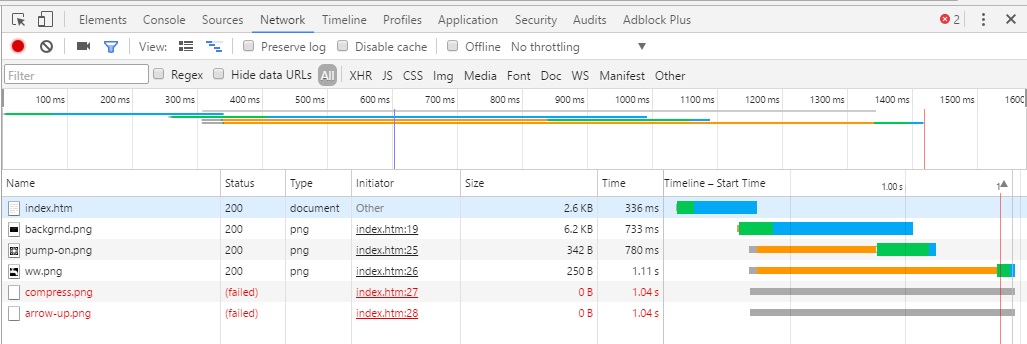
- W5500_Chrome_1.jpg (88.46 KiB) Viewed 341 times


