http://ru.aliexpress.com/item/stm32f103 … wVersion=3
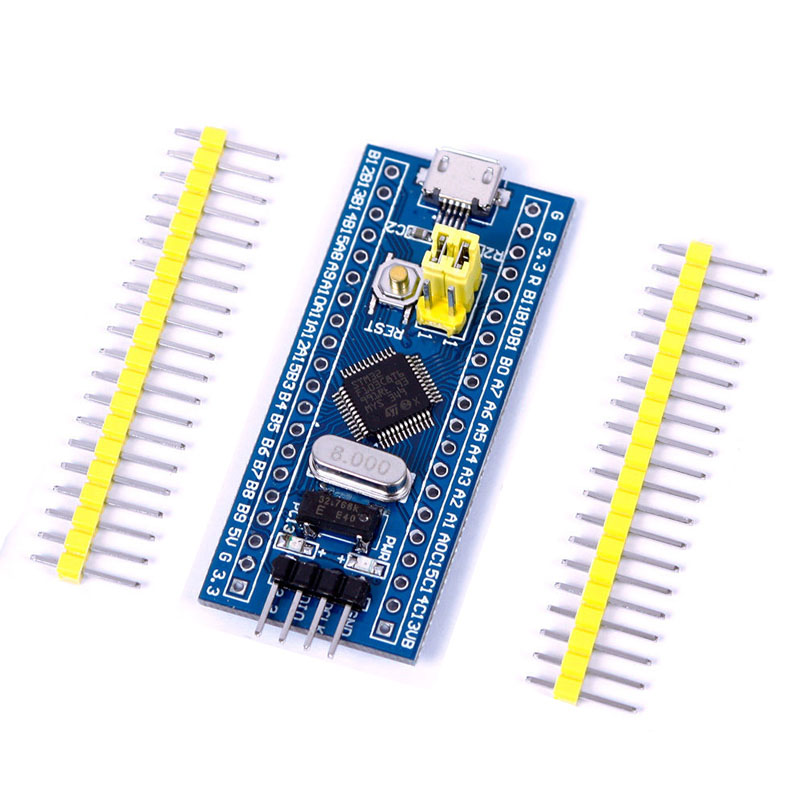
based on STM32f103c8t6
Is there any instruction how to program stm32 using arduino UNO with CH340G?
https://www.youtube.com/watch?v=Ze6q6NidS5w
I just used a USB to TTL adapter and ran gnd, vcc, tx an rx lines to the board. The tx to PA10 and rx go to PA9. What I’m not sure is on the board you have where the jumpers should be.
But follow the video for the board selection etc. My biggest gotcha was forgetting to reset the board before telling the IDE to program it.
If not maybe someone else with chime in with some answers. At least it might get you started.
Michael
I just used a USB to TTL adapter and ran gnd, vcc, tx an rx lines to the board. The tx to PA10 and rx go to PA9. What I’m not sure is on the board you have where the jumpers should be.
l
2. we must connect RX to RX TX to TX not OVRWISE!
set them for flash.
whilst they may well be 5v tolerant, if possible i’d set the voltage on your serial interface to 3v3
only connect tx/rx and ground, take the main power via a usb cable.
the serial interface is tx => stm32f rx and serial rx => stm32f tx.
if the serial interface led’s twinkle and nothing works, double check them and/or swap them.
the tx or rx is what ‘that’ particular interface pin on ‘that’ device is doing,
this is where the worlds divide, some info that would make this much, much easier is what your OS is? linux or windows
i tend to dip my toes in u$ water rather minimally, actually not knowing is a bit of reply stopper.
it’s either install windows drivers and check in device manager versus lsusb and adding udev rules.
stephen
2. we must connect RX to RX TX to TX not OVRWISE!
not snipped off as i might one day have a need.
stephen
<…>
There would only need to be a voltage divider into the RX pin on the STM32, and I suspect the tricknof putting a 10k resistor in series with the RX pin may also work, if you dont have the correct resistors to make a full voltage divider
got 20 of them for 6USD (so 80 channels
 ) so I’ll never think about level shifting problems anymore:
http://www.aliexpress.com/item/20pcs-lo … 11638.html
Ok, didn’t try out high speed connections like SPI, but with I2c it works like a charm.
Now i see that my arduino can’t be used as USB to TTL (becuase of desoldered/not soldered PULL-HIGH resistor)!
Madis my Level shifter works on freq up to 18MHZ but i have only 4 of them. (if anybody needs i can give link to AliExpress)
got 20 of them for 6USD (so 80 channels
) so I’ll never think about level shifting problems anymore:http://www.aliexpress.com/item/20pcs-lo … 11638.html
Ok, didn’t try out high speed connections like SPI, but with I2c it works like a charm.
as now 0.55ukp, … … , 8off is max with free shipping.
http://www.aliexpress.com/item/3-3V-5V- … 56568.html
they might handle spi speeds ~8MBps?
TI datasheet http://www.ti.com/lit/ds/symlink/txs0108e.pdf has
                        1.8     2.5    3.3   5.0  V

Push-pull driving       40      60    60    60 Mbps

Open-drain driving        2     2   2   2   Mbps
I have trouble getting my “blue pill” STM32 to work.
What I have done:
– I have a (working) Arduino Nano as a USB to serial adapter (with CH340G chipset):
RESET is connected to GND
RX is connected to TX (STM, PIN9) via a level shifter
TX is connected to RX (STM, PIN10) via a level shifter
Arduino GND is connected to the level shifter and then to the STM32 GND.
Boths microcontrollers are powered via USB cables. (Is this the problem)?
– I tried Arduino 1.6.3/4/5 and extracted the “Arduino_STM32_master.zip” to the …/hardware/ folder. The Cortex M3 package is installed via the IDE.
-I can upload sketches to the Arduino, the RX led flashes just the way it should and everything works. But when I try to flash to the STM32 (via Serial/COM3), it stops after compiling and tells me:
“
Failed to init device.
stm32flash 0.4
http://stm32flash.googlecode.com/
Using Parser : Raw BINARY
Interface serial_w32: 230400 8E1
“
The RX LED flashes just two times and so dim, that you can barely see it.
I know that I should buy a ST-LINK but I would like to start this project right know and don’t wanna wait any longer!
Cheers for the help!
What I have done:
– I have a (working) Arduino Nano as a USB to serial adapter (with CH340G chipset):
RESET is connected to GND
I understand this will work on an UNO; but, I have never heard of a Nano being used in this way. Did you test if by “looping” Send to Receive and use a terminal program on PC.
You only need one (1) level-shifter, from 5V send to 3.3V Receive.
3.3V Send can go directly to 5V Receive.
But when I try to flash to the STM32 (via Serial/COM3), it stops after compiling and tells me:
“
Failed to init device.
stm32flash 0.4
So, (IF) you got a “clean” compile… all libs and core files found for STM32… then the software should be OK.
I understand you are in a hurry to play, but when you go off and create a frankenstein bundle of wires and stuff, it really is difficult for us to help you. Do a serial loopback on Nano first.
Ray
Thanks for that quick reply!
I use a bidirectional logic converter like this one here: http://www.aliexpress.com/item/1PCS-IIC … 13805.html – is that okay? The “bidirectional” makes me think it is but I am a electronic newbie…
I just tried to flash the .bin file “by hand” via cmd.exe and the stm32flash.exe but I got the same result: “Failed to init device…”
For me it seems like there is something wrong with the CH340G driver…
Or do I block the CH340 somehow with pulling RESET LOW on the Arduino?
Make sure that the boot jumpers are set correctly. For serial upload, set BOOT0=1 and BOOT1=0. Your code should run automatically once the upload completes. You will need to press reset before each upload attempt. For normal operation (your program runs at reset) set both boot jumpers to 0.
You can also try the STM Flashloader Demonstrator GUI and see if it recognizes the device. I believe this is the right one.
<…>The “bidirectional” makes me think it is but I am a electronic newbie…
<…>
The RX and TX leds blink, but nothing appears on the display.
This may not be a viable option for uploading to a blue pill.
Serial works as expected on the nano with a sketch loaded.
The RX and TX leds blink, but nothing appears on the display.
This may not be a viable option for uploading to a blue pill.
Serial works as expected on the nano with a sketch loaded.
Arduino:1.6.7 (Windows 7), Placa:”Generic STM32F103C series, STM32F103C8 (20k RAM. 64k Flash), Serial”
WARNING: Category ” in library OneWireSTM is not valid. Setting to ‘Uncategorized’
WARNING: Category ” in library RTClock is not valid. Setting to ‘Uncategorized’
WARNING: Category ” in library SPI is not valid. Setting to ‘Uncategorized’
WARNING: Category ” in library Serasidis_EtherCard_STM is not valid. Setting to ‘Uncategorized’
WARNING: Category ” in library Serasidis_VS1003B_STM is not valid. Setting to ‘Uncategorized’
WARNING: Category ” in library Serasidis_XPT2046_touch is not valid. Setting to ‘Uncategorized’
Atención: platform.txt del núcleo ‘STM32 Boards (STM32duino.com)’ contiene recipe.ar.pattern=”{compiler.path}{compiler.ar.cmd}” {compiler.ar.flags} {compiler.ar.extra_flags} “{build.path}/{archive_file}” “{object_file}” desfasada, automáticamente convertida a recipe.ar.pattern=”{compiler.path}{compiler.ar.cmd}” {compiler.ar.flags} {compiler.ar.extra_flags} “{archive_file_path}” “{object_file}”. Considera el actualizar este núcleo.
In file included from C:\Users\xxxx\Documents\Arduino\hardware\Arduino_STM32-master\STM32F1\cores\maple/Arduino.h:30:0,
from sketch\Blink.ino.cpp:1:
C:\Users\xxxx\Documents\Arduino\hardware\Arduino_STM32-master\STM32F1\cores\maple/wirish.h:51:28: fatal error: libmaple/stm32.h: No such file or directory
#include <libmaple/stm32.h>
^
compilation terminated.
exit status 1
Error de compilación
Este informe podría tener más información con
“Mostrar salida detallada durante la compilación”
activala desde Archivo > Preferencias
please your help for this error.
Many thanks for all work done. Working with stm32 with arduino is very very cool stuff.
But I want to try it. So I buy the aliexpress minimal board same as :
http://www.rogerclark.net/wp-content/up … 32Mini.jpg
So it’s a STM32F103C8T6.
I work under linux debian testing. I have install the last github stm32duino on arduino 2:1.5.6.2+sdfsg2d-3.
And programming with it doesn’t work. and give :
*******************************************************************
Failed to init device.
stm32flash Arduino_STM32_0.9
http://github.com/rogerclarkmelbourne/arduino_stm32
Using Parser : Raw BINARY
Interface serial_posix: 230400 8E1
******************************************************************
Or :
******************************************************************
Failed to read ACK byte
Unexpected reply from device on command 0x01
stm32flash Arduino_STM32_0.9
http://github.com/rogerclarkmelbourne/arduino_stm32
Using Parser : Raw BINARY
Interface serial_posix: 230400 8E1
******************************************************************
I have done some test in command line with stm32flash from src give by Roger clark melbourne or by stm32flash 0.4 on source forge.
Same problem… I have try with several baud rate.. very slow to avoid high transmission problem… same result ???
I have test my usb serial adapter ch340 which one work very good for all my arduino atmega328 cards…so i’m ok with usbserial ! It’s absolutely working.
So after some search some say’s “” Ok, the ST loader Tool never fails and is all I use to flash firmware. “”
Hi all !
Many thanks for all work done. Working with stm32 with arduino is very very cool stuff.
But I want to try it. So I buy the aliexpress minimal board same as :
http://www.rogerclark.net/wp-content/up … 32Mini.jpg
So it’s a STM32F103C8T6.
I work under linux debian testing. I have install the last github stm32duino on arduino 2:1.5.6.2+sdfsg2d-3.
And programming with it doesn’t work. and give :
*******************************************************************
Failed to init device.
stm32flash Arduino_STM32_0.9
http://github.com/rogerclarkmelbourne/arduino_stm32
Using Parser : Raw BINARY
Interface serial_posix: 230400 8E1
******************************************************************
Or :
******************************************************************
Failed to read ACK byte
Unexpected reply from device on command 0x01
stm32flash Arduino_STM32_0.9
http://github.com/rogerclarkmelbourne/arduino_stm32
Using Parser : Raw BINARY
Interface serial_posix: 230400 8E1
******************************************************************
I have done some test in command line with stm32flash from src give by Roger clark melbourne or by stm32flash 0.4 on source forge.
Same problem… I have try with several baud rate.. very slow to avoid high transmission problem… same result ???
I have test my usb serial adapter ch340 which one work very good for all my arduino atmega328 cards…
So i’m ok with it ! It’s absolutely working.
So after some search some say’s “” Ok, the ST loader Tool never fails and is all I use to flash firmware. “”
from forum :
http://www.rcgroups.com/forums/showthread.php?t=2454682
So i try STLOADER TOOL with Virtualbox
… so Start a VM on virtualbox with Win10… install ST loader tool… attach the Usb serial adapter and at First Time
the Chip is detect…..
I send the blink.bin just compile in tmp directory by arduino ide to ST loader tool from my linux host to the VM Win machine.
Send program to the chip and the LED start to Blink….
So it seems thats problems really come from STM32FLASH .
Because i program the IC on the same computer with the same usb port than the VM is sending on with ST TOOL… So all hardware is good…and my hardware setting are good…(boot0 boot1 setting… wire connection…and so and so).
My linux setting udev rules etc must be good because I can send to arduino uno or others…
Did Someone have found good result with this chip on LInux arduino ide and stm32duino install ?
Because it’s very painfull to have to load the binary to a virtual machine with ST TOOLS….
Many thanks ! have a nice day.
I swapped my Windows 8.1 OS for Mint Cinnamon 17.3 and I am using the ArduinoIDE 1.7.8 and the ARM c++ tools installation from ArduinoIDE 1.6.7 after Due support is installed (I just hardcode the compiler path in the STM32 platform.txt file.) I need 1.6.7 for the ESP8266.
All of my STM32 boards are [urlhttp://www.aliexpress.com/item/leaflabs-Leaf-m … 64071.html]Maple Mini clones.[/url]
I’ve gone through maybe 15 sketches today to validate my STM32 environment, USB ports, and permissions and everything is compiling and downloading correctly.
I do remember having to chmod 0755 a couple of scripts and there was one other executable, dfu-util, I think, that needed to be set to execute.
Other than the above changes, I think everything else was non-Arduino related. One of the installation scripts for Arduino (1.0.5 I think) set the serial port permissions. I use 1.0.5 for Attiny85 stuff.
Just rereading your post and I do not notice anything obvious that you missed. Double check permissions on those 2 scripts and the dfu utility.
Flash Loader Demonstrator….with 256000 baud rate…
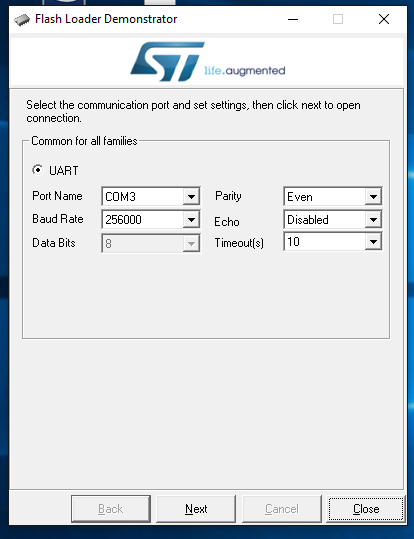
- 01_setting_stdem.png (25.15 KiB) Viewed 1032 times
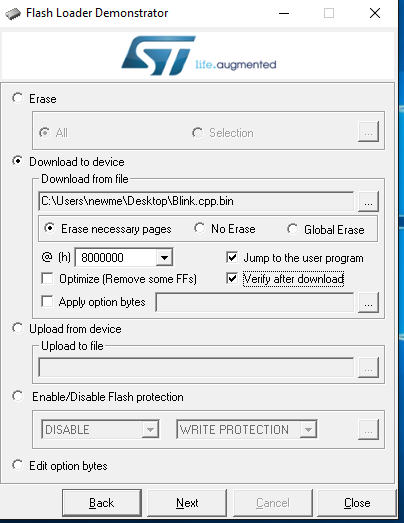
- 04_stm32_send_to_device.png (21.53 KiB) Viewed 1031 times
I have hardcode the compiler path in the STM32 platform.txt file like you… so after that’s build work fine with all example.
I have ever verify chmod 0755… so i redo… but nothing change… I have rebuild the stm32flash in Arduino_STM32-master/tools/src/stm32flash_serial/src
And this give nothing…
Please could you say me if the stm32flash command with just your serial port set command work for you ? :
me i do for just testing stm32flash :
stm32flash /dev/ttyUSB0
from the Arduino hardware path… with rebuild version or the others one directly from git build by Melbourne…
Arduino/hardware/Arduino_STM32-master/tools/src/stm32flash_serial/src$ ./stm32flash /dev/ttyUSB0
Give me results…
**********************************************************
stm32flash Arduino_STM32_0.9
http://github.com/rogerclarkmelbourne/arduino_stm32
Interface serial_posix: 57600 8E1
Failed to read ACK byte
Unexpected reply from device on command 0x01
**********************************************************
So perhaps a port access error but why because all others program can use my usbserial on /dev/ttyUSB0
And if y have well understand the
“AN2606 Application note STM32TM microcontroller system memory boot mode”
for the STM32F103XXX just the serial port bootloaders work for native…. for DFU you must have STM32F105XX….
your couple of posts suggest you’re windows based or are you switching between?
is your linux installed in virtualbox or similar?
that arduino package is from experimental, what is the version in the splash screen or via Help/About Arduino please?
your link is a blue pill, red pills exist as well.
with lsusb, all my red and blue pills return 1eaf:000[3|4]? 1eaf i suspect is from leaf labs not Arduino
you really need to check your udev rules andmost likely run the install.sh as root after reading it.
debian testing is usually 32 bit? do a file sketchbook/hardware/Arduino_STM32/tool/linux/dfu-util/* and confirm them
as suitable for your system.
version as of 310116-1345 has 64 bit, wrong for me.
your experience with serial duplicates mine, i don’t think i’ve ever managed to upload via serial except to one of the Arduino family, uno, nano mainly. hence if you have a st-link, it is the method i use most and the easiest. 3 wires to any variant of stm32f103 board i have.
@Ray
I swapped my Windows 8.1 OS for Mint Cinnamon 17.3 and I am using the ArduinoIDE 1.7.8 and the ARM c++ tools installation from ArduinoIDE 1.6.7 after Due support is installed (I just hardcode the compiler path in the STM32 platform.txt file.) I need 1.6.7 for the ESP8266.
I just hardcode the compiler path a wake up moment for me.
i suspect you’ve got the 64 bit one, so would you please also do the file ~/sketchbook/hardware/Arduino_STM32/tools/linux/dfu-utils/* ?
stephen
And run the WinXXX on Virtual box…
Yes my arduino package is from experimental… on the Debian i can have package for Arduino 2 ver just with experimental…
I have ever read and execute the install.sh but i don’t use a chip with a mapple firmware… so don’t use this… the DFU can’t run
on my chip until i burn the mapple firmware… but normally the chip must directly burn by USART1 with stm32flash with serial port.
And Debian TEsting is the XXbit you want have installed…..
My install is 64BIT.
<…>
I just hardcode the compiler path a wake up moment for me.
i suspect you’ve got the 64 bit one, so would you please also do the file ~/sketchbook/hardware/Arduino_STM32/tools/linux/dfu-utils/* ?
stephen
<…>
Please could you say me if the stm32flash command with just your serial port set command work for you ? :
me i do for just testing stm32flash :
stm32flash /dev/ttyUSB0
from the Arduino hardware path… with rebuild version or the others one directly from git build by Melbourne…
Arduino/hardware/Arduino_STM32-master/tools/src/stm32flash_serial/src$ ./stm32flash /dev/ttyUSB0
Give me results…
**********************************************************
stm32flash Arduino_STM32_0.9
http://github.com/rogerclarkmelbourne/arduino_stm32
Interface serial_posix: 57600 8E1
Failed to read ACK byte
Unexpected reply from device on command 0x01
**********************************************************
So perhaps a port access error but why because all others program can use my usbserial on /dev/ttyUSB0
And if y have well understand the
“AN2606 Application note STM32TM microcontroller system memory boot mode”
for the STM32F103XXX just the serial port bootloaders work for native…. for DFU you must have STM32F105XX….
I’m trying to verify what do exactly stm32flash …
OS: Linux Mint 17.3 Cinnamon
Navigating to ~/Arduino/hardware/STM32/tools/linux/stm32flash and looking at the file permissions:
-rw-r--r-- 1 ray ray 88981 Dec 10 14:57 stm32flash
put the good setting for boot0 boot1 pin you just have to reset start stm32flash and you must have the chip good detect….
Install Arduino-1.6.5, Arduino_STM32, STM32duino-bootloader
Run latest tools/linux/install.sh to setup udev, groups, etc.
Use stm32flash to burn bootloader to blue pill via serial
Connect blue pill via usb
/dev/maple shows up pointing to bus/usb/NNN/MMM because there is no serial sketch yet
dfu-util -l RUN AS ROOT shows board
Loading a sketch from IDE using bootloader via USB AS NOT ROOT USER fails
This is because /dev/bus/usb/NNN/MMM is in the plugdev group as specified by 45-maple.rules but the install.sh script only adds $USER to the dialout group, not the plugdev group. Running dfu-util -l as $USER does not show the device because of a permission problem. When I added $USER to the plugdev group, running dfu-util -l as $USER now works. Loading the sketch from IDE using bootloader now works, powercycle blue pill and /dev/maple now points to /dev/ACMnn which is in group dialout. Bottom line is check permissions and make sure $USER can access all of the necessary devices.
armleo wrote:1.I found that i can use ARDUINO UNO as USB to TTL by connecting RESET and 5V without removing ATMEL AVR CORE
2. we must connect RX to RX TX to TX not OVRWISE!
https://www.monocilindro.com/wp-content … G_1303.jpg
I’ve gone through maybe 15 sketches today to validate my STM32 environment, USB ports, and permissions and everything is compiling and downloading correctly.
I do remember having to chmod 0755 a couple of scripts and there was one other executable, dfu-util, I think, that needed to be set to execute.
Other than the above changes, I think everything else was non-Arduino related. One of the installation scripts for Arduino (1.0.5 I think) set the serial port permissions. I use 1.0.5 for Attiny85 stuff.
Just rereading your post and I do not notice anything obvious that you missed. Double check permissions on those 2 scripts and the dfu utility.