
First working video:
https://www.youtube.com/watch?v=uyHcGiRt4c0
Hello,
3 years ago, I developed a wooden MP3 player for my (at that time) 3y old daughter. viewtopic.php?f=19&t=14&start=20
This device was and is(!) a massive success and my daughter is using it all the time and some parents are talking to me like “shut up and take the money, we want one!”
So the idea was born to create a new version for my second daughter (2y) and as a little series production (about 5-10 devices).
Meanwhile I have better resources (3D printer, a friend of mine (partner of this project) ones a very good CNC router) and some new ideas.
So these are the key facts of the new version:
Case made of wood (interior with 3D printing), maybe acrylic front
Easy of use for a 3 year old child
As less as possible buttons
RFID tags: using RFID stickers or cards starting the player. Ideas: RFID cards (credit card format) with the motif / picture of the radioplay (or songs) or RFID stickers on figures (3D print….)
Easy of use interface for the parents (my partner is very good at programming (like JAVA) – so we are thinking of a cross platform end user interface)
complete open hardware / open source
easy to solder and assembly (because of 5-10 devices, for the main board I’ll use KICAD and let them produce in Asia (PCB 100x100mm, 10 pieces are under 20 bucks, I have done that twice before with very good results)
Before that I have to decide some major technical things (so I need some hints or inputs from you  :
:
Power:
I used in the first version a two 18650 Lithium/Ion with a charging circuit. I wont do it anymore. Li-Ion (or LiPo) and little children are a totally no-go for me for many security reasons. So maybe good old NiMh or LiFePO 4 (are they safer?). Charging circuit?
MP3 module:
Practically there are 3 possibilities:
(1) DF mini player (or any other serial connection mp3 module): I used it in my first version with a lot of disadvantages:
No direct access to the SD card with the MCU: So no directory, filenames, nothing. The end user must connect two USB devices (the player OR remove SD card) and the MCU (for creating a directory, setup RFID tags…)
(2) VS1003/VS1053 module A smarter choice, works good with STM32duino. Disadvantages: More connections, no endurance test of mine, more expensive (just joking). This version also contains a SD Card holder: https://www.aliexpress.com/item/-/32877402571.html
(3) STM32F407xx with external DAC’s and native encoding. Maybe an interesting project, but lack of time, knowledge and experience with the STM32F4xx, so not my preferred option. On the other way such boards (with EEPROM, SD-card holder…) are available for under 10 Euros (I own one) and I have plenty of DAC’s at home.
MCU (board)
For sure STM32, even a maple mini (or bluepill) will do this job (as in my first version). I was thinking about ESP8266 (too less pins) or ESP32, but there would be no real benefit (no BT or WIFI needed for this project – not everything in the world must be wireless )
Display
Totally unsure at the moment, but no touch display (Would not last long). In my first version I used a little OLED (even for power consumption reasons)
So this is my little abstract for now, I have about one year left (3rd birthday of second daughter) for further researches and thinkings….
What are the problem with LiPo cells? I know during charging there are potential risks.
Is that what you mean ?
Re: UI via RFID
Interesting but it seems expensive unless there is s cheap source of RFID stickers??
Also.
How often do the MP3 files get changed.
It looks like most player modules just have a SD card, and not a USB interface
It sounds difficult to update the MP3 files.
Or did you do some clever dual port access to the SD ?
Li-Ion / Lipo: You are right. The most potential problem is due the charging process: Both are very sensitive in relation to overcharging. The “standard” charging circuit / chip in DIY is the TP4056. I used them a lot and in one charger circuit the TP4056 smoked up, I didn’t tested the faulty module if the 5V pass through the smoked chip. In that case you can search for “18650 on fire” on YT….
Second: Children will shake and let the player fall down, so a short circuit is every time possible.
It seems that LiFePO4 are more safe, but I’m unsure:
http://www.rvlithiumsystems.com.au/Abou … fepo4.html
RFID/NFC Cards/Stickers: They aren’t really expensive, cause I wont need much of them (For each “CD” one sticker or card): Some examples:
https://www.aliexpress.com/item/Free-Sh … 97835.html
https://www.aliexpress.com/item/10pcs-L … 83249.html
I plan to reuse the stickers/cards and I only need the ID of them.
MP3 Modules: All MP3 modules with a serial communications have no access to the SD card via the MCU. It’s totally fiddly to solder a “dual port” on those modules.
As you can see here viewtopic.php?f=13&p=48175#p48175 I’ve done major success with the VS1053 module. So it’s easy, because the SD Card is directly connected to the MCU. So I can use the new USB composite functions (“SD reader” example! – so direct access via USB to the card). Beside that I can use the SD card for the whole config file of the player (assignment RFID to folders, user options). With USB composite there is also no driver for the PC needed. I think, this is the most comfortable way.
regards
Matthias
The rfid stickers look cool, and only about 10 cents each.
Re: batteries
I don’t think any LifePo4 would be any safer. I thought their main benefit was the number of recharge cycles was a lot more than lipo .
Energy density is similar and hence I think the risks are similar
What about removing the battery to charge it ?
Cheers
Roger

as to the safety of the batteries, videos of burning iphones and burning samsung high end phones and very commonly self balancing mono scooters catching fire during charging are visited by many, going viral and widely shared on youtube etc.
i’d guess LiFePO4 batteries may be safer in that aspects as the wikipedia article seem to say so
https://en.wikipedia.org/wiki/Lithium_i … te_battery
just that my guess is they may cost more and possibly store less energy compared to say the high density li-po batteries
You can buy a “starter set” (including module and some test chips/cards) for far less than 2 Euros:
https://www.aliexpress.com/item/1PCS-RC … 50152.html
Most/all libraries are working out of the box with stm32duino.
Lipo/LiIon again: I also own many 2s/3s Lipos (up to 6000mAh) and only use them in safety backs (each one) and stored on a safe place, never full charged. They are really time bombs without taking care of them. I also own some rather new / unused NiMh battery packs (they were included with RC cars, but I use Lipos), so I think I cut them off and do some experiments with the single cells. Heisan comment is absolutely correct about LiFePo4 > the safety benefit is too less.
take in account that not all rfid tags work with this module since they require a different frequency and a diffewrent module that is cheap like the RC522.
I found some tags in clothing selled by Decathlon (in the white strip where are written instruction or other things), in Amsterdam bus/subway/underground tickets and some other products.
Beside that: As a funny feature (most) of the stickers can be read/written by any NFC able smartphone.
I tried out some benchmark tests copying MP3 folders (about 160MB) to SD Card via the USB-HID example.
Tried out my “best working standard SD card configuration” (I found out in the past) and with SDfatEX (DMA enabled) and also SDfat (for cross checking) with SPI full speed (and tried out half speed) with different SD cards. I used the standard SPI1 port.
The good point: It’s stable.
The bad one:
The results (on my old Macbook, maybe this is the problem) are not good enough: Copying a folder with 160MB tooks about minimum 25 minutes. This is much too long for such an application. So maybe it’s better to remove the SD card for transferring big folders/files.
But I think, there must be more speed possible, this are my best results with the “printBenchmark” example:
Type any character to start

FreeStack: 15756

Type is FAT32

Starting print test.  Please wait.
Test of println(uint16_t)
Time 1.07 sec
File size 128.89 KB
Write 120.12 KB/sec
Maximum latency: 671 usec, Minimum Latency: 19 usec, Avg Latency: 52 usec
Test of printField(uint16_t, char)
Time 0.22 sec
File size 128.89 KB
Write 591.24 KB/sec
Maximum latency: 206 usec, Minimum Latency: 5 usec, Avg Latency: 9 usec
Test of println(uint32_t)
Time 1.73 sec
File size 200.00 KB
Write 115.67 KB/sec
Maximum latency: 279 usec, Minimum Latency: 82 usec, Avg Latency: 85 usec
Test of printField(uint32_t, char)
Time 0.28 sec
File size 200.00 KB
Write 727.27 KB/sec
Maximum latency: 626 usec, Minimum Latency: 9 usec, Avg Latency: 12 usec
Test of println(float)
Time 2.29 sec
File size 149.00 KB
Write 65.04 KB/sec
Maximum latency: 721 usec, Minimum Latency: 85 usec, Avg Latency: 113 usec
Test of printField(float, char)
Time 0.48 sec
File size 149.00 KB
Write 310.42 KB/sec
Maximum latency: 923 usec, Minimum Latency: 18 usec, Avg Latency: 22 usec
Done!
Using a WIFI SD card adapter like this:
https://www.aliexpress.com/item/ezshare … 40226.html
Speed should be enough for transfering MP3’s.
So there is no need for USB composite mass storage and not even an USB cable. So STM32 is going to WIFI without additional hardware and/or programming. Even the config file for the player can be edited via the WIFI SD adapter.
Drawback: The need of a big SD card adapter.
14 Euros is not less money but I also can use the adapter for my “old” Canon EOS.
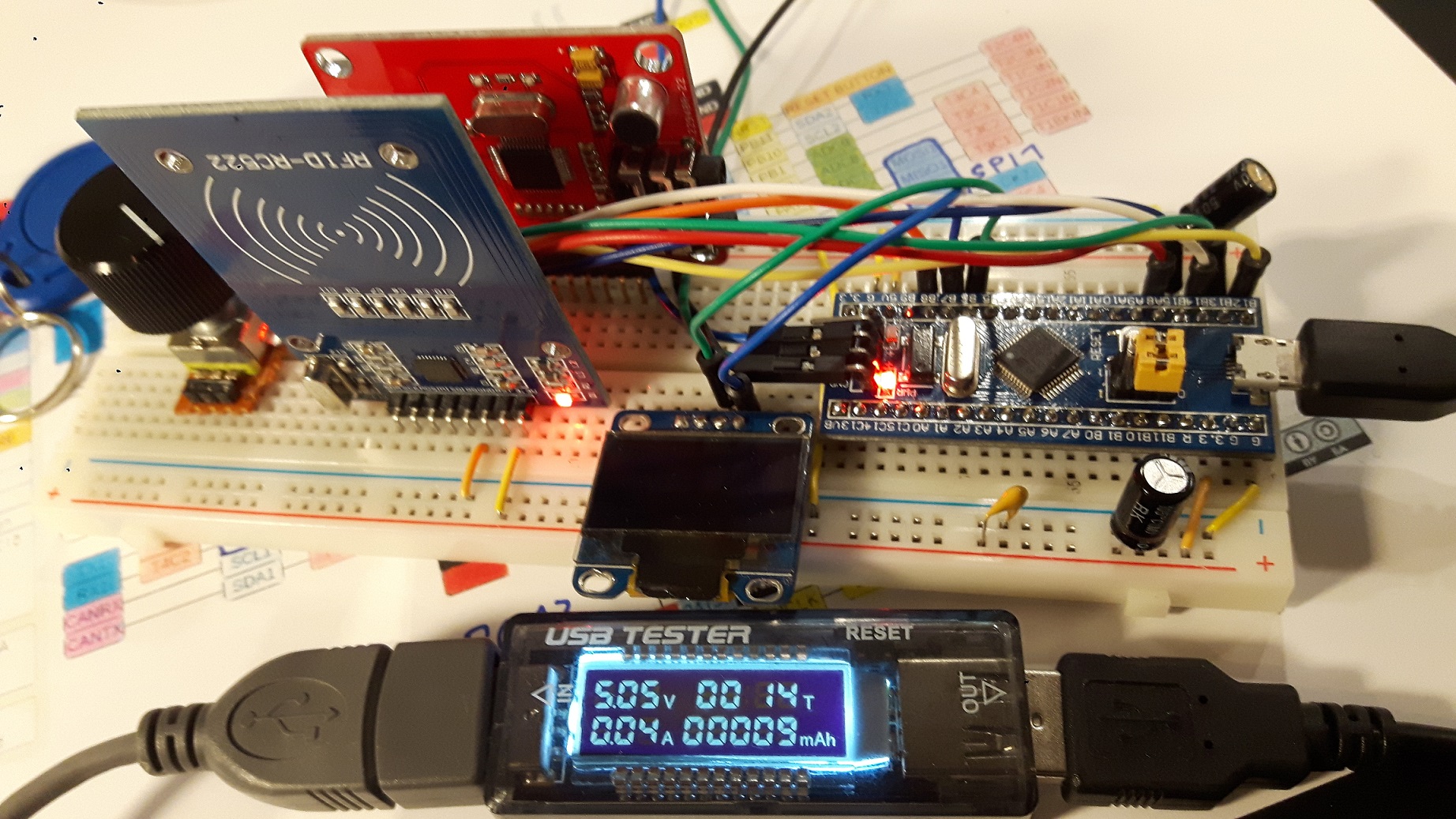
This is my bluepill with VS1003 module version. There are only a few components:
- bluepill
- RFID-RC522 module
- VS1003 module (with working SD-card reader)
- SSD1306 OLED
- encoder (with button)
Total cost: <10 EUR.
Every single module/device was tested successfully in single mode, but there should not be any problem:
VS1003 + SD Card : SPI1
RFID-RC522 SPI2
SSD1306: I2C
(The “USB tester” on the pic isn’t really accurate, but better than nothing (shows me unexpected consumption) – in the final version it’s done with a regular multimeter to save every mAh. (after eliminating at least 3 “module” LED’s )
probably you could squeeze down the cost a little bit by using an ESP8266 and the Audio-Lib from Early-Hill-Power which has a build in MP3 decoder:
https://github.com/earlephilhower/ESP82 … r/examples
I never tested if the MP3 decoder could be easily ported to the F407.
- power consumption
- too less pins (display, RFID reader, buttons, SD-Card….)
I combined all modules above into one code and it works as it should (after some minor changes in the libraries like:
- MFRC522 (= library for RFID reader, changed to SPI2)
- Adafruit_SSD1306_STM32 (mostly bugfixes, cannot really remember…)
- Adafruit_VS1053 (bugfixes, add SDfat instead of the SD standard library)
So I can :
- Hold a RFID Tag to the “player” and a mp3 is playing from SD card.
- Fancy OLED
- Using long filenames (thanks to SDfat)
- Pausing, repeating, scanning the MP3’s (even slow or faster speed is possible (but I don’t need that) – it’s all about the file pointer)
- Using an encoder for volume while playing
I also included a software switch:
If a specified pin is HIGH at start the player acts as mass storage device (not fast (200-350kBs) – see another thread of mine)
The tricky part is how to communicate with the RFID tag:
I experimented with various chips: mifare classic, NTAG213 (these are the little cheap sticker I prefer). With the NTAG213 I got in problems writing more than 80 bytes on it. (I locked 5/10 by accident).
But:
I don’t need to write to any tags!
I only use the ID (even of the “locked” ones) of the tag so I do not need any extra code for writing each individual type of RFID chips. (Only keep in mind, that the ID’s are are not always the same length, so I took the first 6 (or 8) values)
On the SD card there is a extra file storing all tag ID’s and the linked MP3 folder name. Easy and powerful. So this file can be edited by a text editor or something else (I’m going to write with Processing a program to organize the player).
It wouldn’t be a problem linking the RFID tags directly via the player to the specified MP3 (folder), but I use an OLED with 128×64 pixels – there is no fun about organizing 100+ MP3 folders.
After trying out many combinations, I successfully tested this simple workflow:
In the root of the SD card there are sub folders: “PLAYER/TAGS”
Each tagID creates a single file (in HEX) in the folder above, like:
049271D2A54A80.txt (NTAG213 ID length) or
F50BA975.txt (Mifare classic ID length)
So you can nearly use any RFID tag/sticker/card/chip without taking care of the different ID length, encryption and/or read/write behaviors.
It’s also easy to edit this file (with the player, with text editor….) and it’s individual for each SD card (so tags can be used for different folders on different SD cards).
In each of this files there is written the direct path to the MP3 subfolder, like:
“The Smashing Pumpkins – Rotten Apples – The Smashing Pumpkins Greatest Hits/”
So if a IDtag is recognized correctly, the player starts with the first song in the folder.
Sounds easy, but it isn’t:
We are really patronized/lulled by our PC OS – whether OSX, Windows, Linux. Files are shown by default alphabetical.
Mostly copying a MP3 folder to SD card it will work correctly and playing the files in order.
Example:
01 xyz is track 1
02 abc is track 2 and so on.
BUT:
sdfat is sorting the files by index. The very first written file has the lowest index, the last the highest. So goodbye to file.openNext()
So:
deleting track “01 xyz.mp3”
and insert “01 def.mp3”
results in following order by index:
02 abc.mp3
01 def.mp3 (because it’s younger)
This behavior was “standard” with cheap MP3-players about 10-15 years ago.
This is not all:
OSX (or Itunes?) creating funny files for each mp3, like: “_01 abc.mp3” (thankfully this are hidden files).
So -at least -following things must be done:
- exclude: Every hidden file, every NOT .mp3 file and so on.
- creating a sorting array by index for all MP3 is one folder (I have done it by the first two bytes like “01”)
- take care of MP3 files not starting with a number (added at the end of the sorting array (by index)
- All SD card file & sorting routines: CHECK
- found the memory hole: CHECK (costs me hours)
- reading MP3 tags: CHECK
Still waiting for this:
https://www.aliexpress.com/item/ESP32-E … 60405.html
I’ve worked on modifying the Adafruit SSD1306 library and getting a SD-Card file handler/chooser with an encoder. Works superb, pics will follow. As a byproduct, I’ll going to publish a “Adafruit_SSD1306_STM32_PLUS” library with many enhancements, like putting the private static buffer into a public buffer, refresh the display not only at once, but by pages…and a lot more.
Music can be played either from a display browser or directly from tags.
Software is stable, but needs clean up.
So next thing:
Building a GUI (parent mode, children mode) adding some gimmicks, waiting for my 1.3 OLED for setting up Fusion360 for the first design.
Here is the first working video:
https://www.youtube.com/watch?v=uyHcGiRt4c0
Or Blender is you want something with a UI.
Fusion360 is free for hobby use so there is really no good reason not to use it. It also has a moderate learning curve, but you can master most of the skills needed for creating 3D printed objects in a few hours. Creating a custom case to hold a PCB takes a few minutes. For 3D printing, you probably want to set the workspace to Z up.
TinkerCad is a bit easier to learn as long as your design isn’t too complicated.
There are lots of tutorials on Youtube for Fusion360 and TinkerCad.
I tried some of the free cad tools but never could get the workflow to make sense.
I’ve been caught out in the past when the cloud based system gets sold to another company, or they just decided that they’re no longer going to run the service any more.
I agree Blender has a very steep learning curve. I don’t use it much, as its not very suited to the sort of 3D components I want to create.
OpenSCad works pretty well for my 3D needs as they tend to be mechanical parts of some type, either to be 3D printed or to be laser cut.
But it’s no use for producing anything organic looking.
I’ve tried a few other procedural CAD programs, e.g. FreeCad, but could not get to grips with their graphic programming style of workflow.
BTW. If I want to produce a PCB, I’ll use KiCAD. I did buy the basic commercial version of Eagle Cad,a few years ago, but Eagle then got sold to AutoDesk which effectively made my Eagle basic commercial license virtually worthless.
<rant_mode>
The only software as a service I’m forced to use is Adobe’s Creative Studio SW, because I have a client who uses it and I have to be compatible.
So I have to pay $$ per year for software I dont own. And with the latest changes, to the Windows version of CS, Adobe no longer support anything other than Windows 10.
I can still use the old version on W7, but I still have to pay $$ per year, to use the old version.
They sell software as service on the premise that you are paying for enhancements not just rental, but in this case its turned into $$ per year, just to rent old software.
</rant_mode>
I used 123Design in the past even for “big” projects.
Why I do not use OpenSCAD?
It’s about the creativity process while designing the draft. This is easy with the two programs above. I think all those CAD programs are for art OR for function design.
Another reason why using Fusion360 is, because a friend of mine with the CNC machine can handle that (paths you can do easily with F360)
Like anything, the main problem is how long it takes to learn the skills to use a program
But since I mostly make “engineering” things, openScad works really well
I going to plan to use the MP3 player also as a “bluetooth speaker”, see this thread: viewtopic.php?f=3&p=50265#p50265
Second:
I got my 1.3 I2C OLED displays delivered and I “forgot” something: They are using not SH1306 but SH1106 display drivers. No, they are NOT compatible by default! Not really a problem after a bit of researching (I just added a alternative display.display() function), but it took time (single page (so row x to row y) update isn’t really perfect, I still messed something up, but I’m working on it. (Whole display update works without problems, so more a cosmetic problem).
https://www.facebook.com/photo.php?fbid … =3&theater
Got at least 10 pre-orders by friendly families. So there is no way back 
https://librecad.org/
the other notable 2d cad is inkscape for working in svg
but i find librecad more suitable for project design, cad/cam purposes, librecad works directly with Autocad DXF files
and to me it is a pretty big win. i’ve actually tried some laser cut templates using librecad and sending the DXF files for the laser cuts
the features take a while to learn but once you are used to it, it is a pretty productive tool
the developers working on it did some pretty good job with the snapping on objects, edges, points etc.
the move/copy function can be used to easily replicate objects so that you could make matrices of objects
I use librecad too, it works with DXF and DWG too!

