
After testing various C FFT routines, including FHT, real-FFT, CMSIS libraries, and finding them all to be too slow to run real-time 38khz audio FFTs with a size of 1024 on the STM32F103C, I finally figured out how to make the Arduino environment accept assembly functions.
The C routines all needed at least 28ms to perform 1024 FFT, with FHT being the fastest. This was insufficient for real-time spectrum analysis.
The assembly implementation (code by MCD Application Team, STM) takes abour 2ms per 1024 window, but is not in-place, so you will need at least 8Kb RAM for it (2×1024 uint32_t input and output buffers).
With the excellent DMA capabilities, buffer swapping and performing FFT without missing a beat is possible, all while outputting the spectrogram to an ILI9341 SPI display.
All that is needed is to make a folder in arduino libraries with the following two files:
cr4_fft_1024_stm32.s
/*;******************** (C) COPYRIGHT 2009  STMicroelectronics ********************

;* File Name          : cr4_fft_1024_stm32.s

;* Author             : MCD Application Team

;* Version            : V2.0.0

;* Date               : 04/27/2009

;* Description        : Optimized 1024-point radix-4 complex FFT for Cortex-M3

;********************************************************************************

;* THE PRESENT FIRMWARE WHICH IS FOR GUIDANCE ONLY AIMS AT PROVIDING CUSTOMERS

;* WITH CODING INFORMATION REGARDING THEIR PRODUCTS IN ORDER FOR THEM TO SAVE TIME.

;* AS A RESULT, STMICROELECTRONICS SHALL NOT BE HELD LIABLE FOR ANY DIRECT,

;* INDIRECT OR CONSEQUENTIAL DAMAGES WITH RESPECT TO ANY CLAIMS ARISING FROM THE

;* CONTENT OF SUCH SOFTWARE AND/OR THE USE MADE BY CUSTOMERS OF THE CODING

;* INFORMATION CONTAINED HEREIN IN CONNECTION WITH THEIR PRODUCTS.

;*******************************************************************************/
.cpu cortex-m3
.fpu softvfp
.syntax unified
.thumb
.text
.global cr4_fft_1024_stm32
.extern TableFFT
.equ NPT, 1024
/*;*******************************************************************************
;* Function Name : cr4_fft_1024_stm32
;* Description : complex radix-4 1024 points FFT
;* Input : - R0 = pssOUT: Output array .
;* - R1 = pssIN: Input array
;* - R2 = Nbin: =1024 number of points, this optimized FFT function
;* can only convert 1024 points.
;* Output : None
;* Return : None
;*********************************************************************************/
.thumb_func
cr4_fft_1024_stm32:
STMFD SP!, {R4-R11, LR}
MOV r12, #0
MOV r3, r0
MOV r0,#0
preloop_v7:
ADD r14, r1, r12, LSR#22 /*1024pts*/
LDRSH r5, [r14, #2]
LDRSH r4, [r14]
ADD r14, #NPT
LDRSH r9, [r14, #2]
LDRSH r8, [r14]
ADD r14, #NPT
LDRSH r7, [r14, #2]
LDRSH r6, [r14]
ADD r14, #NPT
LDRSH r11, [r14, #2]
LDRSH r10, [r14]
ADD r14, #NPT
ADD r8, r8, r10
ADD r9, r9, r11
SUB r10, r8, r10, LSL#1
SUB r11, r9, r11, LSL#1
MOV r4, r4, ASR#2
MOV r5, r5, ASR#2
ADD r4, r4, r6, ASR#2
ADD r5, r5, r7, ASR#2
SUB r6, r4, r6, ASR#1
SUB r7, r5, r7, ASR#1
ADD r4, r4, r8, ASR#2
ADD r5, r5, r9, ASR#2
SUB r8, r4, r8, ASR#1
SUB r9, r5, r9, ASR#1
ADD r6, r6, r11, ASR#2
SUB r7, r7, r10, ASR#2
SUB r11, r6, r11, ASR#1
ADD r10, r7, r10, ASR#1
STRH r5, [r3, #2]
STRH r4, [r3], #4
STRH r7, [r3, #2]
STRH r6, [r3], #4
STRH r9, [r3, #2]
STRH r8, [r3], #4
STRH r10, [r3, #2]
STRH r11, [r3], #4
ADD r0, r0, #1
RBIT r12, r0
CMP r0,#256 /*1024pts*/
BNE preloop_v7
SUB r1, r3, r2, LSL#2
MOV r0, #16
MOVS r2, r2, LSR#4
/*;------------------------------------------------------------------------------
; The FFT coefficients table can be stored into Flash or RAM.
; The following two lines of code allow selecting the method for coefficients
; storage.
; In the case of choosing coefficients in RAM, you have to:
; 1. Include the file table_fft.h, which is a part of the DSP library,
; in your main file.
; 2. Decomment the line LDR.W pssK, =TableFFT and comment the line
; ADRL pssK, TableFFT_V7
; 3. Comment all the TableFFT_V7 data.
;------------------------------------------------------------------------------*/
ADR r3, TableFFT_V7
/*LDR.W r3, =TableFFT*/
passloop_v7:
STMFD SP!, {r1,r2}
ADD r12, r0, r0, LSL#1
ADD r1, r1, r12
SUB r2, r2, #1<<16
grouploop_v7:
ADD r2,r2,r0,LSL#(16-2)
butterloop_v7:
LDRSH r5, [r1, #2] LDRSH r4, [r1] SUB r1, r1, r0
LDRSH r11, [r3, #2] LDRSH r10, [r3] ADD r3, r3, #4
SUB r14, r5, r4
MUL r12, r14, r11
ADD r14, r10, r11, LSL#1
MLA r11, r5, r10, r12
MLA r10, r4, r14, r12
LDRSH r5, [r1, #2] LDRSH r4, [r1] SUB r1, r1, r0
LDRSH r9, [r3, #2] LDRSH r8, [r3] ADD r3, r3, #4
SUB r14, r5, r4
MUL r12, r14, r9
ADD r14, r8, r9, LSL#1
MLA r9, r5, r8, r12
MLA r8, r4, r14, r12
LDRSH r5, [r1, #2] LDRSH r4, [r1] SUB r1, r1, r0
LDRSH r7, [r3, #2] LDRSH r6, [r3] ADD r3, r3, #4
SUB r14, r5, r4
MUL r12, r14, r7
ADD r14, r6, r7, LSL#1
MLA r7, r5, r6, r12
MLA r6, r4, r14, r12
LDRSH r5, [r1, #2] LDRSH r4, [r1]
ADD r8, r8, r10
ADD r9, r9, r11
SUB r10, r8, r10, LSL#1
SUB r11, r9, r11, LSL#1
MOV r4, r4, ASR#2
MOV r5, r5, ASR#2
ADD r4, r4, r6, ASR#(2+14)
ADD r5, r5, r7, ASR#(2+14)
SUB r6, r4, r6, ASR#(1+14)
SUB r7, r5, r7, ASR#(1+14)
ADD r4, r4, r8, ASR#(2+14)
ADD r5, r5, r9, ASR#(2+14)
SUB r8, r4, r8, ASR#(1+14)
SUB r9, r5, r9, ASR#(1+14)
ADD r6, r6, r11, ASR#(2+14)
SUB r7, r7, r10, ASR#(2+14)
SUB r11, r6, r11, ASR#(1+14)
ADD r10, r7, r10, ASR#(1+14)
STRH r5, [r1, #2]
STRH r4, [r1]
ADD r1, r1, r0
STRH r7, [r1, #2]
STRH r6, [r1]
ADD r1, r1, r0
STRH r9, [r1, #2]
STRH r8, [r1]
ADD r1, r1, r0
STRH r10, [r1, #2]
STRH r11, [r1], #4
SUBS r2,r2, #1<<16
BGE butterloop_v7
ADD r12, r0, r0, LSL#1
ADD r1, r1, r12
SUB r2, r2, #1
MOVS r14, r2, LSL#16
IT ne
SUBNE r3, r3, r12
BNE grouploop_v7
LDMFD sp!, {r1, r2}
MOV r0,r0,LSL#2
MOVS r2, r2, LSR#2
BNE passloop_v7
LDMFD SP!, {R4-R11, PC}
TableFFT_V7:
/*N=16*/
.short 0x4000,0x0000, 0x4000,0x0000, 0x4000,0x0000
.short 0xdd5d,0x3b21, 0x22a3,0x187e, 0x0000,0x2d41
.short 0xa57e,0x2d41, 0x0000,0x2d41, 0xc000,0x4000
.short 0xdd5d,0xe782, 0xdd5d,0x3b21, 0xa57e,0x2d41
/*N=64*/
.short 0x4000,0x0000, 0x4000,0x0000, 0x4000,0x0000
.short 0x2aaa,0x1294, 0x396b,0x0646, 0x3249,0x0c7c
.short 0x11a8,0x238e, 0x3249,0x0c7c, 0x22a3,0x187e
.short 0xf721,0x3179, 0x2aaa,0x1294, 0x11a8,0x238e
.short 0xdd5d,0x3b21, 0x22a3,0x187e, 0x0000,0x2d41
.short 0xc695,0x3fb1, 0x1a46,0x1e2b, 0xee58,0x3537
.short 0xb4be,0x3ec5, 0x11a8,0x238e, 0xdd5d,0x3b21
.short 0xa963,0x3871, 0x08df,0x289a, 0xcdb7,0x3ec5
.short 0xa57e,0x2d41, 0x0000,0x2d41, 0xc000,0x4000
.short 0xa963,0x1e2b, 0xf721,0x3179, 0xb4be,0x3ec5
.short 0xb4be,0x0c7c, 0xee58,0x3537, 0xac61,0x3b21
.short 0xc695,0xf9ba, 0xe5ba,0x3871, 0xa73b,0x3537
.short 0xdd5d,0xe782, 0xdd5d,0x3b21, 0xa57e,0x2d41
.short 0xf721,0xd766, 0xd556,0x3d3f, 0xa73b,0x238e
.short 0x11a8,0xcac9, 0xcdb7,0x3ec5, 0xac61,0x187e
.short 0x2aaa,0xc2c1, 0xc695,0x3fb1, 0xb4be,0x0c7c
/*N=256*/
.short 0x4000,0x0000, 0x4000,0x0000, 0x4000,0x0000
.short 0x3b1e,0x04b5, 0x3e69,0x0192, 0x3cc8,0x0324
.short 0x35eb,0x0964, 0x3cc8,0x0324, 0x396b,0x0646
.short 0x306c,0x0e06, 0x3b1e,0x04b5, 0x35eb,0x0964
.short 0x2aaa,0x1294, 0x396b,0x0646, 0x3249,0x0c7c
.short 0x24ae,0x1709, 0x37af,0x07d6, 0x2e88,0x0f8d
.short 0x1e7e,0x1b5d, 0x35eb,0x0964, 0x2aaa,0x1294
.short 0x1824,0x1f8c, 0x341e,0x0af1, 0x26b3,0x1590
.short 0x11a8,0x238e, 0x3249,0x0c7c, 0x22a3,0x187e
.short 0x0b14,0x2760, 0x306c,0x0e06, 0x1e7e,0x1b5d
.short 0x0471,0x2afb, 0x2e88,0x0f8d, 0x1a46,0x1e2b
.short 0xfdc7,0x2e5a, 0x2c9d,0x1112, 0x15fe,0x20e7
.short 0xf721,0x3179, 0x2aaa,0x1294, 0x11a8,0x238e
.short 0xf087,0x3453, 0x28b2,0x1413, 0x0d48,0x2620
.short 0xea02,0x36e5, 0x26b3,0x1590, 0x08df,0x289a
.short 0xe39c,0x392b, 0x24ae,0x1709, 0x0471,0x2afb
.short 0xdd5d,0x3b21, 0x22a3,0x187e, 0x0000,0x2d41
.short 0xd74e,0x3cc5, 0x2093,0x19ef, 0xfb8f,0x2f6c
.short 0xd178,0x3e15, 0x1e7e,0x1b5d, 0xf721,0x3179
.short 0xcbe2,0x3f0f, 0x1c64,0x1cc6, 0xf2b8,0x3368
.short 0xc695,0x3fb1, 0x1a46,0x1e2b, 0xee58,0x3537
.short 0xc197,0x3ffb, 0x1824,0x1f8c, 0xea02,0x36e5
.short 0xbcf0,0x3fec, 0x15fe,0x20e7, 0xe5ba,0x3871
.short 0xb8a6,0x3f85, 0x13d5,0x223d, 0xe182,0x39db
.short 0xb4be,0x3ec5, 0x11a8,0x238e, 0xdd5d,0x3b21
.short 0xb140,0x3daf, 0x0f79,0x24da, 0xd94d,0x3c42
.short 0xae2e,0x3c42, 0x0d48,0x2620, 0xd556,0x3d3f
.short 0xab8e,0x3a82, 0x0b14,0x2760, 0xd178,0x3e15
.short 0xa963,0x3871, 0x08df,0x289a, 0xcdb7,0x3ec5
.short 0xa7b1,0x3612, 0x06a9,0x29ce, 0xca15,0x3f4f
.short 0xa678,0x3368, 0x0471,0x2afb, 0xc695,0x3fb1
.short 0xa5bc,0x3076, 0x0239,0x2c21, 0xc338,0x3fec
.short 0xa57e,0x2d41, 0x0000,0x2d41, 0xc000,0x4000
.short 0xa5bc,0x29ce, 0xfdc7,0x2e5a, 0xbcf0,0x3fec
.short 0xa678,0x2620, 0xfb8f,0x2f6c, 0xba09,0x3fb1
.short 0xa7b1,0x223d, 0xf957,0x3076, 0xb74d,0x3f4f
.short 0xa963,0x1e2b, 0xf721,0x3179, 0xb4be,0x3ec5
.short 0xab8e,0x19ef, 0xf4ec,0x3274, 0xb25e,0x3e15
.short 0xae2e,0x1590, 0xf2b8,0x3368, 0xb02d,0x3d3f
.short 0xb140,0x1112, 0xf087,0x3453, 0xae2e,0x3c42
.short 0xb4be,0x0c7c, 0xee58,0x3537, 0xac61,0x3b21
.short 0xb8a6,0x07d6, 0xec2b,0x3612, 0xaac8,0x39db
.short 0xbcf0,0x0324, 0xea02,0x36e5, 0xa963,0x3871
.short 0xc197,0xfe6e, 0xe7dc,0x37b0, 0xa834,0x36e5
.short 0xc695,0xf9ba, 0xe5ba,0x3871, 0xa73b,0x3537
.short 0xcbe2,0xf50f, 0xe39c,0x392b, 0xa678,0x3368
.short 0xd178,0xf073, 0xe182,0x39db, 0xa5ed,0x3179
.short 0xd74e,0xebed, 0xdf6d,0x3a82, 0xa599,0x2f6c
.short 0xdd5d,0xe782, 0xdd5d,0x3b21, 0xa57e,0x2d41
.short 0xe39c,0xe33a, 0xdb52,0x3bb6, 0xa599,0x2afb
.short 0xea02,0xdf19, 0xd94d,0x3c42, 0xa5ed,0x289a
.short 0xf087,0xdb26, 0xd74e,0x3cc5, 0xa678,0x2620
.short 0xf721,0xd766, 0xd556,0x3d3f, 0xa73b,0x238e
.short 0xfdc7,0xd3df, 0xd363,0x3daf, 0xa834,0x20e7
.short 0x0471,0xd094, 0xd178,0x3e15, 0xa963,0x1e2b
.short 0x0b14,0xcd8c, 0xcf94,0x3e72, 0xaac8,0x1b5d
.short 0x11a8,0xcac9, 0xcdb7,0x3ec5, 0xac61,0x187e
.short 0x1824,0xc850, 0xcbe2,0x3f0f, 0xae2e,0x1590
.short 0x1e7e,0xc625, 0xca15,0x3f4f, 0xb02d,0x1294
.short 0x24ae,0xc44a, 0xc851,0x3f85, 0xb25e,0x0f8d
.short 0x2aaa,0xc2c1, 0xc695,0x3fb1, 0xb4be,0x0c7c
.short 0x306c,0xc18e, 0xc4e2,0x3fd4, 0xb74d,0x0964
.short 0x35eb,0xc0b1, 0xc338,0x3fec, 0xba09,0x0646
.short 0x3b1e,0xc02c, 0xc197,0x3ffb, 0xbcf0,0x0324
/*N=1024*/
.short 0x4000,0x0000, 0x4000,0x0000, 0x4000,0x0000
.short 0x3ed0,0x012e, 0x3f9b,0x0065, 0x3f36,0x00c9
.short 0x3d9a,0x025b, 0x3f36,0x00c9, 0x3e69,0x0192
.short 0x3c5f,0x0388, 0x3ed0,0x012e, 0x3d9a,0x025b
.short 0x3b1e,0x04b5, 0x3e69,0x0192, 0x3cc8,0x0324
.short 0x39d9,0x05e2, 0x3e02,0x01f7, 0x3bf4,0x03ed
.short 0x388e,0x070e, 0x3d9a,0x025b, 0x3b1e,0x04b5
.short 0x373f,0x0839, 0x3d31,0x02c0, 0x3a46,0x057e
.short 0x35eb,0x0964, 0x3cc8,0x0324, 0x396b,0x0646
.short 0x3492,0x0a8e, 0x3c5f,0x0388, 0x388e,0x070e
.short 0x3334,0x0bb7, 0x3bf4,0x03ed, 0x37af,0x07d6
.short 0x31d2,0x0cdf, 0x3b8a,0x0451, 0x36ce,0x089d
.short 0x306c,0x0e06, 0x3b1e,0x04b5, 0x35eb,0x0964
.short 0x2f02,0x0f2b, 0x3ab2,0x051a, 0x3505,0x0a2b
.short 0x2d93,0x1050, 0x3a46,0x057e, 0x341e,0x0af1
.short 0x2c21,0x1173, 0x39d9,0x05e2, 0x3334,0x0bb7
.short 0x2aaa,0x1294, 0x396b,0x0646, 0x3249,0x0c7c
.short 0x2931,0x13b4, 0x38fd,0x06aa, 0x315b,0x0d41
.short 0x27b3,0x14d2, 0x388e,0x070e, 0x306c,0x0e06
.short 0x2632,0x15ee, 0x381f,0x0772, 0x2f7b,0x0eca
.short 0x24ae,0x1709, 0x37af,0x07d6, 0x2e88,0x0f8d
.short 0x2326,0x1821, 0x373f,0x0839, 0x2d93,0x1050
.short 0x219c,0x1937, 0x36ce,0x089d, 0x2c9d,0x1112
.short 0x200e,0x1a4b, 0x365d,0x0901, 0x2ba4,0x11d3
.short 0x1e7e,0x1b5d, 0x35eb,0x0964, 0x2aaa,0x1294
.short 0x1ceb,0x1c6c, 0x3578,0x09c7, 0x29af,0x1354
.short 0x1b56,0x1d79, 0x3505,0x0a2b, 0x28b2,0x1413
.short 0x19be,0x1e84, 0x3492,0x0a8e, 0x27b3,0x14d2
.short 0x1824,0x1f8c, 0x341e,0x0af1, 0x26b3,0x1590
.short 0x1688,0x2091, 0x33a9,0x0b54, 0x25b1,0x164c
.short 0x14ea,0x2193, 0x3334,0x0bb7, 0x24ae,0x1709
.short 0x134a,0x2292, 0x32bf,0x0c1a, 0x23a9,0x17c4
.short 0x11a8,0x238e, 0x3249,0x0c7c, 0x22a3,0x187e
.short 0x1005,0x2488, 0x31d2,0x0cdf, 0x219c,0x1937
.short 0x0e61,0x257e, 0x315b,0x0d41, 0x2093,0x19ef
.short 0x0cbb,0x2671, 0x30e4,0x0da4, 0x1f89,0x1aa7
.short 0x0b14,0x2760, 0x306c,0x0e06, 0x1e7e,0x1b5d
.short 0x096d,0x284c, 0x2ff4,0x0e68, 0x1d72,0x1c12
.short 0x07c4,0x2935, 0x2f7b,0x0eca, 0x1c64,0x1cc6
.short 0x061b,0x2a1a, 0x2f02,0x0f2b, 0x1b56,0x1d79
.short 0x0471,0x2afb, 0x2e88,0x0f8d, 0x1a46,0x1e2b
.short 0x02c7,0x2bd8, 0x2e0e,0x0fee, 0x1935,0x1edc
.short 0x011c,0x2cb2, 0x2d93,0x1050, 0x1824,0x1f8c
.short 0xff72,0x2d88, 0x2d18,0x10b1, 0x1711,0x203a
.short 0xfdc7,0x2e5a, 0x2c9d,0x1112, 0x15fe,0x20e7
.short 0xfc1d,0x2f28, 0x2c21,0x1173, 0x14ea,0x2193
.short 0xfa73,0x2ff2, 0x2ba4,0x11d3, 0x13d5,0x223d
.short 0xf8ca,0x30b8, 0x2b28,0x1234, 0x12bf,0x22e7
.short 0xf721,0x3179, 0x2aaa,0x1294, 0x11a8,0x238e
.short 0xf579,0x3236, 0x2a2d,0x12f4, 0x1091,0x2435
.short 0xf3d2,0x32ef, 0x29af,0x1354, 0x0f79,0x24da
.short 0xf22c,0x33a3, 0x2931,0x13b4, 0x0e61,0x257e
.short 0xf087,0x3453, 0x28b2,0x1413, 0x0d48,0x2620
.short 0xeee3,0x34ff, 0x2833,0x1473, 0x0c2e,0x26c1
.short 0xed41,0x35a5, 0x27b3,0x14d2, 0x0b14,0x2760
.short 0xeba1,0x3648, 0x2733,0x1531, 0x09fa,0x27fe
.short 0xea02,0x36e5, 0x26b3,0x1590, 0x08df,0x289a
.short 0xe865,0x377e, 0x2632,0x15ee, 0x07c4,0x2935
.short 0xe6cb,0x3812, 0x25b1,0x164c, 0x06a9,0x29ce
.short 0xe532,0x38a1, 0x252f,0x16ab, 0x058d,0x2a65
.short 0xe39c,0x392b, 0x24ae,0x1709, 0x0471,0x2afb
.short 0xe208,0x39b0, 0x242b,0x1766, 0x0355,0x2b8f
.short 0xe077,0x3a30, 0x23a9,0x17c4, 0x0239,0x2c21
.short 0xdee9,0x3aab, 0x2326,0x1821, 0x011c,0x2cb2
.short 0xdd5d,0x3b21, 0x22a3,0x187e, 0x0000,0x2d41
.short 0xdbd5,0x3b92, 0x221f,0x18db, 0xfee4,0x2dcf
.short 0xda4f,0x3bfd, 0x219c,0x1937, 0xfdc7,0x2e5a
.short 0xd8cd,0x3c64, 0x2117,0x1993, 0xfcab,0x2ee4
.short 0xd74e,0x3cc5, 0x2093,0x19ef, 0xfb8f,0x2f6c
.short 0xd5d3,0x3d21, 0x200e,0x1a4b, 0xfa73,0x2ff2
.short 0xd45c,0x3d78, 0x1f89,0x1aa7, 0xf957,0x3076
.short 0xd2e8,0x3dc9, 0x1f04,0x1b02, 0xf83c,0x30f9
.short 0xd178,0x3e15, 0x1e7e,0x1b5d, 0xf721,0x3179
.short 0xd00c,0x3e5c, 0x1df8,0x1bb8, 0xf606,0x31f8
.short 0xcea5,0x3e9d, 0x1d72,0x1c12, 0xf4ec,0x3274
.short 0xcd41,0x3ed8, 0x1ceb,0x1c6c, 0xf3d2,0x32ef
.short 0xcbe2,0x3f0f, 0x1c64,0x1cc6, 0xf2b8,0x3368
.short 0xca88,0x3f40, 0x1bdd,0x1d20, 0xf19f,0x33df
.short 0xc932,0x3f6b, 0x1b56,0x1d79, 0xf087,0x3453
.short 0xc7e1,0x3f91, 0x1ace,0x1dd3, 0xef6f,0x34c6
.short 0xc695,0x3fb1, 0x1a46,0x1e2b, 0xee58,0x3537
.short 0xc54e,0x3fcc, 0x19be,0x1e84, 0xed41,0x35a5
.short 0xc40c,0x3fe1, 0x1935,0x1edc, 0xec2b,0x3612
.short 0xc2cf,0x3ff1, 0x18ad,0x1f34, 0xeb16,0x367d
.short 0xc197,0x3ffb, 0x1824,0x1f8c, 0xea02,0x36e5
.short 0xc065,0x4000, 0x179b,0x1fe3, 0xe8ef,0x374b
.short 0xbf38,0x3fff, 0x1711,0x203a, 0xe7dc,0x37b0
.short 0xbe11,0x3ff8, 0x1688,0x2091, 0xe6cb,0x3812
.short 0xbcf0,0x3fec, 0x15fe,0x20e7, 0xe5ba,0x3871
.short 0xbbd4,0x3fdb, 0x1574,0x213d, 0xe4aa,0x38cf
.short 0xbabf,0x3fc4, 0x14ea,0x2193, 0xe39c,0x392b
.short 0xb9af,0x3fa7, 0x145f,0x21e8, 0xe28e,0x3984
.short 0xb8a6,0x3f85, 0x13d5,0x223d, 0xe182,0x39db
.short 0xb7a2,0x3f5d, 0x134a,0x2292, 0xe077,0x3a30
.short 0xb6a5,0x3f30, 0x12bf,0x22e7, 0xdf6d,0x3a82
.short 0xb5af,0x3efd, 0x1234,0x233b, 0xde64,0x3ad3
.short 0xb4be,0x3ec5, 0x11a8,0x238e, 0xdd5d,0x3b21
.short 0xb3d5,0x3e88, 0x111d,0x23e2, 0xdc57,0x3b6d
.short 0xb2f2,0x3e45, 0x1091,0x2435, 0xdb52,0x3bb6
.short 0xb215,0x3dfc, 0x1005,0x2488, 0xda4f,0x3bfd
.short 0xb140,0x3daf, 0x0f79,0x24da, 0xd94d,0x3c42
.short 0xb071,0x3d5b, 0x0eed,0x252c, 0xd84d,0x3c85
.short 0xafa9,0x3d03, 0x0e61,0x257e, 0xd74e,0x3cc5
.short 0xaee8,0x3ca5, 0x0dd4,0x25cf, 0xd651,0x3d03
.short 0xae2e,0x3c42, 0x0d48,0x2620, 0xd556,0x3d3f
.short 0xad7b,0x3bda, 0x0cbb,0x2671, 0xd45c,0x3d78
.short 0xacd0,0x3b6d, 0x0c2e,0x26c1, 0xd363,0x3daf
.short 0xac2b,0x3afa, 0x0ba1,0x2711, 0xd26d,0x3de3
.short 0xab8e,0x3a82, 0x0b14,0x2760, 0xd178,0x3e15
.short 0xaaf8,0x3a06, 0x0a87,0x27af, 0xd085,0x3e45
.short 0xaa6a,0x3984, 0x09fa,0x27fe, 0xcf94,0x3e72
.short 0xa9e3,0x38fd, 0x096d,0x284c, 0xcea5,0x3e9d
.short 0xa963,0x3871, 0x08df,0x289a, 0xcdb7,0x3ec5
.short 0xa8eb,0x37e1, 0x0852,0x28e7, 0xcccc,0x3eeb
.short 0xa87b,0x374b, 0x07c4,0x2935, 0xcbe2,0x3f0f
.short 0xa812,0x36b1, 0x0736,0x2981, 0xcafb,0x3f30
.short 0xa7b1,0x3612, 0x06a9,0x29ce, 0xca15,0x3f4f
.short 0xa757,0x356e, 0x061b,0x2a1a, 0xc932,0x3f6b
.short 0xa705,0x34c6, 0x058d,0x2a65, 0xc851,0x3f85
.short 0xa6bb,0x3419, 0x04ff,0x2ab0, 0xc772,0x3f9c
.short 0xa678,0x3368, 0x0471,0x2afb, 0xc695,0x3fb1
.short 0xa63e,0x32b2, 0x03e3,0x2b45, 0xc5ba,0x3fc4
.short 0xa60b,0x31f8, 0x0355,0x2b8f, 0xc4e2,0x3fd4
.short 0xa5e0,0x3139, 0x02c7,0x2bd8, 0xc40c,0x3fe1
.short 0xa5bc,0x3076, 0x0239,0x2c21, 0xc338,0x3fec
.short 0xa5a1,0x2faf, 0x01aa,0x2c6a, 0xc266,0x3ff5
.short 0xa58d,0x2ee4, 0x011c,0x2cb2, 0xc197,0x3ffb
.short 0xa581,0x2e15, 0x008e,0x2cfa, 0xc0ca,0x3fff
.short 0xa57e,0x2d41, 0x0000,0x2d41, 0xc000,0x4000
.short 0xa581,0x2c6a, 0xff72,0x2d88, 0xbf38,0x3fff
.short 0xa58d,0x2b8f, 0xfee4,0x2dcf, 0xbe73,0x3ffb
.short 0xa5a1,0x2ab0, 0xfe56,0x2e15, 0xbdb0,0x3ff5
.short 0xa5bc,0x29ce, 0xfdc7,0x2e5a, 0xbcf0,0x3fec
.short 0xa5e0,0x28e7, 0xfd39,0x2e9f, 0xbc32,0x3fe1
.short 0xa60b,0x27fe, 0xfcab,0x2ee4, 0xbb77,0x3fd4
.short 0xa63e,0x2711, 0xfc1d,0x2f28, 0xbabf,0x3fc4
.short 0xa678,0x2620, 0xfb8f,0x2f6c, 0xba09,0x3fb1
.short 0xa6bb,0x252c, 0xfb01,0x2faf, 0xb956,0x3f9c
.short 0xa705,0x2435, 0xfa73,0x2ff2, 0xb8a6,0x3f85
.short 0xa757,0x233b, 0xf9e5,0x3034, 0xb7f8,0x3f6b
.short 0xa7b1,0x223d, 0xf957,0x3076, 0xb74d,0x3f4f
.short 0xa812,0x213d, 0xf8ca,0x30b8, 0xb6a5,0x3f30
.short 0xa87b,0x203a, 0xf83c,0x30f9, 0xb600,0x3f0f
.short 0xa8eb,0x1f34, 0xf7ae,0x3139, 0xb55e,0x3eeb
.short 0xa963,0x1e2b, 0xf721,0x3179, 0xb4be,0x3ec5
.short 0xa9e3,0x1d20, 0xf693,0x31b9, 0xb422,0x3e9d
.short 0xaa6a,0x1c12, 0xf606,0x31f8, 0xb388,0x3e72
.short 0xaaf8,0x1b02, 0xf579,0x3236, 0xb2f2,0x3e45
.short 0xab8e,0x19ef, 0xf4ec,0x3274, 0xb25e,0x3e15
.short 0xac2b,0x18db, 0xf45f,0x32b2, 0xb1cd,0x3de3
.short 0xacd0,0x17c4, 0xf3d2,0x32ef, 0xb140,0x3daf
.short 0xad7b,0x16ab, 0xf345,0x332c, 0xb0b5,0x3d78
.short 0xae2e,0x1590, 0xf2b8,0x3368, 0xb02d,0x3d3f
.short 0xaee8,0x1473, 0xf22c,0x33a3, 0xafa9,0x3d03
.short 0xafa9,0x1354, 0xf19f,0x33df, 0xaf28,0x3cc5
.short 0xb071,0x1234, 0xf113,0x3419, 0xaea9,0x3c85
.short 0xb140,0x1112, 0xf087,0x3453, 0xae2e,0x3c42
.short 0xb215,0x0fee, 0xeffb,0x348d, 0xadb6,0x3bfd
.short 0xb2f2,0x0eca, 0xef6f,0x34c6, 0xad41,0x3bb6
.short 0xb3d5,0x0da4, 0xeee3,0x34ff, 0xacd0,0x3b6d
.short 0xb4be,0x0c7c, 0xee58,0x3537, 0xac61,0x3b21
.short 0xb5af,0x0b54, 0xedcc,0x356e, 0xabf6,0x3ad3
.short 0xb6a5,0x0a2b, 0xed41,0x35a5, 0xab8e,0x3a82
.short 0xb7a2,0x0901, 0xecb6,0x35dc, 0xab29,0x3a30
.short 0xb8a6,0x07d6, 0xec2b,0x3612, 0xaac8,0x39db
.short 0xb9af,0x06aa, 0xeba1,0x3648, 0xaa6a,0x3984
.short 0xbabf,0x057e, 0xeb16,0x367d, 0xaa0f,0x392b
.short 0xbbd4,0x0451, 0xea8c,0x36b1, 0xa9b7,0x38cf
.short 0xbcf0,0x0324, 0xea02,0x36e5, 0xa963,0x3871
.short 0xbe11,0x01f7, 0xe978,0x3718, 0xa912,0x3812
.short 0xbf38,0x00c9, 0xe8ef,0x374b, 0xa8c5,0x37b0
.short 0xc065,0xff9b, 0xe865,0x377e, 0xa87b,0x374b
.short 0xc197,0xfe6e, 0xe7dc,0x37b0, 0xa834,0x36e5
.short 0xc2cf,0xfd40, 0xe753,0x37e1, 0xa7f1,0x367d
.short 0xc40c,0xfc13, 0xe6cb,0x3812, 0xa7b1,0x3612
.short 0xc54e,0xfae6, 0xe642,0x3842, 0xa774,0x35a5
.short 0xc695,0xf9ba, 0xe5ba,0x3871, 0xa73b,0x3537
.short 0xc7e1,0xf88e, 0xe532,0x38a1, 0xa705,0x34c6
.short 0xc932,0xf763, 0xe4aa,0x38cf, 0xa6d3,0x3453
.short 0xca88,0xf639, 0xe423,0x38fd, 0xa6a4,0x33df
.short 0xcbe2,0xf50f, 0xe39c,0x392b, 0xa678,0x3368
.short 0xcd41,0xf3e6, 0xe315,0x3958, 0xa650,0x32ef
.short 0xcea5,0xf2bf, 0xe28e,0x3984, 0xa62c,0x3274
.short 0xd00c,0xf198, 0xe208,0x39b0, 0xa60b,0x31f8
.short 0xd178,0xf073, 0xe182,0x39db, 0xa5ed,0x3179
.short 0xd2e8,0xef4f, 0xe0fc,0x3a06, 0xa5d3,0x30f9
.short 0xd45c,0xee2d, 0xe077,0x3a30, 0xa5bc,0x3076
.short 0xd5d3,0xed0c, 0xdff2,0x3a59, 0xa5a9,0x2ff2
.short 0xd74e,0xebed, 0xdf6d,0x3a82, 0xa599,0x2f6c
.short 0xd8cd,0xeacf, 0xdee9,0x3aab, 0xa58d,0x2ee4
.short 0xda4f,0xe9b4, 0xde64,0x3ad3, 0xa585,0x2e5a
.short 0xdbd5,0xe89a, 0xdde1,0x3afa, 0xa57f,0x2dcf
.short 0xdd5d,0xe782, 0xdd5d,0x3b21, 0xa57e,0x2d41
.short 0xdee9,0xe66d, 0xdcda,0x3b47, 0xa57f,0x2cb2
.short 0xe077,0xe559, 0xdc57,0x3b6d, 0xa585,0x2c21
.short 0xe208,0xe448, 0xdbd5,0x3b92, 0xa58d,0x2b8f
.short 0xe39c,0xe33a, 0xdb52,0x3bb6, 0xa599,0x2afb
.short 0xe532,0xe22d, 0xdad1,0x3bda, 0xa5a9,0x2a65
.short 0xe6cb,0xe124, 0xda4f,0x3bfd, 0xa5bc,0x29ce
.short 0xe865,0xe01d, 0xd9ce,0x3c20, 0xa5d3,0x2935
.short 0xea02,0xdf19, 0xd94d,0x3c42, 0xa5ed,0x289a
.short 0xeba1,0xde18, 0xd8cd,0x3c64, 0xa60b,0x27fe
.short 0xed41,0xdd19, 0xd84d,0x3c85, 0xa62c,0x2760
.short 0xeee3,0xdc1e, 0xd7cd,0x3ca5, 0xa650,0x26c1
.short 0xf087,0xdb26, 0xd74e,0x3cc5, 0xa678,0x2620
.short 0xf22c,0xda31, 0xd6cf,0x3ce4, 0xa6a4,0x257e
.short 0xf3d2,0xd93f, 0xd651,0x3d03, 0xa6d3,0x24da
.short 0xf579,0xd851, 0xd5d3,0x3d21, 0xa705,0x2435
.short 0xf721,0xd766, 0xd556,0x3d3f, 0xa73b,0x238e
.short 0xf8ca,0xd67f, 0xd4d8,0x3d5b, 0xa774,0x22e7
.short 0xfa73,0xd59b, 0xd45c,0x3d78, 0xa7b1,0x223d
.short 0xfc1d,0xd4bb, 0xd3df,0x3d93, 0xa7f1,0x2193
.short 0xfdc7,0xd3df, 0xd363,0x3daf, 0xa834,0x20e7
.short 0xff72,0xd306, 0xd2e8,0x3dc9, 0xa87b,0x203a
.short 0x011c,0xd231, 0xd26d,0x3de3, 0xa8c5,0x1f8c
.short 0x02c7,0xd161, 0xd1f2,0x3dfc, 0xa912,0x1edc
.short 0x0471,0xd094, 0xd178,0x3e15, 0xa963,0x1e2b
.short 0x061b,0xcfcc, 0xd0fe,0x3e2d, 0xa9b7,0x1d79
.short 0x07c4,0xcf07, 0xd085,0x3e45, 0xaa0f,0x1cc6
.short 0x096d,0xce47, 0xd00c,0x3e5c, 0xaa6a,0x1c12
.short 0x0b14,0xcd8c, 0xcf94,0x3e72, 0xaac8,0x1b5d
.short 0x0cbb,0xccd4, 0xcf1c,0x3e88, 0xab29,0x1aa7
.short 0x0e61,0xcc21, 0xcea5,0x3e9d, 0xab8e,0x19ef
.short 0x1005,0xcb73, 0xce2e,0x3eb1, 0xabf6,0x1937
.short 0x11a8,0xcac9, 0xcdb7,0x3ec5, 0xac61,0x187e
.short 0x134a,0xca24, 0xcd41,0x3ed8, 0xacd0,0x17c4
.short 0x14ea,0xc983, 0xcccc,0x3eeb, 0xad41,0x1709
.short 0x1688,0xc8e8, 0xcc57,0x3efd, 0xadb6,0x164c
.short 0x1824,0xc850, 0xcbe2,0x3f0f, 0xae2e,0x1590
.short 0x19be,0xc7be, 0xcb6e,0x3f20, 0xaea9,0x14d2
.short 0x1b56,0xc731, 0xcafb,0x3f30, 0xaf28,0x1413
.short 0x1ceb,0xc6a8, 0xca88,0x3f40, 0xafa9,0x1354
.short 0x1e7e,0xc625, 0xca15,0x3f4f, 0xb02d,0x1294
.short 0x200e,0xc5a7, 0xc9a3,0x3f5d, 0xb0b5,0x11d3
.short 0x219c,0xc52d, 0xc932,0x3f6b, 0xb140,0x1112
.short 0x2326,0xc4b9, 0xc8c1,0x3f78, 0xb1cd,0x1050
.short 0x24ae,0xc44a, 0xc851,0x3f85, 0xb25e,0x0f8d
.short 0x2632,0xc3e0, 0xc7e1,0x3f91, 0xb2f2,0x0eca
.short 0x27b3,0xc37b, 0xc772,0x3f9c, 0xb388,0x0e06
.short 0x2931,0xc31c, 0xc703,0x3fa7, 0xb422,0x0d41
.short 0x2aaa,0xc2c1, 0xc695,0x3fb1, 0xb4be,0x0c7c
.short 0x2c21,0xc26d, 0xc627,0x3fbb, 0xb55e,0x0bb7
.short 0x2d93,0xc21d, 0xc5ba,0x3fc4, 0xb600,0x0af1
.short 0x2f02,0xc1d3, 0xc54e,0x3fcc, 0xb6a5,0x0a2b
.short 0x306c,0xc18e, 0xc4e2,0x3fd4, 0xb74d,0x0964
.short 0x31d2,0xc14f, 0xc476,0x3fdb, 0xb7f8,0x089d
.short 0x3334,0xc115, 0xc40c,0x3fe1, 0xb8a6,0x07d6
.short 0x3492,0xc0e0, 0xc3a1,0x3fe7, 0xb956,0x070e
.short 0x35eb,0xc0b1, 0xc338,0x3fec, 0xba09,0x0646
.short 0x373f,0xc088, 0xc2cf,0x3ff1, 0xbabf,0x057e
.short 0x388e,0xc064, 0xc266,0x3ff5, 0xbb77,0x04b5
.short 0x39d9,0xc045, 0xc1fe,0x3ff8, 0xbc32,0x03ed
.short 0x3b1e,0xc02c, 0xc197,0x3ffb, 0xbcf0,0x0324
.short 0x3c5f,0xc019, 0xc130,0x3ffd, 0xbdb0,0x025b
.short 0x3d9a,0xc00b, 0xc0ca,0x3fff, 0xbe73,0x0192
.short 0x3ed0,0xc003, 0xc065,0x4000, 0xbf38,0x00c9
.end
/******************* (C) COPYRIGHT 2009 STMicroelectronics *****END OF FILE****/
Thank you for your post… I am hopeful that I will have an opportunity to try this out over the weekend… after completion of the wife’s todo list, of course.
Ray
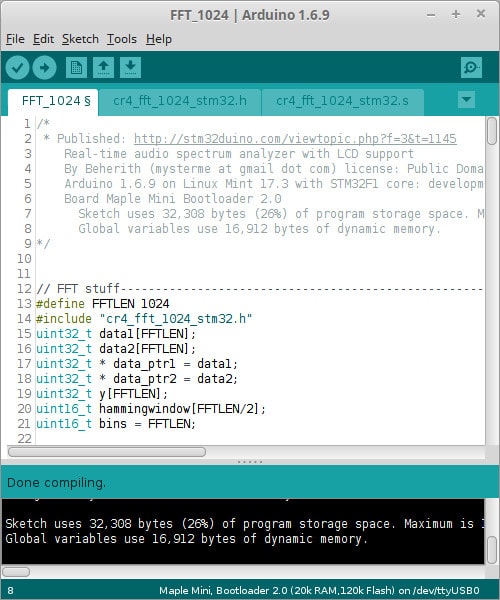
- Screenshot.jpg (114.47 KiB) Viewed 4754 times
Ray

I’m going to post the ZIP of the project above for the next few days … then this post will be deleted.

Can I add this code to the examples in the repo ?
We now have a faux library full of examples, and this would make a great addition to the examples
https://github.com/Beherith/STM32_Spectrometer
It supports a couple of display modes, you can pull down PB12 to cycle through them.
linear – works real time
logarithmic – my code for the log binning is too slow for real time
squished-linear – lower frequencies are displayed in full, higher ones are summed
signal-level – displays the input waveform as well as the FFT. Pull down PB13 to switch to this mode.
There are some outstanding issues, the main one being that in real-time mode, some part of the codes actually WRITES INTO the sample buffer. This is visible with PARALLEL = 1 and pulling down PB13 the injected data is clearly visible 
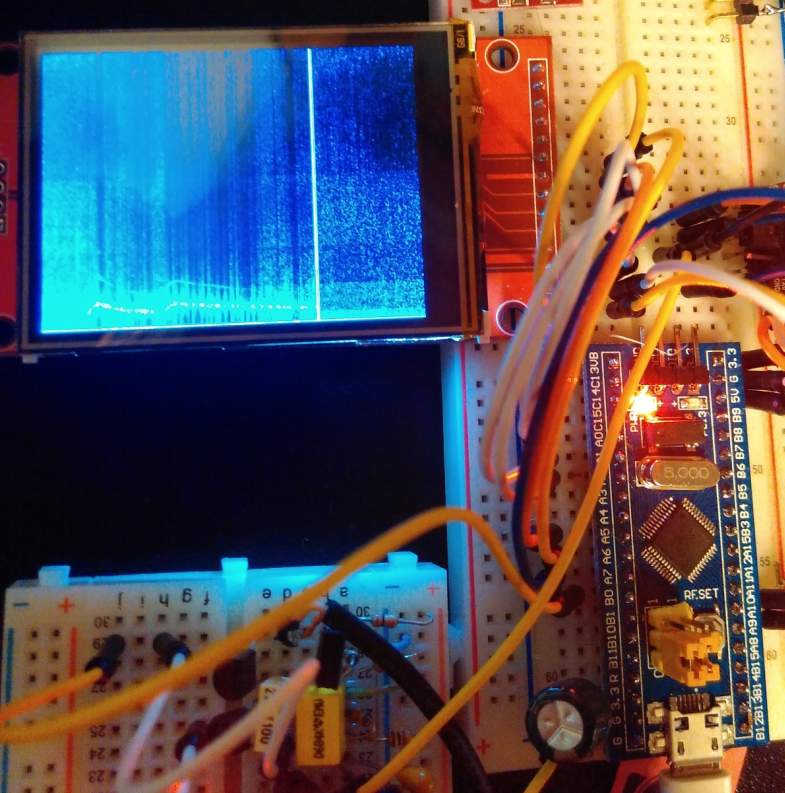
- stm32_fft_spectrum_analyzer.jpg (79.06 KiB) Viewed 1084 times
The library can perform a 1024 sized int16 FFT in about 3 ms.
FYI (I messed with FFT during my R&D at uni quite a lot):
1. in 1985 I did FFT on Sinclair Spectrum (Basic) – it took ~30minutes
2. in 1987 I did FFT on Sinclair Spectrum (asm) – it took ~30secs
3. in 1988 I did FFT on Atari STM (Basic compiled) – it took ~seconds
I did with 1/f noise measurements, so I wasn’t in hurry
4. in 2010 I did FFT on dspic33 – it took ~1ms (512xint16)
It may work even faster on STM32F4xx as it includes DSP math (and FPU) as well (I guess 150us could be doable)..
FYI (I messed with FFT during my R&D at uni quite a lot):
<…>
I licensed my code as Public Domain, so feel free to include/link it in the stm32duino examples.
FYI – a 40MHz clocked dspic33 (includes DSP instructions too) is afaik faster in FFT (written in C) than F103 @72MHz in assembly.
Im only any good at AVR assembly, ARM assembly is out of scope for me. But this spectrometer so far was extremely fun, and impossible without standing on the shoulders of all the giants present here and before them.
The goal for the project is to use this FFT to identify a very specific dog barking
Im only any good at AVR assembly, ARM assembly is out of scope for me. But this spectrometer so far was extremely fun, and impossible without standing on the shoulders of all the giants present here and before them.
The goal for the project is to use this FFT to identify a very specific dog barking
The rest is math.
The rest is math.

You must consider the use case as well..
When the car passes by with a velocity od 20m/s, at 20degC, and the “car noise” would be shaped around say 400Hz,
then, when car is approaching your mic the frequency will be 425Hz, and while receding off the mic the frequency will be 378 Hz.
So you must be able to “zoom in” your spectra into a 370-430Hz range to see the “Doppler shift”..
You must consider the use case as well..
When the car passes by with a velocity od 20m/s, at 20degC, and the “car noise” would be shaped around say 400Hz,
then, when car is approaching your mic the frequency will be 425Hz, and while receding off the mic the frequency will be 378 Hz.
So you must be able to “zoom in” your spectra into a 370-430Hz range to see the “Doppler shift”..
So, Roger and I have FFT on our O’scopes … guess should grab that long extension cord (used for the electric trimmer) and move my scope out to the road for an experiment! (not… Atlanta is not the friendliest place for such foolishness… someone would think it was valuable and shoot me for the scope.)
I don’t think I’d have any problems setting up in the front yard or even our driveway, to measure car noise.
The main problem is the lack of traffic in the street. Because of our street layout, the only cars driving down the street are either local residents or people who are lost 
What about recording car noise on your phone, and they play the recording back into the ADC input (via suitable input conditioning, i.e a capacitor, and possibly a resistor divider network)
https://www.youtube.com/watch?v=CVL99yIB3NQ
With 100m/s speed and 1000Hz pitch the spectral line will move from 1410Hz to 774Hz during the flyby 
Wouldn’t be more productive to use the C code of the FFT and then try to analyze (optimize) the resulting ASM code? I mean, at least for debugging.
This way one could differentiate the ASM code between F1xx, F3zz and F4yy.
Or maybe one can find some compiler directives and use them to get an optimized code without using ASM, just pure C.
Do you have the FFT routine in C? It would be helpful to include it to your repo, I think.
Can someone tell me what range the FFT output represents ?
I can see that the STM code generates a 1024 point array of both imaginary and complex components, and that the code uses the combined magnitude of these.
I presume the window params (array) govern the frequency range of the overall FFT ?
Another thing I dont understand.. Why didnt you reduce the number of points generated by the FFT assembler code ?
It looks like that number, 1024, is defined in the top of the assembler, and could be changed for a different value.
So as the display only has a horizontal resolution of 320, you could reduce the FFT size to 512 and double the speed.
I’m not sure is STM’s assembler code supports arbitary FFT size, but if it does, could you reduce the size to 320???
Only half of the output bins represent usable data, so reducing the size to 512 effectively means a 256 bin resolution.
Overview: http://learn.adafruit.com/fft-fun-with- … transforms
another
http://wiki.openmusiclabs.com/wiki/ArduinoFFT
Ray
OK. I will need to do some more background reading
From what I’ve read, the number of FFT bins is the size of the FFT /2 ( http://support.ircam.fr/docs/AudioSculp … 0Size.html )
I can see its s 1024 point FFT, so therefor the number of bins produced is 512 but the buffers are 1024 long – so I presume the second half of the buffer is used in the generation of the first half, but is not usable data.
On an unrelated note…
I was looking for other programs using this FFT code, and I found that ST have also written various other DSP func’s in assembler, including
IIR ARMA filter
FIR filter
PID controller
and different size FFT’s
(The code for this seems to be here, and other places, https://github.com/tuanpmt/STM32F10x_DS … rc/asm/gcc)
where a “point” means a complex number where
a) the real part is the real signal, ie voltage reading from an ADC, sampled at sample rate ie 1000Hz
b) imaginery part set to zero values
produces
a) 512 real results
b) 512 imaginery results
and you have to combine both in order to get “real amplitude of the spectral components – ampl”
ampl[k] = sqrt(re[k]^2 + im[k]^2), k = 0..511
So the result is the spectra with 512 frequencies, each frequency with the amplitude ampl[0..511].
Frequency zero is the DC part of the input signal, so the real frequencies are in bins from 1-511.
The 511th frequency is 1000/2 (sample rate div 2), with a linear division.
Also mind that you need an “antialiasing filter” [hw one] in front of the ADC in order to get a result.
Any frequency content in the input signal with frequency above “sample rate/2” will “mirror” directly into the FFT results you see.
For example, a frequency of 520Hz with an amplitude of 1000 will be visible after FFT as a frequency 480Hz with the full amplitude of 1000 (provided the sampling rate is 1000Hz). An input frequency of 990Hz will mirror as 10Hz of full amplitude (provided you do not have any filter there and the response of the ADC is flat till sample rate freq).
So you must cutoff everything above the “sample rate/2” frequency “before you do ADC” as best as you can (the most tricky and difficult part of my research in eighties was design of the antialiasing low-pass filters – usually of the highest feasible orders).
Also mind the “windowing” functions used (hamming, hanning, blackman and about 20 of others) have great impact on the shape and amplitude of the spectra you will see on the display. A choice of windowing function depends on what you actually want to achieve with your FFT measurements..
The precision of the spectral amplitudes depends on the number of FFT spectra averaged.
With a single measurement the error could be 100%, the more averaging you do the better spectra you will get.
Afaik the precision depends on 1/sqrt(N), where N is the number of spectra averaged. So with 100 FFT spectra averaged you get 10% precision.
The FFT results are usually represented as “power spectral density” vs “frequency” in log-log scales, so the averaging is not so critical..
FFT is a rocket science, indeed
This clarifies why you need a 1024 bin buffer for a 512 frequency slice output.
The Adafruit page is misleading, as it says that bin[0] is the total magnitude of the signal, (which makes it sound like an average), it also seems to imply that you only need the first half of the output bins, but this would loose all the imaginary parts – which could contain a substantial part of the amplitude.
Creating a filter to completely cut off input frequencies above sample_rate/2 sounds immensely difficult.
I presume nowadays this is done digitally.
Fourier analysis … entirely mechanically.
Its actually a very good of way of understanding what is going on. Watch the full set of videos.
As to the question of designing a good band pass filter.. that is an art in itself. https://en.wikipedia.org/wiki/Band-pass_filter .. but for the purposes of this exercise, you should be able to produce some results with a few passives.
This clarifies why you need a 1024 bin buffer for a 512 frequency slice output.
The Adafruit page is misleading, as it says that bin[0] is the total magnitude of the signal, (which makes it sound like an average), it also seems to imply that you only need the first half of the output bins, but this would loose all the imaginary parts – which could contain a substantial part of the amplitude.
I know what you mean about nyquist. 2 x oversamplimg is the theoretical minimum required.
In practice, my understanding was that the sample rate is normally much higher. e.g 44kHz for audio.
I am not sure of the interplay between Nyquist and FFT, but it seems to make sense that this is why you need to sample at least 2x the input freq.
So I looked at the code and I’ve realized that the FFT is taking a little over 2mS, but the magnitude calculation is taking around 3mS, which is why the combined time is over 5mS
I guess this is a combination of the multiplications, but mainly the square root approximation.
Anyway, I now need to work out how to do an inverse FFT and output the samples to the DAC via DMA and see what it sounds like.
Unfortunately the code you linked to, doesn’t seem to want to compile under gcc, there are loads of things gcc doesn’t like
I have also seen this article which seems to suggest that with pre and post processing that the FFT function can be used as IFFT
https://www.dsprelated.com/showarticle/800.php
Though what puzzles me is that the result from any of these contains both real and imaginary parts
1. “forward FFT” – is that the same as the “FFT”? YES
2. if you mess with FFT/IFFT experiments use an input signal (generated by sw) with known spectra – ie sin/cos, or a sum of a few sin, or a pulse
3. do not use windowing
4. when doing IFFT you have to get exactly the same signal, plus minus digital noise (+/- few bits) – as there are losses due to 16bit integer calcs.
5. FFT and IFFT always work with real and imaginary, the result of IFFT shall be real part with the original signal, the imaginary part will be full of zeros (will be not because of digital noise, there might be something like few bits there and there).
Important note:
1. when doing 1024 FFT you get result as re[0..1023] and im[0..1023], but you consider only THE FIRST HALF OF THE RE and IM ARRAYS = [0..511] (THE SECOND HALF OF THE RE and IM ARRAYS ARE THE SAME VALUES = A SYMMETRIC MIRROR around 512, so you throw it away = THAT MIRROR IS NOT USED WHEN SHOWING SPECTRA ON THE DISPLAY) – ONLY the first half is the RE and IM SPECTRA[0..511] you show on the display
BUT when doing FFT -> IFFT you MUST TAKE THE WHOLE [0..1023] RE and IM arrays as the INPUT to IFFT !!!!
YOU CANNOT INPUT ONLY FIRST 512 RE and IM (displayed SPECTRAL LINES), BUT THE “MIRROR NOT USED” RE and IM SPECTRAL LINES TOO !!!
It means when doing Signal -> FFT -> IFFT -> Signal, you do not provide the calculation of spectral lines
amplitude = sqrt(re^2 + im^2),
but you use the whole 1024 long re and im arrays as-they-are.
2. when doing 1024 IFFT you get again result as re[0..1023] and im[0..1023], but now you consider ALL 1024 RE and IM POINTS = [0..1023] as the result, where RE contains the original signal, and IM is ZERO (plus minus digital noise).
[attachment=0]fft ifft.JPG[/attachment]I presumed you would need to use all the output values from the FFT for use with the IFFT.
What I didn’t notice was that the code packs the Real and Imaginary (16 bit) values onto a 32 bit
In the example code, the Real and Imaginary values are packed into a single 32 bit unsigned integer array.
Hence I was didn’t understand that indexes 0 – 511 of the 1024 point FFT, contain both Real and Imaginary values, and not just the Real values.
I thought 512-1023 contained the Imaginary values
Anyway.
It should not be too hard to test the methods that I found to use FFT as IFFT.
e.f.
Generate a sine wave e.g. 1kHz in memory.
Run FFT
Use
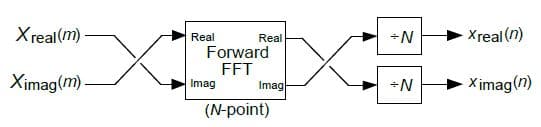
Swap the real and imaginary values
(something like)
uint16_t tmp = *bufPtr>>16 ;
*bufPtr= (*bufPtr << 16) | tmp;
(should not take too long)
Run FFT
No need to swap values.
Just use real part which seems to be the lower 16 bits.
Run the FFT again
I did some tests using the theory in my previous post, but I get some strange results.
I used a sawtooth wave as there was already code to create this test pattern.
I seem to get a corresponding pattern on the output, but its at much lower amplitude after the conversion, and there is consequentially a big loss in precision.
I wonder if this is being caused because we’re using 16 bit maths, and possibly overflowing.
Either way; at the moment it doesnt look very practical to use FFT as IFFT
Try not to divide the IFFT output samples by N.
Also double check whether the output of the FFT (the RE and IM spectral amplitudes) fits into 12bit “range”.
Do not expect you get perfect results today
Start with a single sine wave. Amplitude -2047 to +2047, frequency say 32.
	for (i=0; i<N; i++) {

num = ampl1 * sin ( 2.0 * Pi * freq1 * i / N );

//num += ampl2 * sin ( 2.0 * Pi * freq2 * i / N );

//num += ampl3 * sin ( 2.0 * Pi * freq3 * i / N );

real[i] = num;

imag[i] = 0;

}
<…>
Do not expect you get perfect results today
<…>
Thanks
The results I got using the sawtooth test data, looked a lot like a sawtooth, but the magnitude was wrong, even before dividing by 1024.
I will do some more testing, but I ran out of time yesterday.
I did some testing with the sine wave generator you posted, and once I worked out the input data format to the ASM function, I can see that it generates an FFT as expected.
With Sin generator period of 32, I get a spike at bin 32
With Sin generator period of 20, I get a spike in bin 20
If I generate a waveform which is the sum of 2 sin waves, I see 2 spikes in the FFT output data
So the FFT looks like its working perfectly
What isnt working at all is the inverse FFT, as this looks like a capacitor being charged from a very noisy supply.
However I suspect I know what the IFFT will not work by just using the forward FFT with pre and post processing.
All the methods for IFFT using FFT would require the output of the FFT to be 1024 times larger than the actual waveform value.
So as the FFT is only signed 16 bit, and 1024 is 10 bits, I think this means that it would only be capable of processing input FFT;s that have values of plus or minus 31 (at the very most), as the output would then be 31×1024 to -31 x 1024, which are in the signed 16 bit range.
I will test this hypothesis and post the results, but either way, it looks like the FFT routine is not usable as an Inverse FFT, so the only options seem to be, to either modify the FFT assembler by copying the whole function and making an inverse FFT that does something like do the 1024 division before attempting to pack the result back into a int16_t (But as the assembler is not commented and I have no idea what the Op Codes mean), I suspect this will not be a viable option
Or …
Try to work out why the other ARM IFFT will not compile
I think this second option is the most likely to succeed
With Sin generator period of 32, I get a spike at bin 32
With Sin generator period of 20, I get a spike in bin 20
How large are the spectral lines (actual FFT value against generated amplitude)?
So as the FFT is only signed 16 bit, and 1024 is 10 bits, I think this means that it would only be capable of processing input FFT;s that have values of plus or minus 31 (at the very most), as the output would then be 31×1024 to -31 x 1024, which are in the signed 16 bit range.
Usually the specific FFT IFFT asm algorithms are designed for a MAX input values range, which is less than the type they use.
For example ” this FFT is for 1024point and 12bit”. Internally the FFT may do “normalization” inside the algorithm in order to stay within 16bit arithmetic (for example various shifts left or right after specific math operations). I do not how this specific algorithm works.
The best way to study FFT anf IFFT is to use single or double precision math. You will see a lot of details then..
How large are the spectral lines (actual FFT value against generated amplitude)?
Sawtooth is not a such function nor square wave. But I am not sure.
For sw generated sinus (and integer freq multiply of it) you do not need WF as it starts and finishes at zero. Also other periodic functions which fit inside the input sample array and start and finishes at zero value do not need WF.
Random and none periodic signals require WF, otherwise the FFT produces a crappy spectra.
If not, FFT will think the edges (at the beginning and the end of the input array) do represent an additional signal, ie a rectangular or trapezoidal pulse starting at the beginning and finishing at the end of the input array, and FFT will add its spectra to the spectra of the original signal.
https://datasheets.maximintegrated.com/ … AX7407.pdf
You may tune the low-pass corner frequency with:
1. an external clock (1:100 ratio)
2. a capacitor wired against Gnd at clock input (a varicap diode for easy tuning works too).
I don’t need speed as I’m not displaying the data in real time but I do need resolution.
Cheers Steve.
I hope I’m right in wanting faster CPU for more bins than 16MHz AVRs, as I am only sampling a small portion of the audio spectrum for alarms/alerts. You know, the kind you hear in data centers for UPS’, etc. I’m hoping that if I can’t get FHT to work, I can use FFT effectively with a smaller audio bandwidth (yet decent count of bins).
I have the arduinoFFT lib working on an esp8266, but I need sampling in the neighborhood of 10s/second, and prefer to use the F103 if possible.
Has anyone gotten this code to compile on one of these boards with the stm32duino environment?
TIA!
[Holes Flow – Thu Mar 01, 2018 6:30 pm] –
Has anyone gotten this code to compile on one of these boards with the stm32duino environment?
Which one exactly?
srp
[zmemw16 – Fri Mar 02, 2018 9:12 am] –
“this code” doesn’t appear to link any ware ?
srp
My guess is that he was refering to the code in the first post.
I just tested it today, runs fine. I had to rename the file from .s to .asm, but I use Sloeber/Eclipse, not the Arduino IDE, so that may have something to do.
I downloaded the full F1xx DSP library from STM, and tested also the 256 points and 64 points FFT functions, all ran fine.
Then I added it to my test wav player sketch, and displayed the results, also runs fine although I may need to do something with the scaling, but the fft code definitely runs fine as per the first post.
