
I was using SPI interface with ST7735 tft. i got it working with software SPI.
but hardware spi is not working.
i checked with logic analyser as well. With HwSPI, logic level not at all changing for 4 pins.
here is sketch:
#include <Adafruit_GFX.h>    // Core graphics library

#include <Adafruit_ST7735.h> // Hardware-specific library

#include <SPI.h>
// For the breakout, you can use any 2 or 3 pins
// These pins will also work for the 1.8" TFT shield
#define TFT_CS PA4
#define TFT_RST PA3 // you can also connect this to the Arduino reset
// in which case, set this #define pin to 0!
#define TFT_DC PA2
// Option 1 (recommended): must use the hardware SPI pins
// (for UNO thats sclk = 13 and sid = 11) and pin 10 must be
// an output. This is much faster - also required if you want
// to use the microSD card (see the image drawing example)
Adafruit_ST7735 tft = Adafruit_ST7735(TFT_CS, TFT_DC, TFT_RST);
// Option 2: use any pins but a little slower!
#define TFT_SCLK 5 // set these to be whatever pins you like!
#define TFT_MOSI 7 // set these to be whatever pins you like!
//Adafruit_ST7735 tft = Adafruit_ST7735(TFT_CS, TFT_DC, TFT_MOSI, TFT_SCLK, TFT_RST);
float p = 3.1415926;
void setup(void) {
//Serial.begin(9600);
//Serial.print("Hello! ST7735 TFT Test");
// Use this initializer if you're using a 1.8" TFT
tft.initR(INITR_BLACKTAB); // initialize a ST7735S chip, black tab
// Use this initializer (uncomment) if you're using a 1.44" TFT
//tft.initR(INITR_144GREENTAB); // initialize a ST7735S chip, black tab
//Serial.println("Initialized");
uint16_t time = millis();
tft.fillScreen(ST7735_BLACK);
time = millis() - time;
//Serial.println(time, DEC);
delay(500);
// large block of text
tft.setTextSize(3);
tft.fillScreen(ST7735_BLACK);
testdrawtext("Hello World, Name: Sagar Saste, Email: [email protected], mob-8689823449,", ST7735_RED);
delay(1000);
}
void loop() {
tft.invertDisplay(true);
delay(500);
tft.invertDisplay(false);
delay(500);
}
Regarding Adafruit’s library: https://www.stm32duino.com/viewtopic.ph … 6&start=10
&
Regarding SPI pins: viewtopic.php?t=1767
&
Notes from the WiKi: https://github.com/rogerclarkmelbourne/ … 2/wiki/SPI
Example of syntax from stm32duino github: https://github.com/rogerclarkmelbourne/ … _SPI_ports
Hopefully, I’ve given you links the dmost current (latest) HW SPI references, but I may have failed in my searches. I’ve not been active on this site in many months and I may have missed some recent changes (I’m mostly off in ESP32 and rPi land these days.)
Ray
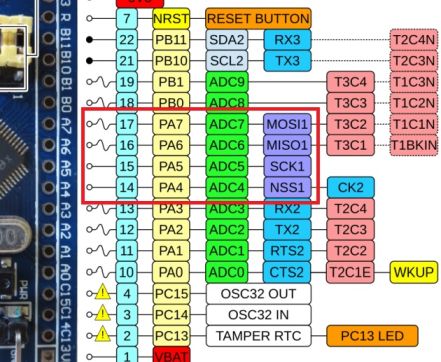
- spi1.jpg (50.85 KiB) Viewed 787 times
[dev – Sun Jul 15, 2018 2:25 pm] –
Do i need to define which SPI interface will be in use?
Yes. If you don’t specify anything, the default SPI (port 1) will be used.
Beside that, I don’t see where in the library the SPI interface is initialized (using SPI.begin). That can be reason why it is not working.
I recommend to do that in your sketch before tft.init.
Are u using the original Adafruit lib or the one from Kenjutsu? Please provide link.
i called SPI.begin() but it will be called default if i call beginTransaction.
I cannot see it.
Adafruit_ST7735::Adafruit_ST7735(int8_t cs, int8_t dc, int8_t rst)

: Adafruit_GFX(ST7735_TFTWIDTH_128, ST7735_TFTHEIGHT_160) {

_cs   = cs;

_dc   = dc;

_rst  = rst;

hwSPI = true;

SPI.begin();

_sid  = _sclk = -1;

}
I recommend to do that in your sketch before calling tft.init.

Can you please have a look at my reply here: Re: ST7735 based LCDs?
If possible, can you provide feedback?
Thank you
here is .ino file.
/***************************************************

This is a library for the Adafruit 1.8" SPI display.
This library works with the Adafruit 1.8" TFT Breakout w/SD card
----> http://www.adafruit.com/products/358
The 1.8" TFT shield
----> https://www.adafruit.com/product/802
The 1.44" TFT breakout
----> https://www.adafruit.com/product/2088
as well as Adafruit raw 1.8" TFT display
----> http://www.adafruit.com/products/618
Check out the links above for our tutorials and wiring diagrams
These displays use SPI to communicate, 4 or 5 pins are required to
interface (RST is optional)
Adafruit invests time and resources providing this open source code,
please support Adafruit and open-source hardware by purchasing
products from Adafruit!
Written by Limor Fried/Ladyada for Adafruit Industries.
MIT license, all text above must be included in any redistribution
****************************************************/
#include <Adafruit_GFX.h> // Core graphics library
#include <Adafruit_ST7735.h> // Hardware-specific library
#include <SPI.h>
// For the breakout, you can use any 2 or 3 pins
// These pins will also work for the 1.8" TFT shield
#define TFT_CS PA4
#define TFT_RST PA2 // you can also connect this to the Arduino reset
// in which case, set this #define pin to 0!
#define TFT_DC PA3
// Option 1 (recommended): must use the hardware SPI pins
// (for UNO thats sclk = 13 and sid = 11) and pin 10 must be
// an output. This is much faster - also required if you want
// to use the microSD card (see the image drawing example)
Adafruit_ST7735 tft = Adafruit_ST7735(TFT_CS, TFT_DC, TFT_RST);
// Option 2: use any pins but a little slower!
#define TFT_SCLK 5 // set these to be whatever pins you like!
#define TFT_MOSI 7 // set these to be whatever pins you like!
//Adafruit_ST7735 tft = Adafruit_ST7735(TFT_CS, TFT_DC, TFT_MOSI, TFT_SCLK, TFT_RST);
float p = 3.1415926;
void setup(void) {
//Serial.begin(9600);
//Serial.print("Hello! ST7735 TFT Test");
// Use this initializer if you're using a 1.8" TFT
SPI.begin();
tft.initR(INITR_BLACKTAB); // initialize a ST7735S chip, black tab
// Use this initializer (uncomment) if you're using a 1.44" TFT
//tft.initR(INITR_144GREENTAB); // initialize a ST7735S chip, black tab
//Serial.println("Initialized");
uint16_t time = millis();
tft.fillScreen(ST7735_BLACK);
time = millis() - time;
//Serial.println(time, DEC);
delay(500);
// large block of text
tft.setTextSize(2);
tft.fillScreen(ST7735_BLACK);
testdrawtext("This is demo for ST7735 TFT display bla bla :) ", ST7735_RED);
delay(1000);
}
void loop() {
tft.invertDisplay(true);
delay(500);
tft.invertDisplay(false);
delay(500);
}
void testlines(uint16_t color) {
tft.fillScreen(ST7735_BLACK);
for (int16_t x=0; x < tft.width(); x+=6) {
tft.drawLine(0, 0, x, tft.height()-1, color);
}
for (int16_t y=0; y < tft.height(); y+=6) {
tft.drawLine(0, 0, tft.width()-1, y, color);
}
tft.fillScreen(ST7735_BLACK);
for (int16_t x=0; x < tft.width(); x+=6) {
tft.drawLine(tft.width()-1, 0, x, tft.height()-1, color);
}
for (int16_t y=0; y < tft.height(); y+=6) {
tft.drawLine(tft.width()-1, 0, 0, y, color);
}
tft.fillScreen(ST7735_BLACK);
for (int16_t x=0; x < tft.width(); x+=6) {
tft.drawLine(0, tft.height()-1, x, 0, color);
}
for (int16_t y=0; y < tft.height(); y+=6) {
tft.drawLine(0, tft.height()-1, tft.width()-1, y, color);
}
tft.fillScreen(ST7735_BLACK);
for (int16_t x=0; x < tft.width(); x+=6) {
tft.drawLine(tft.width()-1, tft.height()-1, x, 0, color);
}
for (int16_t y=0; y < tft.height(); y+=6) {
tft.drawLine(tft.width()-1, tft.height()-1, 0, y, color);
}
}
void testdrawtext(char *text, uint16_t color) {
tft.setCursor(0, 0);
tft.setTextColor(color);
tft.setTextWrap(true);
tft.print(text);
}
void testfastlines(uint16_t color1, uint16_t color2) {
tft.fillScreen(ST7735_BLACK);
for (int16_t y=0; y < tft.height(); y+=5) {
tft.drawFastHLine(0, y, tft.width(), color1);
}
for (int16_t x=0; x < tft.width(); x+=5) {
tft.drawFastVLine(x, 0, tft.height(), color2);
}
}
void testdrawrects(uint16_t color) {
tft.fillScreen(ST7735_BLACK);
for (int16_t x=0; x < tft.width(); x+=6) {
tft.drawRect(tft.width()/2 -x/2, tft.height()/2 -x/2 , x, x, color);
}
}
void testfillrects(uint16_t color1, uint16_t color2) {
tft.fillScreen(ST7735_BLACK);
for (int16_t x=tft.width()-1; x > 6; x-=6) {
tft.fillRect(tft.width()/2 -x/2, tft.height()/2 -x/2 , x, x, color1);
tft.drawRect(tft.width()/2 -x/2, tft.height()/2 -x/2 , x, x, color2);
}
}
void testfillcircles(uint8_t radius, uint16_t color) {
for (int16_t x=radius; x < tft.width(); x+=radius*2) {
for (int16_t y=radius; y < tft.height(); y+=radius*2) {
tft.fillCircle(x, y, radius, color);
}
}
}
void testdrawcircles(uint8_t radius, uint16_t color) {
for (int16_t x=0; x < tft.width()+radius; x+=radius*2) {
for (int16_t y=0; y < tft.height()+radius; y+=radius*2) {
tft.drawCircle(x, y, radius, color);
}
}
}
void testtriangles() {
tft.fillScreen(ST7735_BLACK);
int color = 0xF800;
int t;
int w = tft.width()/2;
int x = tft.height()-1;
int y = 0;
int z = tft.width();
for(t = 0 ; t <= 15; t++) {
tft.drawTriangle(w, y, y, x, z, x, color);
x-=4;
y+=4;
z-=4;
color+=100;
}
}
void testroundrects() {
tft.fillScreen(ST7735_BLACK);
int color = 100;
int i;
int t;
for(t = 0 ; t <= 4; t+=1) {
int x = 0;
int y = 0;
int w = tft.width()-2;
int h = tft.height()-2;
for(i = 0 ; i <= 16; i+=1) {
tft.drawRoundRect(x, y, w, h, 5, color);
x+=2;
y+=3;
w-=4;
h-=6;
color+=1100;
}
color+=100;
}
}
void tftPrintTest() {
tft.setTextWrap(false);
tft.fillScreen(ST7735_BLACK);
tft.setCursor(0, 30);
tft.setTextColor(ST7735_RED);
tft.setTextSize(1);
tft.println("Hello World!");
tft.setTextColor(ST7735_YELLOW);
tft.setTextSize(2);
tft.println("Hello World!");
tft.setTextColor(ST7735_GREEN);
tft.setTextSize(3);
tft.println("Hello World!");
tft.setTextColor(ST7735_BLUE);
tft.setTextSize(4);
tft.print(1234.567);
delay(1500);
tft.setCursor(0, 0);
tft.fillScreen(ST7735_BLACK);
tft.setTextColor(ST7735_WHITE);
tft.setTextSize(0);
tft.println("Hello World!");
tft.setTextSize(1);
tft.setTextColor(ST7735_GREEN);
tft.print(p, 6);
tft.println(" Want pi?");
tft.println(" ");
tft.print(8675309, HEX); // print 8,675,309 out in HEX!
tft.println(" Print HEX!");
tft.println(" ");
tft.setTextColor(ST7735_WHITE);
tft.println("Sketch has been");
tft.println("running for: ");
tft.setTextColor(ST7735_MAGENTA);
tft.print(millis() / 1000);
tft.setTextColor(ST7735_WHITE);
tft.print(" seconds.");
}
void mediabuttons() {
// play
tft.fillScreen(ST7735_BLACK);
tft.fillRoundRect(25, 10, 78, 60, 8, ST7735_WHITE);
tft.fillTriangle(42, 20, 42, 60, 90, 40, ST7735_RED);
delay(500);
// pause
tft.fillRoundRect(25, 90, 78, 60, 8, ST7735_WHITE);
tft.fillRoundRect(39, 98, 20, 45, 5, ST7735_GREEN);
tft.fillRoundRect(69, 98, 20, 45, 5, ST7735_GREEN);
delay(500);
// play color
tft.fillTriangle(42, 20, 42, 60, 90, 40, ST7735_BLUE);
delay(50);
// pause color
tft.fillRoundRect(39, 98, 20, 45, 5, ST7735_RED);
tft.fillRoundRect(69, 98, 20, 45, 5, ST7735_RED);
// play color
tft.fillTriangle(42, 20, 42, 60, 90, 40, ST7735_GREEN);
}

