
I am using USB IAD CDC example. CDC working properly on windows 10 but not working on windows 7.
Is windows 7 detects IAD?
how to install driver for the same?
How does Win7 report the device?
I tried installing driver automatically but still not working.
It is working properly on windows 10 but not on windows 7.
[stevestrong – Sun Aug 05, 2018 6:39 am] –
How does Win7 report the device?
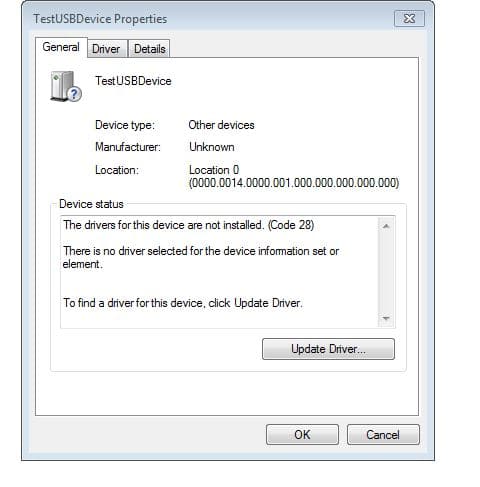
- usb detect2.JPG (39.6 KiB) Viewed 261 times
Which library?
I don’t know any IAD example… so please post the complete example sketch.
If you like trying things that worked at one point but may not work anymore, you can try:
- Finding the Windows dialog somewhere that will let you manually pick an existing driver to use.
- Creating a .inf file that tells Windows to use usbser.sys and convincing Windows to let you install it.
https://www.zdnet.com/article/heres-how … 0-upgrade/
Ray
Update: I recently (maybe 5 weeks ago) purchased an older notebook from eBay for testing purposes and it came with Win7. This process worked perfectly for me; but I have to say that after going through all of the necessary Windows updates after the transformation to Windows 10, it really does make me thankful for the ease of updating my Linux systems. Microsoft may have made updating somewhat abstracted from the end-user, but the need to constantly reboot is a real P.I.T.A.
[devan – Sun Aug 05, 2018 3:49 pm] –
Only Windows 10 supports detecting CDC-ACM devices and automatically installing the appropriate usbser.sys driver for it. In Windows 7, you need to manually tell Windows to use usbser.sys for your CDC-ACM interface. These days, I just use Zadig to manually install the CDC-ACM driver.If you like trying things that worked at one point but may not work anymore, you can try:
- Finding the Windows dialog somewhere that will let you manually pick an existing driver to use.
- Creating a .inf file that tells Windows to use usbser.sys and convincing Windows to let you install it.
Do i need to change the VID and PID in .inf file?
[mrburnette – Mon Aug 06, 2018 3:10 am] –
Win 7 ====> Win 10 FREE
i have installed lot many software on win7 and i am happy with win7 only. i got another pc which runs win10.
[dev – Mon Aug 06, 2018 4:10 pm] –[devan – Sun Aug 05, 2018 3:49 pm] –
Only Windows 10 supports detecting CDC-ACM devices and automatically installing the appropriate usbser.sys driver for it. In Windows 7, you need to manually tell Windows to use usbser.sys for your CDC-ACM interface. These days, I just use Zadig to manually install the CDC-ACM driver.If you like trying things that worked at one point but may not work anymore, you can try:
- Finding the Windows dialog somewhere that will let you manually pick an existing driver to use.
- Creating a .inf file that tells Windows to use usbser.sys and convincing Windows to let you install it.
Do i need to change the VID and PID in .inf file?
Yes, you would need to change the VID/PID and possibly the revision number (Rev_0100) and interface numbers (MI_00/MI_02) to match your own device.
Do note that the example .inf file is for one USB device with two serial ports. If you only need one serial port, you can ignore either BLACKMAGICGDB (the first interface) or BLACKMAGICUART (the second interface) when you replace things.
I did get the .inf file method to work for my own project once, but last time I tried it I couldn’t remember the exact steps, so I still recommend using Zadig.