
Are there any limitations using the Arduino approach?
I mean, are there peripherals, activities, interrupts, who knows, that you can only do with what I’ll dare to call ‘native’ solutions?
I have found trying to get a workflow with STM32CubeMX and, say sw4stm32/openocd, extremely difficult (using xenial, btw), so I keep coming back to the Arduino IDE. Last night I finally got the 2 LEDs on the F407 board to blink (ST-Link V2 via JTag pins), finding errors in pinout diagrams online. But from there I can’t figure out how to get to SD, RTC, or any of the fun stuff like the DACs.
Are there any compromises involved, or are all functions/functionality on the board available via any interface?
Sorry in advance for such a daft question.
there are limitations to any approach, including “the ardiuno approach”.
I mean, are there peripherals, activities, interrupts, who knows, that you can only do with what I’ll dare to call ‘native’ solutions?
No and yes.
No in that arduino is nothing but C/C++ programming with a can’d library. So in the hands of a capable programmer, anything you can do with C/C++, you can do it with the arduino.
Yes in that many arduino programmers are not capable of writing their own code “natively”. So they rely on other people’s prior work (aka libraries). with that approach, you are at the mercy of others developing a library in a way that you know how to use.
so depending on who you are, the answer is somewhere between a yes and a no.
Arduino is often stated to be C++ and while the “core” files are generally all C++, at the Arduino sketche level (program) there are some Arduino paradigms that make the sketch inherently inefficient for I/O; for exampleSo the Arduino’s digital I/O in IDE version 0017 can do roughly 1/5th the speed of direct port access on a 16 MHz ATmega328. Source
I have not personally profiled the STM32DUINO core, but the Arduino paradigm by default will create substantial delay. This translates to extra work on the programmer’s part to write direct port manipulation code if the fastest I/O is required. There are some discussions in the forum regarding direct port manipulation but in doing so, you drop out of the portability across different uC models.
Arduino is a makers platform, a hobby platform, a DIY platorm, and a training/teaching platform. It is not a professional development system. You can use professional (free or paid) development tools on top of the Arduino core code to make it easier to code, but the binary code is still created by Open Source. Therefore there are licensing issues and support issues (and maybe legal concerns) in using Arduino anything.
There is the STM core too, but I have not looked into the “openness” and Corporate support for this core. The core is intended (at this time) for Nucleo official boards.
Ray
http://wiring.org.co/learning/basics/setuploop.html
setup()
and
loop()
hence it is possibly easier for beginners to get started
stm32 cube would provide (much) better support across the stm32 families of mcus and if one wants to go that way one way is to start with the stm’s stm32duino cores or stm32generic cores which provides a good arduino implementations on top of cubemx libraries
yup for the stm32generic and stm’s stm32duino cores, you have a hybrid of both arduino and stm cubemx libraries – the best of both worlds
i think the other camp who likes the libmaple stm32duino core, likes it ‘lean and simple’, possibly less code bloat for specific mcu and perhaps smaller binaries. but it probably won’t ‘work across the board’ for stm32’s range of mcus
If you need more, either develop it yourself and contribute to the community, or switch to the alternative cores stm32duino or generic.
There is lot of value in Arduino as a hobby & DIY-maker world.
Many years ago, the UK was using the PICAXE in education and much of that overflowed into the hobby/maker movement.
The key to success is often nothing more than a decent forum to be used as a clearing house for issues.
Ray
[Manny – Sun Jan 21, 2018 9:13 pm] –
You got a link to the board?
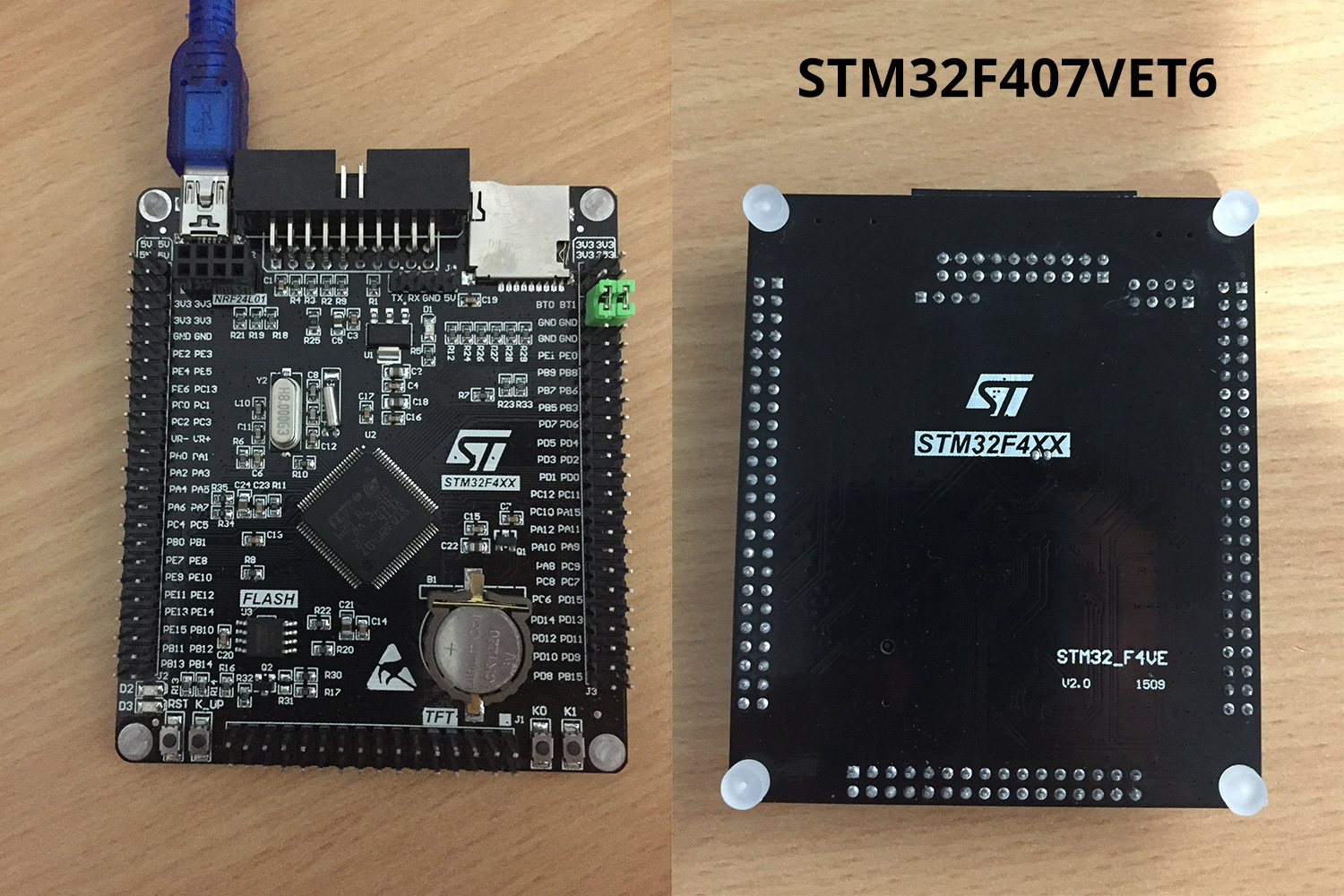
Sorry, Manny… this is the critter:
[stevestrong – Tue Jan 23, 2018 9:53 am] –
That is the so called black F4 board, my link given in my previous post covers the currently supported features by libmaple (Arduino_STM32) core.
Thanks, Steve. A lot of work.
Based on the responses, I think I’m lacking a more fundamental understanding of the cores on the platform. I’m no pro, but after doing a lot with Arduino on AVR, I got the STM32 bug. I’ve done well with the Arduino IDE on the F103C8t6 cheapies, but this F4 board is a different animal.
I won’t bother you very generous folks with back & forth questions about this or that, but rather any pointers to the following appreciated (probably the same place for all/most):
A Language Reference for the Arduino for STM32 environment.
An explanation of how firmware, core, and language components work (in both, I guess).
This is why I was asking daft questions, like:
-What programming languages can I use in Arduino IDE? (transferable from CubeMX starter code, or?)
-Which workflow (language(s) & tools) will allow me to get the most out of the work done here?
Things seem confusing to me; Like how can I upload this code below via the Arduino IDE & JTAG to the F407 board above, and it works? How is this possible with a core that also runs the very different code output from CubeMX?
#define D2 PA6

#define D3 PA7
void setup() {
pinMode(D2, OUTPUT);
pinMode(D3, OUTPUT);
digitalWrite(D2, LOW);
digitalWrite(D3, LOW);
}
void loop() {
digitalWrite(D2, LOW);
digitalWrite(D3, HIGH);
delay(1000);
digitalWrite(D2, HIGH);
digitalWrite(D3, LOW);
delay(1000);
digitalWrite(D2, LOW);
digitalWrite(D3, LOW);
delay(2000);
digitalWrite(D2, HIGH);
digitalWrite(D3, HIGH);
delay(1000);
}
The beauty of Arduino is in it’s simplicity. It assumes a uniform programming model by hiding away the details about the chip and it’s peripherals. That works for new users and simple tasks. And that 99 percent of what a typical Arduino user does.
When you go beyond that, you may find the Arduino approach to be unhelpful. For more complex applications, going beyond Arduino becomes necessary, and even enjoyable to some.
Whether you want to or need to go down that route is not clear at this point.
