
Matt also made some improvements with the core as he is using the latest gcc v7 in his IDE.
Except he is an excellent sw guy he is producing pretty nice boards as well..
https://uecide.org/content/stm32-support
PS: Matt also kindly asks people with experience to test.
I’ve recommended him to make people in this forum aware of this, as this is the best community to ask.

I talked to Matt years ago about porting the STM32duino core (I don’t remember why it stucked).
I think many people didn’t even know about “UECIDE” except all guys played with PIC32 and chipkit.
All I can say is: Give UECIDE a try, it’s an amazing IDE with much improvements and stunning features.
AND: Don’t forget: On THIS board there is no support for UECIDE, okay? 
[madias – Thu Dec 06, 2018 4:55 pm] –
AND: Don’t forget: On THIS board there is no support for UECIDE, okay?
Indeed. UECIDE has its own forums. If you have problem with UECIDE (unless they’re some general fault with the libmaple core) then post them there.
As far as the “improvements” go – it’s just the sorting out of the `inline __always_inline` problem – nothing else.
Good:
– Simple to use
Bad:
– very young, full of bugs,
– cannot install libmaple F1 libraries since they are not contained in the core.
==> not usable.
I would recommend to use the core as it is, and parse the Arduino-related files, similar to Sloeber.
I’m just happy to have the core working… After having an F4 discovery board lying around for 4 or 5 years I finally made the LED blink the other day
TBH I wasn’t planning on announcing the port just yet, since it’s not that ready for consumption. Not until all the parts are finished being ported…
I wonder what you mean by “ported”
Do you mean forked and modified, if so are the changes extensive? Are they backwards compatible with the Arduino IDE?
Are they just in files like boards.txt and platform.txt, or are they to the c/c++ files?
I can’t just take the existing Arduino configuration files since the way that UECIDE works is completely different to the Arduino IDE. It splits the core from the compiler and allows you to have different combinations of board, core and compiler. Also programmers are separate items. And then it’s all packaged in “.deb” files for the internal package manager (my own implementation of “apt” in Java) to control.
And of course UECIDE has so much that the Arduino IDE can never hope to have. The first thing we did away with was that god-awful serial “monitor”, and replaced it with a real ANSI serial terminal…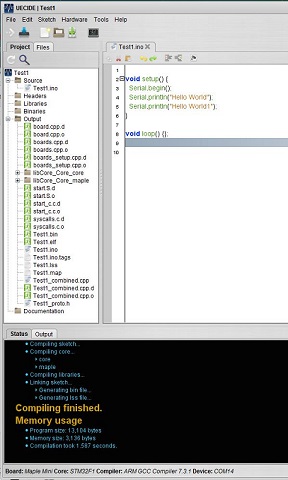
- Hello World.JPG (46.66 KiB) Viewed 486 times
[majenko – Thu Dec 06, 2018 7:44 pm] –
By “ported” I mean creating the configuration files. The code remains the same – except the “inline __always_inline” thing, which is all I modified in the code. Everything else is configuration files and packaging.I can’t just take the existing Arduino configuration files since the way that UECIDE works is completely different to the Arduino IDE. It splits the core from the compiler and allows you to have different combinations of board, core and compiler. Also programmers are separate items. And then it’s all packaged in “.deb” files for the internal package manager (my own implementation of “apt” in Java) to control.
I presumed you must have changed the config files (boards.txt etc)
Whats the issue with always line.
I recall some debate about this a while ago but I can’t remember the outcome
And no, I don’t modify the boards.txt file – in UECIDE a board is a separate entity with its own configuration (board.txt file – singular) in its own folder structure. A completely separate thing to the core. The core has its core.txt file, which has portions adapted from platform.txt, and then the compiler has its own compiler.txt, and the programmers have their own programmer.txt files. Each is a separate entity (a UObject in internal programming terms) and the sketch sees them layered over each other (board -> core -> compiler from top to bottom, each overriding data in the one below it, or complementing settings with additional variables).
How will updates from Roger’s core flow into your structure? Will you have to update each time when a new commit takes place? This is more than cumbersome. Can’t be the core files ported somehow manually to this different structure?
You could still generate those extra layer txt files from the core txt files and IDE settings.
BTW, this is where the inline stuff is discussed: https://github.com/rogerclarkmelbourne/ … 2/pull/551
It would be helpful if there was a release structure in place for the Arduino core, but alas not – so it falls on my shoulders to keep my end up to date. For some cores I have, in the past (and I need to re-create this) had nightly builds of the core direct from the source github repository which have been published in a separate Nightly Builds UECIDE repository for those that like bleeding edge software. That was (and will again be) all 100% scripted and unattended. But only for cores that I have written the scripting for.
I try and keep the variable names in the configuration files the same where possible – although UECIDE does impose some special names of its own – and variables are in the bash format ${…} instead of just {…}, and there are extra-special variable that I call “varcmds” which are small executable scripts that get replaced with whatever the script returns (programmed in Javascript) which give you ultimate flexibility to build really quite complex command structures in the config files – something Arduino can never do
So yes, once I have finished porting the boards and things over and I know just what is needed in the porting, I will be scripting it. And then I may add it to the nightly repository too with automated builds, when I resurrect it. But really that needs the upstream core to have “releases” for “nightly” to make any sense.
As an UECIDE beginner I tried to add a new Maple Mini1 board, and a new stm32f1A core – and it was easy (sure, I asked Matt for a hint outside this forum) – I made copies of the Maple Mini and stm32f1 folders (called the Maple Mini1 and stm32f1A) and edited those board.txt and core.txt files located inside those new folders (on my Win7 in C:\Users\pito\AppData\Local\UECIDE\..)
All those config txt files start with a “name and description..” which need to be changed accordingly
name=maple-mini1

description=Maple Mini1

core=stm32f1A

..And maybe there will be a script available which allows a user to generate his own board, core and compiler variant.
Then one could eventually “manually” (per script) update/add UECIDE core and libs with his own (core/lib taken directly from git repo).
And I am quite capable of debugging my own issues thank you without having to come here and pester you. Besides, I use gcc7 with numerous different ARM boards – Due, Teensy, etc, and this is the only core I have had so far that has needed modification to work with it.
I just installed the source and compiled it, that seems to work fine.
So it seems you have lots of flexibility here, why don’t you just make it so the user can select which gcc is used ? Why did you decide to switch the compiler when the current platform uses the older gcc?
[majenko – Fri Dec 07, 2018 3:46 pm] –
Oh, and the beauty of UECIDE is you’re not tied to GCC 7. You can use the Due compiler if you really must (although it’s not set up for that at the moment). UECIDE has one simple underlying rule: the user chooses what they run – I just provide the choice.
Then please also provide the scripts for that 
[majenko – Fri Dec 07, 2018 3:38 pm] –
This is the only issue that I know of, and it’s not me that found it – it’s been hanging around for a while (See the link above).And I am quite capable of debugging my own issues thank you without having to come here and pester you. Besides, I use gcc7 with numerous different ARM boards – Due, Teensy, etc, and this is the only core I have had so far that has needed modification to work with it.
We appreciate the author of any complex piece of software coming into the forum to present and showcase their efforts. Here, our members span novices to professional developers such as Rick. Therefore, you get a diverse span of dialog and sometimes it is critical: not mean, but coming from years of exposure to both professional tools sets as well as products such as UECIDE which is a superb individual effort.
In my opinion “-duino” means that the product must be Arduino compatible and should follow closely the output binary that will be created by the current Arduino Official IDE. When the compiler/linker utilized with the default install of any non-official IDE differs then we enter the realm of supportability and in a non-moderated forum such as STM32duino, this is a great concern. This is why I a m so pleased that you took the initiative to join as a member. It also means that you will get some harsh feedback sometimes from a few of us experienced members. Overall, I think you and your product will benefit from the interactions.
Ray
I couldn’t get the teensy boards working with the Due compiler – that needed its own compiler because the one Arduino provide doesn’t have everything in it. I wanted to have one standard compiler for all ARM boards, so I chose the one which ARM themselves currently provide as the standard.
In due course, I will tweak the old Arduino compiler package to work with STM32 as well, but that will come later.
Incidentally, for AVR and PIC32 I provide multiple compilers. For PIC32 no less than 6 versions of the compiler are available – one of which is manually tweaked by me to work slightly differently (I can’t persuade them to lift a hard heap limit, so I have to roll my own to do it).
[majenko – Fri Dec 07, 2018 4:17 pm] –
In due course, I will tweak the old Arduino compiler package to work with STM32 as well, but that will come later.
You realize when someone has a problem with your “tweaked” package, they will come here and complain. Just search the forum for posts about sloeber and platform IO. Those projects “tweak” the compile or package, when it didn’t work they didn’t go to those project leads to find out why. They came here and didn’t even mention they were using sloeber or platform i/o… In the end I’ve submitted bugs and fixes to those packages but it wasted a lot of posts on here to figure out why the user was having issues.
The mantra here is, if it compiles in the Arduino IDE, then it isn’t really a problem. Otherwise, we are just chasing our tails to satisfy someone else’s bad decisions.
Example:
https://github.com/Sloeber/arduino-ecli … ssues/1005
[majenko – Fri Dec 07, 2018 4:27 pm] –
If they are using UECIDE then they got it from the UECIDE website – where there is a forum prominently visible. By all means, tell them to eff off over there. I will be glad to help them there.
I’ve suggested that to users with a Non-Arduino IDE problem here and that behavior prompted other to scold me for being a killjoy. Also, it didn’t actually discourage the problem user from continued questions. It is a no win situation.
This site is called stm32duino. It focuses on stm32 and the Arduino IDE/API. No paid people support people here, Just users with a common board and common problems looking for solutions. If you adding to the problems, you are fixated on the wrong problem. The goal should be making an stm32 board usable in the Arduino universe.

Users of the Arduino IDE (what I call “ardueenies”) are whiny little ******s. And they can keep their crummy IDE. UECIDE’s users tend to be a step above them. You don’t get the crap that I deal with daily from the Arduino community with UECIDE. The users know what they are doing and know where to go to seek solutions. I think I have only ever seen one UECIDE related question on ASE ever. UECIDE is not for Ardueenies. It’s for people with a brain. And that itself filters out much of the dross.
This poll ( https://www.stm32duino.com/viewtopic.ph … 7&start=10 ) from a year+ ago showed most people have succumbed to the less than $2 cost of the “pill boards”. It is probably time to take another poll, however I get the feeling that the pill board fans have gone up. I would suggest the Robotdyn black board as the best of that group. https://robotdyn.com/catalog/developmen … ields.html
PS: this one below is with a few extensions described at the end of the thread.. It builds straight, even my original source organization is a bit weird..
Compiling...

• Preprocessing...

• Converting binary files

• Compiling sketch...

• Compiling core...

‣ core

‣ maple

• Compiling libraries...

‣ SdFat [C:\Users\pito\Documents\UECIDE\libraries\SdFat]
‣ SPI [C:\Users\pito\Documents\UECIDE\libraries\SPI]
‣ MapleFreeRTOS900 [C:\Users\pito\Documents\UECIDE\libraries\MapleFreeRTOS900]
• Linking sketch...

‣ Generating bin file...

‣ Generating lss file...

Compiling finished.

Memory usage

• Program size: 28,344 bytes

• Memory size: 18,088 bytes

• Compilation took 1.526 seconds.     // NOTE: second build
[Rick Kimball – Fri Dec 07, 2018 4:56 pm] –
Why doesn’t UECIDE provide the user with a total flash and ram left? How much it uses is interesting, but how much is free is more interesting.
It will do when I get round to it. It’s low priority. To help me remember you could add a feature request on github…
[Rick Kimball – Fri Dec 07, 2018 4:50 pm] –
BTW: A shrinking number of users on this site are using the maple mini.This poll ( https://www.stm32duino.com/viewtopic.ph … 7&start=10 ) from a year+ ago showed most people have succumbed to the less than $2 cost of the “pill boards”. It is probably time to take another poll, however I get the feeling that the pill board fans have gone up. I would suggest the Robotdyn black board as the best of that group. https://robotdyn.com/catalog/developmen … ields.html
I have a blue pill coming in a few days. Much as I would love to, I can’t own all boards that are out there – so I have to start with just a few when porting a core and then once I am familiar with how it all works do a mass porting of all the boards the core comes with.
[majenko – Fri Dec 07, 2018 4:46 pm] –
I don’t design things to work in the Arduino IDE. If people want to try and use them in that piece of crap then so be it. The Arduino IDE is of no use to anyone who is more advanced than blinking an LED. It’s a complete joke of an IDE.
If I want a real profession tool I use eclipse. If I want to use a profession style tool that works easily with the Arduino API, I use sloeber (which is really just a plugin for eclipse) It seems to use most of the Arduino build system and it sets up all those little things in eclipse (paths etc) so function discovery/ code completion work properly. In addition, I can easily launch a real debugger from it without flogging myself.
Are any of those features on your list of things to do in UECIDE?
[majenko – Fri Dec 07, 2018 5:00 pm] –
I have a blue pill coming in a few days. Much as I would love to, I can’t own all boards that are out there – so I have to start with just a few when porting a core and then once I am familiar with how it all works do a mass porting of all the boards the core comes with.
You realize that Roger’s core is headed for mothballs yes?
The real future of the STM32 Arduino cores are coming from the STM led effort that goes on with the “official core”
https://github.com/stm32duino/Arduino_Core_STM32
Oh, and one thing that UECIDE does that all the others can only dream of – the Arduino IDE, sloeber, all that lot – is library recursion. UECIDE has a firm grasp on what a library is (although that does impose stricter rules on how you name your libraries), and it maintains a tree of library dependencies, so if a library includes another library UECIDE already knows to include that one in the compilation – no need for you to know that or even include it in your sketch.
UECIDE was the first Arduino-centric IDE to fix the prototype location problem that was plaguing the Arduino IDE for years breaking code left right and centre.
I don’t think, in the 6 years that I have been programming UECIDE, that I have ever heard anyone complain about things being compiled differently and giving different results. Sometimes compilation would break, due to internal problems parsing the code, but that has nothing to do with the cores – purely my shoddy Java code at the time.
UECIDE is not a newcomer. It’s far from new. It grew out of Arduino 0023. Yes, It started before Arduino 1.0.0. And grew from there. So you could say that Arduino should be trying to be compatible with UECIDE. And the number of things that appeared in the Arduino IDE after I had them in UECIDE for some time shows they do have *some* aspirations…
[Rick Kimball – Fri Dec 07, 2018 5:05 pm] –[majenko – Fri Dec 07, 2018 5:00 pm] –
I have a blue pill coming in a few days. Much as I would love to, I can’t own all boards that are out there – so I have to start with just a few when porting a core and then once I am familiar with how it all works do a mass porting of all the boards the core comes with.You realize that Roger’s core is headed for mothballs yes?
The real future of the STM32 Arduino cores are coming from the STM led effort that goes on with the “official core”
https://github.com/stm32duino/Arduino_Core_STM32
Yes, I know. And once I am done with Roger’s core I will be working on the HAL one next. I hope to be able to integrate the board definitions into one so that you can use the same board selection with either core. It remains to be seen if I can though. That’s for another day.
[majenko – Fri Dec 07, 2018 4:46 pm] –
…
I don’t design things to work in the Arduino IDE. If people want to try and use them in that piece of crap then so be it. The Arduino IDE is of no use to anyone who is more advanced than blinking an LED. It’s a complete joke of an IDE.Users of the Arduino IDE (what I call “ardueenies”) are whiny little ******s. And they can keep their crummy IDE. UECIDE’s users tend to be a step above them.
…
Fair enough, you’re the author of the IDE, you can stand on your soap box in Speakers’ Corner and shout the praises of your creation.
But, I still have to work daily with the ArduinoIDE as it is the “standard yardstick” for this forum.
Just so there is no misunderstanding, UECIDE will be treated just as any other non-ArduinoIDE … questions will be posed ONLY in this forum and anyone asking anything that leads the members to think it is really UECIDE related will point the questioner to the UECIDE official forum. However, since you are a member, you are surely permitted to answer questions in this forum, if you wish, although you are not obliged to do so.
Your cocky (understandable) attitude really makes things difficult for us old-guard members that are trying to keep order in the forum due to the influx of non-techies: more like a flood! Some of the original team have moved on since much of the recent forum activity is just “noise” from Blue_Pill users who have little or no Arduino embedded programming experience. A few of the new users do have ArduinoIDE experience and are here looking to port previous projects they created in the AVR-constrained resource silicon. An under $2 delivered STM32F103 on a Blue_Pill is a huge reduction in cost from even a clone-UNO, never mind a real UNO. The forum started as a service for seasoned software folks to create a truly compatible “core” for the ArduinoIDE beyond version 1.5.x and many hands have been in the code base inherited from LeafLabs which shipped their own hacked Java IDE based on ArduinoIDE 0022.
The above being said, the core codebase is fairly mature, in a monolithic view. Most serious errors have been mitigated and enhancements are the largest pull-requests; and many members have forked Roger’s repository and have their own versions with their own enhancements and from time to time new members are referred to forked repositories for quick cures. In view of this and other issues, Roger has expressed a desire to achieve this forum and go to a strictly read-only and searchable historical record – the same as LeafLabs did a few years ago with their forum and documentations.
As a retired professional software manager, I really understand your poo-poo’ing the Arduino IDE. But it works for novices and it is well documented and it is undergoing changes to incorporate a wide variety of hardware. It is what it is, entrenched, and there is no good reason to bash it; although I find no good reason to embrace it, either. Anything that advances the technology of microcomputers and microcontrollers into the non-traditional hobbyist world is a good thing. Once the new user learns to blink a LED, they often develop a desire to learn basic electronics. My guess is that a large number of recent Amatuer Radio licenses are awarded to folks that got their interest from blinking a LED. So, I try and assist in this forum to drive people to learn to do things on their own; try and find their own answers; learn how to use the Internet to find the answers that most certainly exists for simple to complex ideas. The forum is about education and enjoyment and not a poison statement about how nasty the Arduino tools are. Those that find their heads hitting the ceiling will advance on their own.
Ray
At the moment it’s only me and Pito using UECIDE for STM32, unless I can tempt any of you guys …  so no problems there.
[majenko – Fri Dec 07, 2018 5:12 pm] –
Function discovery is already there. I would love to add code completion, but the editor I use doesn’t seem to want to function with it.
Are you talking about the “right click, Go to… manual page thing?” If so, your idea of function discovery and mine are completely different.
Try right click and goto definition in eclipse, it opens the file of the function and brings you to the code. I can right click on the Serial.begin(9600) and it finds the Serial code and the begin function. Also, If i just hover over the begin() function after a slight delay I can see the code for that function in a popup overlay window without any clicking. That also works for variables, enums anything.
I have used your product in the past. It is refreshing. I prefer for little one-off things to stay with the ArduinoIDE and punish myself… it helps to have an appreciation of what our “jill or joe” user is facing. With a little understanding, the ArduinoIDE can work for a medium-complex application … I use it when I play and post because I can ZIP up everything and publish. After I upload a ZIP, I can care less what IDE the end-user wishes to embrace.
Thanks again,
Ray
[majenko – Fri Dec 07, 2018 5:31 pm] –
At the moment it’s only me and Pito using UECIDE for STM32..
I’ve been using Sloeber, and for a pretty long time already
But I have no problem to learn something new, and I have no problem to share with others when I see something interesting.. I also see UECIDE filling the gap between “Arduino IDE” and heavy Eclipse based stuff.
PS: there is the “Ozone” debugger (ARM, RISC_V, free by Segger afaik) and it may work with j-link and st-link (easily hacked to j-link). I think UECIDE and Ozone could be an interesting combo. There are threads on the Ozone here..
And how to use its embedded libraries.
[stevestrong – Sat Dec 08, 2018 8:10 am] –
I would love to use UECIDE if you explain me in detailed steps how can I use my core (forked from Roger’s) instead of Roger’s with UECIDE.
And how to use its embedded libraries.
I would suggest:
- Copy the existing core folder
- Change the name= in core.txt to reflect the new folder name
- Change the desription= to give it a distinct menu entry
- Replace the maple and system folders with your copies
For the libraries I’d just drop them into “Documents/UECIDE/libraries/<XXX>” where “<XXX>” is the name of your new core. That will tie the libraries to only working with your core, and the system should pick them in preference to any others of the same name. Alternatively you could create a separate area to store them and add it as a library path in preferences, but still place them in a subdirectory named after your core.
You can read more about libraries here: https://uecide.org/wiki/adding-libraries
I am pondering having it so that you can force a library to a specific location with a #pragma entry so that you can dictate precisely which library version is used for what sketch.
Oh, and you can also use “local” libraries in a sketch – drop them into a “libraries” directory within the sketch’s directory – or “localize” it from the tree by right clicking on it. Great for if you want to tweak a library specifically for a sketch or require a specific version for a specific sketch and want it all bundled together.
Note: Mind under Win7 the “Documents” Matt refers to means “My Documents”. The UECIDE cuts off the “My”, it seems..
With the default settings your sketches folders and libraries folders reside in:
C:\Users\XXXX\My Documents\UECIDE\Blinker_sketch
C:\Users\XXXX\My Documents\UECIDE\libraries\SPI
C:\Users\XXXX\My Documents\UECIDE\libraries\MAX7219
C:\Users\XXXX\My Documents\UECIDE\libraries\Wire
where here the libs are available to all cores.
PS: there are other library placement strategies as described in the above post too…
The sketch folder is created automatically upon “save as”, for example.
The libraries’ folder names must be the same as the one used in #include “ABCD.h” (here the lib folder name must be “ABCD”) – see below.
Compiling...

• Preprocessing...

• Converting binary files

• Compiling sketch...

• Compiling core...

‣ core

‣ maple

• Compiling libraries...

‣ SPI [C:\Users\pito\Documents\UECIDE\libraries\SPI]
‣ ADS1110 [C:\Users\pito\Documents\UECIDE\libraries\ADS1110]
‣ MAX7219 [C:\Users\pito\Documents\UECIDE\libraries\MAX7219]
‣ Wire [C:\Users\pito\Documents\UECIDE\libraries\Wire]
‣ bitBangedSPI [C:\Users\pito\Documents\UECIDE\libraries\bitBangedSPI]
• Linking sketch...

‣ Generating bin file...

‣ Generating lss file...

Compiling finished.

Memory usage

• Program size: 43,324 bytes

• Memory size: 5,128 bytes

• Compilation took 1.641 seconds.

Try an example – load a binary file into the IDE through the tree and right click on it and set the conversion. If it’s a graphics file you get a different menu to if it’s any other form. Then compile, and take a look in the Output branch to see the results.
