
You will have to download this plugin http://www.visualmicro.com/ for Visual Studio 2013.
If you have Arduino for STM32 working on the Arduino IDE, all you need to do is configure the Visual Micro plugin to point to your Arduino IDE installation folder.
To upload from Visual Studio 2013 you may have to change {runtime.hardware.path} under the Uploading Tools section in the platform.txt which is located in under Arduino_STM32/STM32F”X” directory (X which can be 1, 3 or 4 depending on which processor you are using) to {runtime.ide.path}hardware/Arduino_STM32/tools/win as for some reason {runtime.hardware.path} does not get resolved and thus returns “The system cannot find the file specified”
I’ll take a look.
I’m not sure why you had to change the path, but all will become clear after I’ve installed VS 2013 community edition etc etc
I did a clean install of VS2013 community edition and installed it, and then downloaded and installed visual micro
However even an empty sketch won’t compile
The reason for this is a bug in VisualMicro because they don’t support the platform.rewrite.keys function which was added in 1.6.3
The purpose of the platform.rewrite.keys is because the IDE moved where the compiler was located in 1.6.2 and its no longer in program files (x86) its in %appdata% somewhere
what you have done manually is what the IDE does automatically
If you are subscribed to the Visual Micro forum, perhaps you can post to them an issue a bug notification, and get them to read the docs on this, or just send them the platform.rewrite.keys file so that they can see an example of it
The other problem with Visual MIcro for VS is that it doesnt seem to support the sub-menus that are used to select the processor variant or the upload method, and other similar things
Also, I can’t see how to upload at all to my STLink adaptor,
Also, it doesn’t seem to do code completion for some built in functions like Serial ??
Overall, unless you are a developer that normally uses Visual Studio, that I’d not use this at the moment, as its more trouble than its worth
I think getting Eclipse CDT to work with the Arduino files is probably a better option if you want to use a full featured modern IDE, as Eclipse will give you in-circuit debugging via STLink and GDB
Ps. I copied the compiler to the location visual micro expected it to be, but I now get
Compiling ‘Test1’ for ‘Generic STM32F103C series’
stm32.h:255:2: error: #error “Bad STM32F1 configuration. Check STM32F1 <series\stm32.h> header.”
stm32.h:85:2: error: #error “Bad STM32F1 configuration. Check <series\stm32.h> header for your MCU.”
stm32.h:255:2: error: #error “Bad STM32F1 configuration. Check STM32F1 <series\stm32.h> header.”
stm32.h:85:2: error: #error “Bad STM32F1 configuration. Check <series\stm32.h> header for your MCU.”
Error compiling
So I really don’t think this one is ready for prime time 
Thanks!
Ah OK
Yes, it may work with 1.6.0, I don’t have that version, and even 1.6.3 has been superseded and I think 1.6.4 is released and 1.6.5 is soon (arrgggh)
If you want to have a go with Eclipse try PM’ing @Rick Kimball as I think he is using Eclipse albeit on Linux
I did install Eclipse on my Windows 7 machine today, but had issues because it needs JDK not just JRE 
And I have not managed to work out how to add include paths etc etc
I think there is an Eclipse plugin for Arduino, but I have not investigated it. There is also another Arduino like IDE (but I forget what its called, PM @madias, he knows what the other one is called, but I think its very much like the Arduino IDE and doesnt have the facilities of VS or Eclipse)
PS. If you don’t have one already, I’d recommend you get a STLink clone. I’m sure that fairly soon we will sort out in circuit debugging using Eclipse using STLink or perhaps Black Magic Probe (cloned onto a STM32F103C8 board)
Cheers
Roger
I’m not sure if Arduino support is in the preview, but I am guessing that the final version will have support based on the official partnership.
I’ve also been contacted one of the guys that has a repo for ESP8266, and Visual Micro doesnt work for that repo either
I posted 2 issues on their forum
But there are loads and loads of problems already
see
Visual Micro should now be stable with the new Arduino 1.6.2+ build chain. Unfortunately Arduino did not give prior notice or beta opportunity for some significant changes in 1.6.2 so it was always going to take a few weeks for us to add support.
I am not sure what Roger means by lots of problems? We have an active forum, lots of users and plenty of people attempting to push the limits of non-standard Arduino hardware. http://www.visualmicro.com/forums/
We have not yet tested stm32 but 8266 is working okay so as long at Stm32 sticks to the official Arduino build process it should work okay. Any problems please report in the Visual Micro forum. Thanks
I also urge people to follow the Arduino press and avoid trying to re-invent the wheel. Arduino has a really great Boards Manager and Library Manager, I see Adafruit have not included the 8266 but it would be really great to see Stm32 in the list.
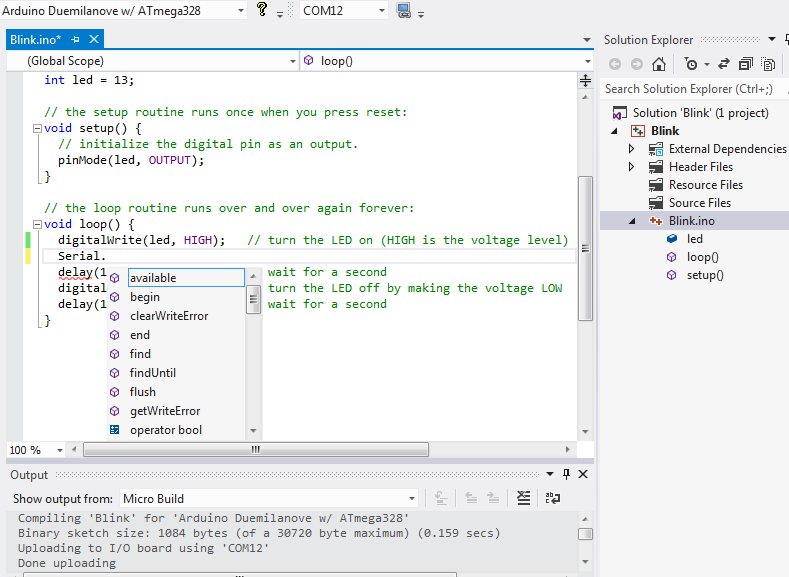


Thanks for the update.
I will retest, and perhsps @skyng22003 can also retest if he is still reading this thread.
PS. I know what you mean about the Arduino team making significant changes in 1.6.2 – it caught a lot of people by surprise and should have been released as 1.7 rather than a minor revision.
The roadblock I currently have trouble with is programming.
The STM type programmers dont seem to be supported (st-link, segger j-link), and I cannot
seem to find anyway to even hook the DFU programming.
Perhaps thats just a terminology/setup thing, however I see most of what I would expect otherwise.
I can happily link to my default fastblink and build it (Arduino 1.6), I can select boards, bootloaders, etc
so it does seem to be seeing the STM32duino extensions installed into Arduino, however it wants me to
select use an AVR programmer to program them from what I can tell.
Any thoughts from visual_micro?
We use these sub-menus to select the upload method, e.g. STLink or DFU.
I think someone wrote that the menu’s had now been added to VisualMicro, but I’ve been too busy to look at this, as the primary focus is on getting the core code to work, only focusing on the Arduino IDE.
Visual Micro is not the only alternative IDE that people could possibly use, e.g. Eclipse may also be an option and these is ucide (I think I spelt it correctly), just to name 2 others.
Its not really practical for me to support much more than the core – using the Arduino IDE. Everything else is basically a third party product, so if something doesnt work on Visual Micro, that does work on the Arduino IDE, then basically the other IDE is not replicating what the Arduino IDE does.
I know it could be argued that perhaps the IDE is not operating as it should be and the STM32 is only working via a loophole etc, but the IDE third party board support docs are really quite minimal.
So ultimately the spec to confirm to is how the Arduino IDE its self operates.

The good news is the menus are starting to appear – I think the upload selection is the major missing piece at
present, so hopefully they find time to have a look in that area (or I was missing something, which is of course
quite possible).
Playing around some more tonight I have managed to get reasonably working builds and upload via DFU in the VS2013.
I *think* I added a new menu to the ribbon bar area that allowed me to select the programmer (ST-Link and DFU, etc)
which was something along the lines of ‘Upload Method’, however it vanished again after some testing, and for the life
of me I cannot get it to return – however it did work for a while! it appeared just before the dropdown for selecting
bootloader.
I would love to know how to get it back – and then the next step will be to try and hook some kind of debugging.
Certainly far from plug and play though..


