
Ever wanted to see the “raw” HTML of a website without having to use the browser: view source? Ever needed to grab an image for sticking on this forum or other use such as in the word processor? Little things.
I’m sure you probably know this but back in my corporate days, I was surprised as to the number of IT professionals who did not know, so I’m going to post this little trick; that is, Windows OS applets with File/Open are not necessarily looking for a file on the local disk or even on a LAN resource! One can use Notepad to open google.com … and view the raw HTML.
Example 1: HTML in Notepad
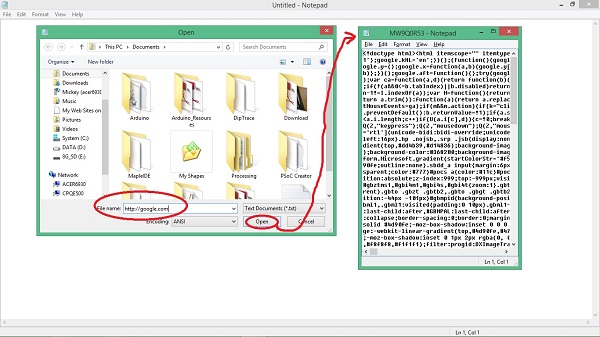
- HTML in Notepad.jpg (73.44 KiB) Viewed 656 times
Another couple of useful tools for this sort of thing are curl an wget, which can be scripted do grab pretty much anything from the web.
Both curl and wget come in Windows flavour too.
This is especially handy with Notepad++ on windows, because if you have lots of files open which are in different directories, when you go yo Open another file, Notepad++ opens the file selector in the same directory as the tab of the file you currently have selected.
So if I need an explorer window to a particular location, e.g. Where boards.txt is, I just click on the tab in notepad++ that i have boards.txt open in, then press open, and gives me an explorer window to boards.txt folder.
There is also the shift right click on a folder, which has the open command prompt and cd to the selected folder trick.
Also. In Firefox the pageinfo dialog is handy for tracking down image urls as I’ve noticed that sites like Aliexpress try to prevent you getting the image URL by making it a CSS background image which is setup by JavaScript etc
Also..
Inspec element in both Firefox and chrome is handy. E.g. If you go to one of those sites which greys out the page with and overlay and asks you to log in.
Just inspect the element that is masking the page, and add
display:none;
To its style, and it goes away. There are lots more web page tricks like that one.
There is also the shift right click on a folder, which has the open command prompt and cd to the selected folder trick.
And the converse:
.. and from the command prompt, open an explorer GUI in the same context (user or administrative) with “start .” Particularly useful if you have opened the command as administrative rights… as the GUI has admin rights.
Ray
True.
Opening CMD as admin, like you said, can be useful as well
I presume you’ve heard the problems with SourceForge, adding malware to the installers – but I don’t think it goes as far as viruses, I presumed they were trackers and annoying browser search engine changers etc
I presume you’ve heard the problems with SourceForge, adding malware to the installers – but I don’t think it goes as far as viruses, I presumed they were trackers and annoying browser search engine changers etc
I’m not sure which ones they infected with Malware, I read about it indirectly on SlashDot, but there is stuff about it here
