
Happy New Year to all.
I intend to make a program which allows to auto balance off Wheatstone bridge by pressing the button.
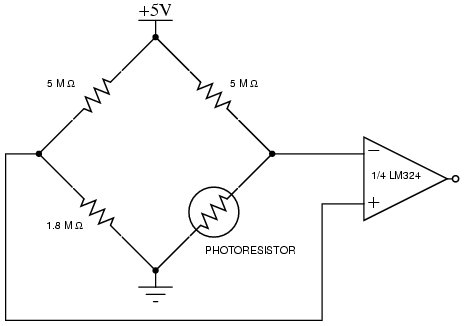
The circuit.
1.8 M is replaced by second photoresistor and LED which brightness is regulated by PWM pulse width by pressing the buttons. I want to replace those two buttons by 1 button = auto balance. The function should find the minimum value of voltage applied to PA7 which comes from amplifier LM324.
I was searching for similar applications of Arduino functions min/max without luck.
I need help.
#include "EmonLib.h"

#include <LiquidCrystal.h>

LiquidCrystal lcd(PA0, PA1, PA2, PA3, PA4, PA5);

EnergyMonitor emon1;

float  cur, acur[50], sumc;

volatile int i = 128; //initializing a integer for incrementing and decrementing duty ratio.
void setup() {
pinMode(PB6, INPUT_PULLDOWN);// sets the pin0 as output
pinMode(PB5, INPUT_PULLDOWN);// sets the pin1 as output
// pinMode(PA3, PWM);
//pinMode(PA2, PWM);
pinMode(PA7, INPUT); // I2
analogWrite(PA3, i);
lcd.begin(16, 2); // set up the LCD’s number of columns and rows
Serial.begin(9600);
emon1.current(PA7, 2500);
}
// Serial.begin(9600);
//Serial.println(i);
void loop()
{
emon1.calcVI(20, 2000);
emon1.serialprint();
float Irms = emon1.Irms;
if (digitalRead(PB6) == HIGH)
{
if (i < 255)
{
i++;//if pin PB3 is pressed and the duty ratio value is less than 255
analogWrite(PA3, i); // analogWrite values from 0 to 255
delay(30);
}
}
if (digitalRead(PB5) == HIGH)
{
if (i > 0)
{
i--;// if pin PB5 is pressed and the duty ratio value is greater than 0
analogWrite(PA3, i); // analogWrite values from 0 to 255
delay(30);
}
}
Serial.println(i);
lcd.setCursor(0, 1);
lcd.print("U=");
lcd.print(i); // triming b
lcd.setCursor(0, 0);
lcd.print("H="); //A, PA7
lcd.print(Irms );
}
https://www.arduino.cc/reference/en/lan … /math/min/
[ted – Thu Jan 03, 2019 10:22 pm] –
With hardware I have no problems, I am looking for examples how arduino function minimum/maximum is used.
https://www.arduino.cc/reference/en/lan … /math/min/
http://docs.leaflabs.com/docs.leaflabs.com/index.html
…under Math
min()
max()
abs()
constrain()
map()
pow()
sqrt()
This may seem like a silly question, but what is the intended function of this design? Could you use something like a loadcell amplifier (designed for weighing stuff using loadcells which are essentially wheatstone bridges) to do the job for you?
sounds like you want to manually auto-balance a bridge – the first in human history I think, 
many ways to do it and the simplest would be an analog solution, even if it is implemented via a MCU (using the onboard comparator for example).
but before you do anything, you need to make up your mind as to what exactly you are trying to do.
The link do not have math section.
PWM pulse width sweep will allow to record minimum value of voltage, mim() will find it, than PWM will generate designated pulse width.
In the first program the LED’s brightness is changing when the button is pressed=0k,
int led = PB15;

/////////////////////

// int button = PB7; // continuous

const int button= PB12;//

//////////////////////

int buttonState =0;

int brightness = 0;

int brightup = 1;
void setup() {

pinMode(led, OUTPUT);

//pinMode(button, INPUT);

pinMode(button, INPUT_PULLDOWN);

}
void loop() {

analogWrite(led, brightness);
buttonState = digitalRead(button);
if ( buttonState == HIGH ) {

brightness = brightness + brightup;

}

//if ( brightness == 255 )

if ( brightness == 100 )

{

brightness = 0;

}

delay(30);

}
 if (ledPin, HIGH) //PC13

{

}
 if (ledPin, HIGH) //PC13

{

}[ted – Mon Jan 07, 2019 2:50 am] –
It is mean, do whatever is in the brackets when logic level on PC13 is HIGH
No, it does not do that. It means if HIGH is true, do whatever is in the brackets.
In the C and C++ programming languages, the comma operator (represented by the token ,) is a binary operator that evaluates its first operand and discards the result, and then evaluates the second operand and returns this value (and type).
See https://en.wikipedia.org/wiki/Comma_operator#Condition

if (ledPin == HIGH) //PC13//int led = PB15;
const int led = PB15;
const int button= PB12;//
// constants won't change. They're used here to set pin numbers:
//const int button2Pin = PB9;
int button2Pin = PB9; // the number of the pushbutton pin
int ledPin = PC13; // the number of the LED pin
// variables will change:
int button2State = 0;
int buttonState =0;
int brightness = 0;
int brightup = 1;
void setup() {
// initialize the LED pin as an output:
pinMode(ledPin, OUTPUT);
// initialize the pushbutton pin as an input:
pinMode(button2Pin, INPUT_PULLDOWN);
pinMode(led, OUTPUT);
//pinMode(button, INPUT);
pinMode(button, INPUT_PULLDOWN);
}
void loop() {
// read the state of the pushbutton value:
button2State = digitalRead(button2Pin);
// check if the pushbutton is pressed. If it is, the buttonState is HIGH:
if (button2State == HIGH) {
// turn LED on:
digitalWrite(ledPin, HIGH);
} else {
// turn LED off:
digitalWrite(ledPin, LOW);
}
analogWrite(led, brightness);
buttonState = digitalRead(button);
if ( buttonState == HIGH ) {
brightness = brightness + brightup;
}
//if ( brightness == 255 )
if ( brightness == 100 )
{
brightness = 0;
}
delay(30);
}
To make more clear, this is a voltmeter program when LED is turning ON at
if(volt <= 1200 && volt >= 1000)
Part 2 is done.
Just put both programs together and auto balance will work.
int currentValue;  // global variables are retained on each iteration of loop()

int previousValue;

int analogPin = PB0;

const int buttonPin = PB12; //

int buttonState = 0;

int volt;

int i;

//int volt, avolt[50];

int LED =  PB14;

//int volt = 0;

#include <LiquidCrystal.h>

LiquidCrystal lcd(PA0, PA1, PA2, PA3, PA4, PA5);
void setup() {

pinMode(buttonPin, INPUT_PULLDOWN);

pinMode(LED_BUILTIN, OUTPUT);

//pinMode(PA7, INPUT_ANALOG);

pinMode(PB0, INPUT);

pinMode(PB14, OUTPUT);

lcd.begin(16, 2);

}
void loop() {

buttonState = digitalRead(buttonPin);

digitalWrite(LED_BUILTIN, HIGH);   // turn the LED on (HIGH is the voltage level)

delay(100);                       // wait for a second

digitalWrite(LED_BUILTIN, LOW);    // turn the LED off by making the voltage LOW

delay(200);
float volt = analogRead(PB0);

//volt = (volt * 3.3) / 4095.0;

volt = (volt * 3.3);

lcd.setCursor(0, 0);

lcd.print(volt);

delay(1000);
previousValue = currentValue;  // store what was read last time

currentValue = analogRead(analogPin);  // get a new reading

//if (previousValue != currentValue)

if (buttonState == HIGH)

if (previousValue > currentValue)
{ // compare them

// do something, they are different
digitalWrite(PB14, HIGH);

LED = 1;
}

else

// do something else, they are the same

{

digitalWrite(PB14, LOW);

LED = 0;
}
}
![[SOLVED] Discovery STM32F100RB — Trouble with timers and library structure](https://sparklogic.ru/wp-content/uploads/2019/11/st-stm32vl-discovery-90x90.jpg)
