
– My computer development environment is: OS-windows 7 64 Bit, IDE version-Arduino IDE 1.6.11, library version-Ethernet_STM,
library source-https://github.com/Serasidis/Ethernet_STM
STM32 blupill,W5100 ethernet
I am using w5100 shield and stm32 blue pill…trying HTTP GET function Code ..It gets connected to server but wont print HTTP headers and response body…actually it also dont print serially what is written in SETUP()…also tried different Baud Rates ….But No Luck
code:
#include <SPI.h>

#include <Ethernet_STM.h>
// Newer Ethernet shields have a MAC address printed on a sticker on the shield
byte mac[] = { 0xDE, 0xAD, 0xBE, 0xEF, 0xFE, 0xED };
// if you don't want to use DNS (and reduce your sketch size)
// use the numeric IP instead of the name for the server:
IPAddress gateway( 192, 168, 10, 3);
IPAddress subnet( 255, 255, 255, 0 );
IPAddress dns1( 59, 144, 127, 16);
//IPAddress server(192, 168, 10, 191);
IPAddress ip(192, 168, 10, 11);
char server[] = "https://test-turnstile.gymshim.com";
// Initialize the Ethernet client library
// with the IP address and port of the server
// that you want to connect to (port 80 is default for HTTP):
EthernetClient client;
//////////////////////
void setup() {
Serial.begin(9600); // init Serial USB
while (!Serial); delay(10);
Serial.println("Hello from USB Serial !!");
Ethernet.begin(mac, ip, dns1, gateway, subnet);
delay(500);
Serial.println("Send an e in serial monitor to test"); // what to do to test
}
void loop() {
// check for serial input
if (Serial.available() > 0) //if something in serial buffer
{
byte inChar; // sets inChar as a byte
inChar = Serial.read(); //gets byte from buffer
if (inChar == 'e') // checks to see byte is an e
{
sendGET();
}
}
}
void sendGET()
{
if (client.connect(server, 80)) { //starts client connection, checks for connection
Serial.println("connected");
client.print(String("GET ") + "/api/v2/turnstile/user_access?qr_code_number=123&tripod_uniq_id=1234" + " HTTP/1.1\r\n" +
"Host:https://test-turnstile.gymshim.com" + "\r\n" +
"Connection: close\r\n\r\n");
Serial.println("request sent");
}
else {
Serial.println("connection failed"); //error message if no client connect
Serial.println();
}
if (client.available()) {
char c = client.read();
Serial.print(c);
}
client.stop();
Serial.println("client disconnected.");
}
Selecting the Ethernet type controller (W5100, W5200 or W5500)
For selecting among those tree chips edit the file: Ethernet_STM\src\utility\w5100.h and comment-out only the line with the chip you want to use.
By default the W5500 ethernet controller is selected.
//#define W5100_ETHERNET_SHIELD // Arduino Ethenret Shield and Compatibles …
//#define W5200_ETHERNET_SHIELD // WIZ820io, W5200 Ethernet Shield
#define W5500_ETHERNET_SHIELD // WIZ550io, ioShield series of WIZnet
If you edit the w5100.h file, save it and re-compile your sketch.
Library is working ok…..
got the output with arduino nano something like that:
connecting...

connected

HTTP/1.1 200 OK

Cache-Control: no-cache

Pragma: no-cache

Content-Type: application/json; charset=utf-8

Expires: -1

Server: Microsoft-IIS/7.5

X-AspNet-Version: 4.0.30319

X-Powered-By: ASP.NET

Date: Mon, 28 May 2018 11:13:31 GMT

Connection: close

Content-Length: 12
"123-1234-1"

disconnecting
Show me the sketch you used with Arduino library +arduino nano + w5100 and the serial output after you connected to the server.
Actually now I have tried Code from Ethernet_STM library Examples Webclient:
/*

Web client
This sketch connects to a website (http://www.google.com)

using an Arduino Wiznet Ethernet shield.
Circuit:

* Ethernet shield attached to pins 10, 11, 12, 13
created 18 Dec 2009

by David A. Mellis

modified 9 Apr 2012

by Tom Igoe, based on work by Adrian McEwen

modified 12 Aug 2013

by Soohwan Kim

Modified 18 Aug 2015

by Vassilis Serasidis
=========================================================

Ported to STM32F103 on 18 Aug 2015 by Vassilis Serasidis
<---- Pinout ---->

W5100 <--> STM32F103

SS    <-->  PA4 <-->  BOARD_SPI1_NSS_PIN

SCK   <-->  PA5 <-->  BOARD_SPI1_SCK_PIN

MISO  <-->  PA6 <-->  BOARD_SPI1_MISO_PIN

MOSI  <-->  PA7 <-->  BOARD_SPI1_MOSI_PIN

=========================================================
*/
#include <SPI.h>

#include <Ethernet_STM.h>
// Enter a MAC address for your controller below.

// Newer Ethernet shields have a MAC address printed on a sticker on the shield

#if defined(WIZ550io_WITH_MACADDRESS) // Use assigned MAC address of WIZ550io

;

#else

byte mac[] = {0xDE, 0xAD, 0xBE, 0xEF, 0xFE, 0xED};

#endif

// if you don't want to use DNS (and reduce your sketch size)

// use the numeric IP instead of the name for the server:

//IPAddress server(74,125,232,128);  // numeric IP for Google (no DNS)

char server[] = "www.serasidis.gr";    // name address for Google (using DNS)
// Set the static IP address to use if the DHCP fails to assign

IPAddress ip(192,168,10,11);
// Initialize the Ethernet client library

// with the IP address and port of the server

// that you want to connect to (port 80 is default for HTTP):

EthernetClient client;
void setup() {

// Open serial communications and wait for port to open:

Serial.begin(9600);

while (!Serial) {

; // wait for serial port to connect. Needed for Leonardo only

}
// start the Ethernet connection:

#if defined(WIZ550io_WITH_MACADDRESS)

if (Ethernet.begin() == 0) {

#else

if (Ethernet.begin(mac) == 0) {

#endif

Serial.println("Failed to configure Ethernet using DHCP");

// no point in carrying on, so do nothing forevermore:

// try to congifure using IP address instead of DHCP:

#if defined(WIZ550io_WITH_MACADDRESS)

Ethernet.begin(ip);

#else

Ethernet.begin(mac, ip);

#endif

}

// give the Ethernet shield a second to initialize:

delay(1000);

Serial.println("connecting...");
// if you get a connection, report back via serial:

if (client.connect(server, 80)) {

Serial.println("connected");

// Make a HTTP request:

client.println("GET /util/time.php HTTP/1.1");

client.println("Host: www.serasidis.gr");

client.println("Connection: close");

client.println();

}

else {

// if you didn't get a connection to the server:

Serial.println("connection failed");

}

}
void loop()

{

// if there are incoming bytes available

// from the server, read them and print them:

if (client.available()) {

char c = client.read();

Serial.println(c);

}
// if the server's disconnected, stop the client:

if (!client.connected()) {

Serial.println();

Serial.println("disconnecting.");

client.stop();
// do nothing forevermore:

while(true);

}

}
Check your connection between W5100 and bluepill.
Did you put a resistor between RESET and 3V3 on the W5100 module ?
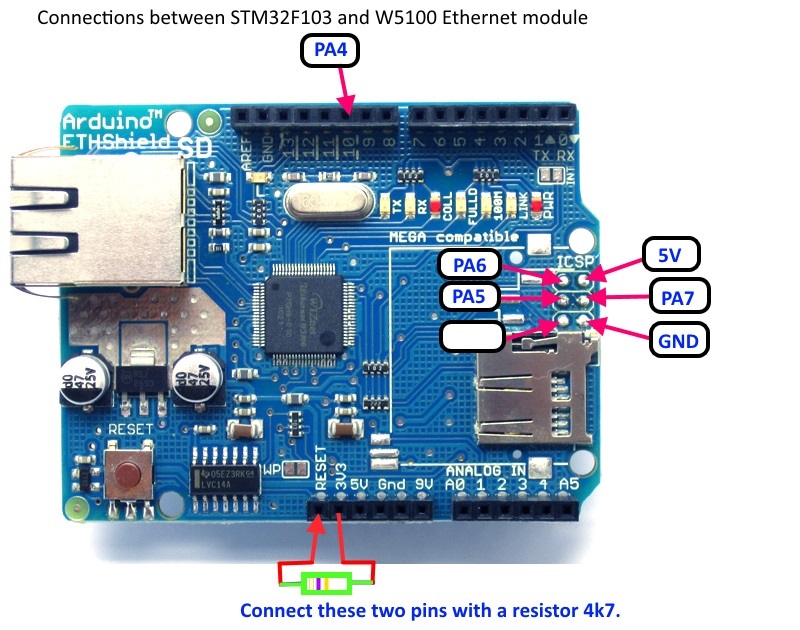
I Have wired like this :
USB SERIAL Blue pill Ethernet shield
+5v —— +5v External 5V supply
Gnd —— gnd —— external supply gnd
TX —— A10
RX —— A9
Blue pill Ethernet shield
A4 —— NSS
A5 —— SCK
A6 —— MISO
A7 —— MOSI
inserted 4.7k between +5v and RESET ethernet shield
also tried common power +5v from usb serial to blue pill and ethernet shield
still giving same output 
[stevestrong – Sat Jun 02, 2018 7:13 am] –
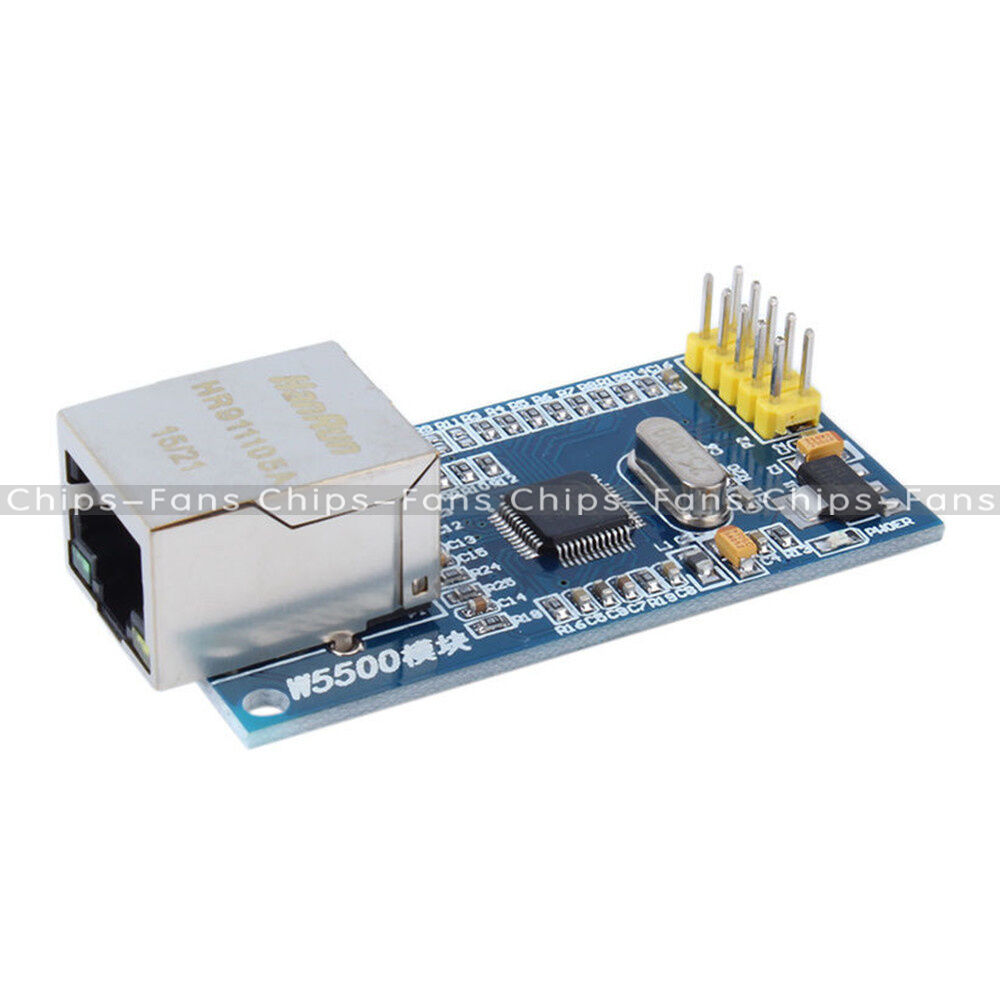
Is that really W5100 and not W5500? I cannot see it clear on the pic.
I thought the same, but the W5500 has less pins than W5100.
If the problem remains, enable this line
//delay(3000); //Enable this line if the problem remainsI’d like to join to this topic, because I have also a problem with my W5500. Module was ok tested with arduino, but I can’t setup it with STM32. When I’m trying this webclient example, my output looks as follow:
Opening port

Port open

connecting...

A: 3393

connected

B: 8451
disconnecting.
If you have build problems, I suggest to use this core (forked from the Roger’s official core): https://github.com/stevstrong/Arduino_STM32
If you have further problems with that, please open a new thread.
My problem is solved, reasons are not so clear, but they were connected to mess in my libraries (arduino, ESP and now STM libraries in one common folder), after clearing all started to work. Now I have some other questions regarding how to detect L1 ethernet connection, but maybe in new topic.
Thanks for help!
[Jarek.P – Mon Jun 11, 2018 10:18 am] –
Hi,My problem is solved, reasons are not so clear, but they were connected to mess in my libraries (arduino, ESP and now STM libraries in one common folder), after clearing all started to work. Now I have some other questions regarding how to detect L1 ethernet connection, but maybe in new topic.
Thanks for help!
Thank you for letting us know

