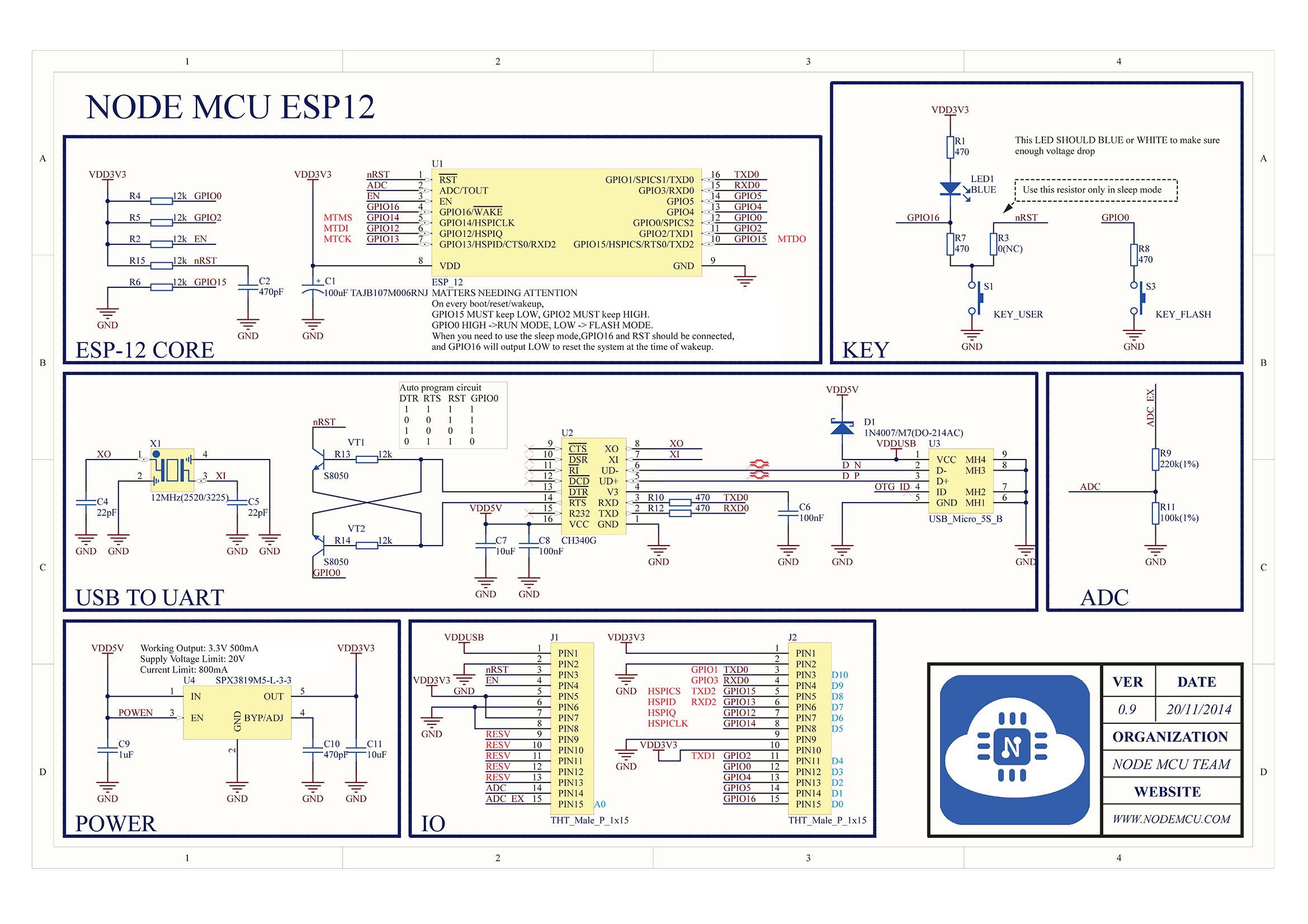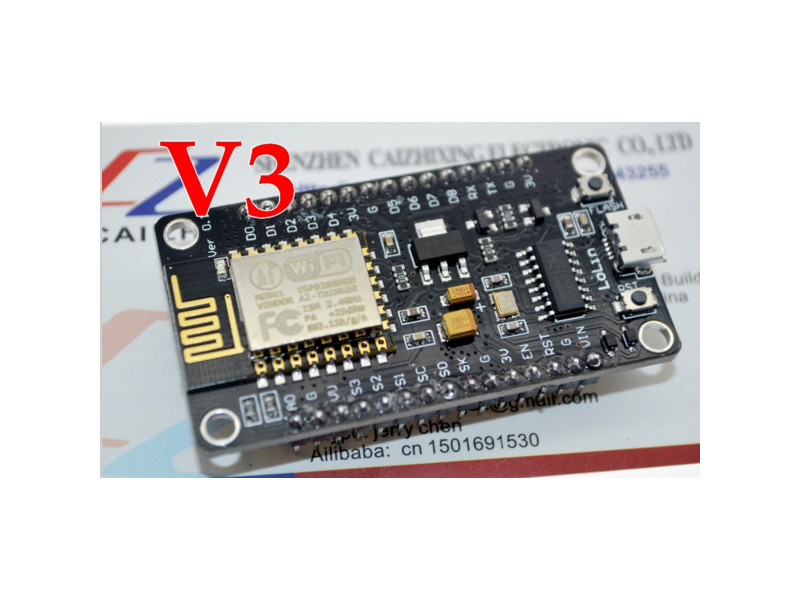
- ESP8266-USB.jpg (80.54 KiB) Viewed 2434 times
How does it handle the upload reset / programming pin ?
Are some other pins of the USB to serial connected to the reset and programming pin?
BTW. It looks like a nice board. i.e like a Maple mini for the ESP8266. I should imagine it will sell well at that price.
I will probably buy some
Edit.
Just ordered 3.
Note. Had to pay postage as I wanted more than one, but hopefully it means they won’t take months to get here 
I like them because they are small and have some shields stackable, like SDCard.
How does it handle the upload reset / programming pin ?
Are some other pins of the USB to serial connected to the reset and programming pin?
<…>
https://raw.githubusercontent.com/nodem … IT_SCH.png
Another link to same board in use:
http://www.cnx-software.com/2015/10/29/ … 266-wisoc/
Roger,
The reason I broke my rule about ordering multiple items is that I was feeling cheap on the last visit to Aliexpress and everything I ordered was “free” shipping … so, when I put in 3x for the quantity I had a shipping cost, with 2x, I had a shipping cost … hence the qty 1.
These are really nice 5V boards with onboard 3.3V regulator and the Reset/Flash buttons and the CH340. It is a bit big but having the mini-USB onboard is ideal for small projects where the output will be serial and a display will not be utilized. Once a TFT is considered, the likelihood of needing the USB for serial out (other than during debugging) is unlikely. But I will order at least 1 more just to have a spare for development as it surely simplifies having to construct a breadboard with the pushbuttons, caps, resistors, etc.
Ray
jit, i was looking for esp8266 and udp code; dr woo who woo who

ok, very bad ascii theme music
@roger
you could do it as 2 orders – slightly annoying if you use the same supplier, 2 transactions for the card and your fingers.
i’m now tending to split across suppliers for the same item, so only the single transaction.
you generally seem to get more than 1 under ‘free shipping’; when i do repeat orders to same supplier, sometimes if they’re really awake you get orders being combined into one package.
with some of the smaller modules, it’s 3, 7 or even 9 before the extra postage appears. make sure you click the update button.
stephen
jit, i was looking for esp8266 and udp code <…>
stephen
I couldn’t help but think of this one–
A husband and wife are shopping in their local Supermarket .
The husband picks up a case of beer and puts it in their trolley.
‘What do you think you’re doing?’ asks the wife.
‘They’re on sale, it’s only $20 for 24 cans’ he replies.
‘Put them back, we can’t afford them’ demands the wife, and so they carry on shopping.
A few aisles further on the woman picks up a $40 jar of face cream and puts it in the trolley.
‘What do you think you’re doing?’ asks the husband.
‘It’s my face cream. It makes me look beautiful,’ replies the wife.
Her husband retorts: ‘So does a case of beer and it’s half the price.’
“Cleanup on Isle 5!”
Michael
might be just that you built it, shoes/handbags i just don’t follow.
then again that’s not a problem. single.
@martinayotte
d1 mini – seems ok; i’ve 2, one’s a full stack, all the shields and a second d1-mini with just sd-card & dht11 shields.
all the shield schematics are available.
i’ve also a couple of their uno sized platforms and double plate blanks, on order.
esp8266-arduino – latest is 2.1??
no problems uploading that a reset or a re-plug or (maybe worst case an arduino exit & restart) hasn’t fixed.
i’ve found my phone again, so pretty picture time when i get chance
stephen
with items that are less than $5 each, I generally buy more than one, because as we all know, its all to easy to release the magic smoke from these things.
I’m hoping that because I paid for postage ( which I think was a couple of dollars), they may take less time to get here.
Currently components seem to be taking 4 weeks to get to me, which often includes 1 week just to pick and dispatch.
I would be happy to pay a few dollars for them to pick and dispatch within 2 days, and for items to not go via the slow boat from China
The NODEMCU supports Auto-Reset during downloading.
There are several flavors, even the original NoceMCU, there are v0.9 and v1.0 version, using different USB-TTL.
Those LoLin are simply another flavor.
There are also some other form factor such Wemos D1-Mini.
I will let you know when I receive my modules, whether they appear to have anything on them.
Just to go slightly off topic… I had’t realised how many features are now in NodeMCU.
I was looking for MQTT code for the ESP8266 the other day, and found one, pure C, version which had been ported to ESP8266, but after I installed the whole Open Esp8266 SDK in order to build it… It didnt seem to build under that SDK 
But looking at NodeMCU on GitHub, they have a MQTT module, so perhaps I may be able to use that code instead, and port it to work with Arduino-ESP8266
How does it handle the upload reset / programming pin ?
The Wemos-D1-Mini provide the same thing.
Under the hood, it is the esptool that ask for that to the CH340.
If ESP Generic is choosen instead, then, a submenu “Reset method” is present, “ck” and “NoceMCU” are the options, “ck” (I don’t known where the name comes from) is manuel Reset, and NodeMCU is, of course, the same automatic describe above.
When I grow up, I want to be as smart as you … nothing seems to elude you. Thanks for the information that I just did not know. When I first tried using this module, I was using “generic” and only today figured out it was a NodeMCU clone.
Ray

But there still some code dedicated to NodeMCU : pin mapping names !
But since I prefer use the real names of the chip itself instead of the board, Generic would work too with the proper ResetMethod.
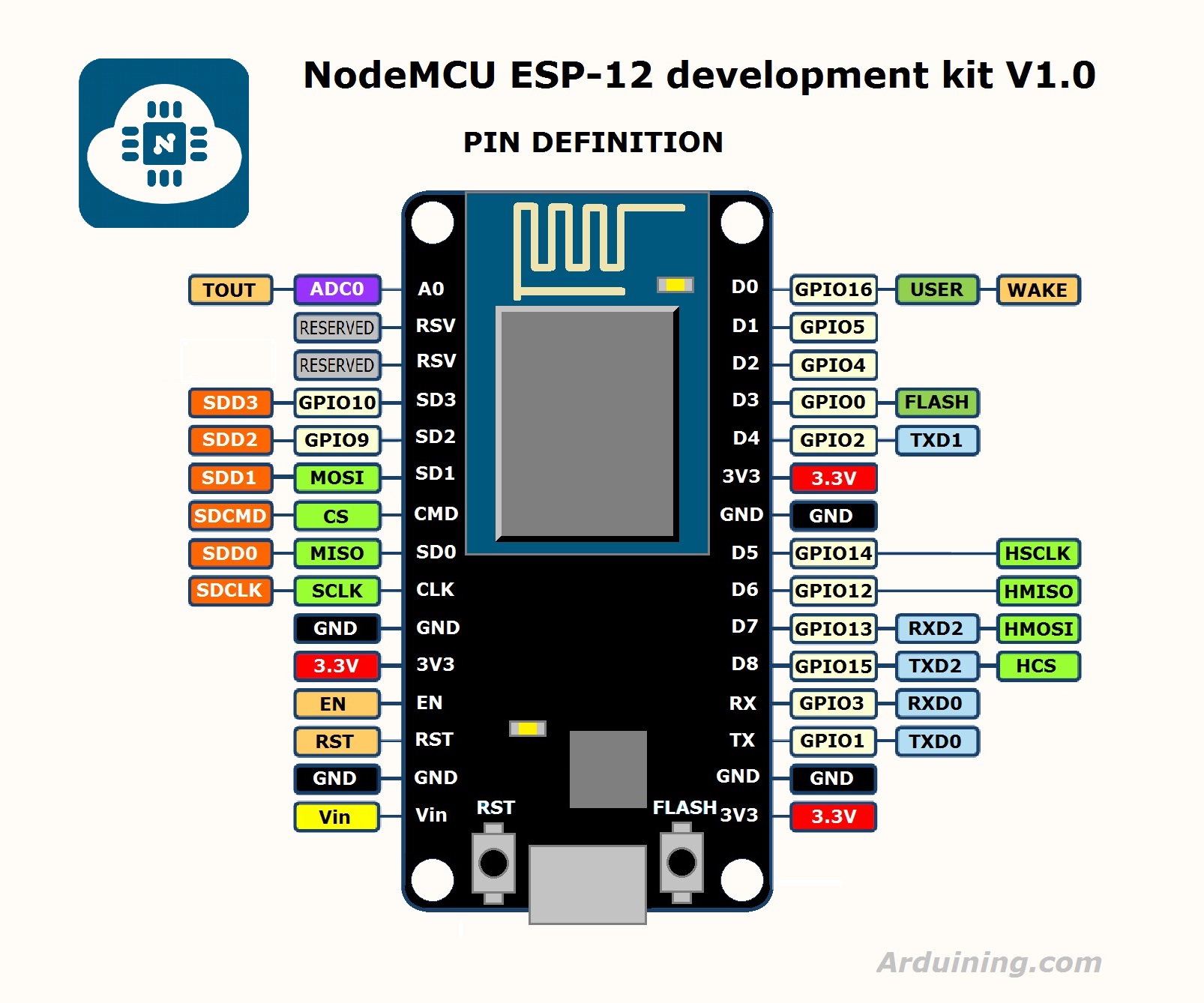
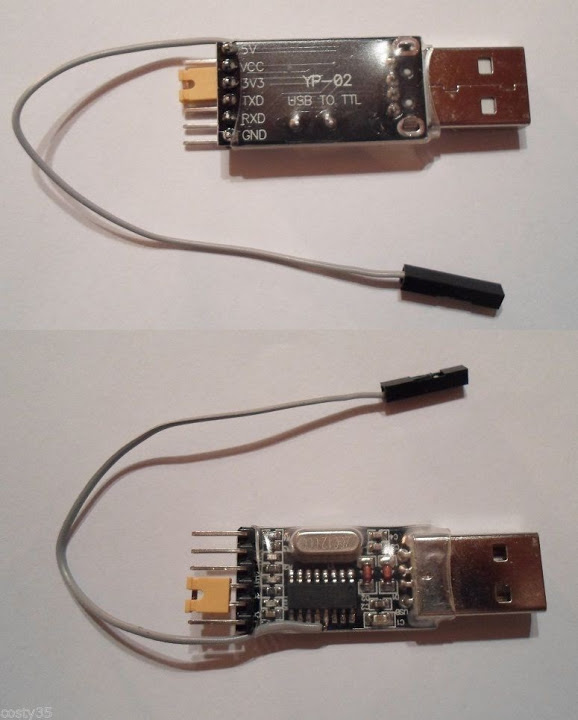
I though you were talking about NodeMCU clones mentioned in this thread.
The issue I am having is that no matter how I try to get this unit to function as the docs state:
http://www.wemos.cc/Tutorial/get_starte … duino.html
My specific unit will not function as board type NodeMCU 1.0 (12E). The unit programs, but the resulting image always kicks-off the WDT and I get a stack dump. Always.
Using the board type “Generic ESP8266 Module”, “Flash Size: 2M (1M SPIFFS)”, “reset method: nodemcu” always works. Neither of the 4M flash sizes seem to work.
Maybe a hardware issue or maybe a configuration issue but I have not tracked this down yet. I have 4 more of these coming in the China Post… 2x from 2 separate sellers to manage the free-shipping. If anyone gets theirs before me, let me know your experience. These modules are marked “LoLin” directly above the micro-USB.
I have no one but my own self to blame because I broke my rule about never, never buy just 1 of something cheap.
And a warning: martinayotte’s diagram of the board is incorrect … just a minor thing, but the two upper-right “reserved” pins are ground and Vcc on this board.
Ray
I don’t own one of those boards, but I’ve read somewhere that some have the flash connected in DIO only, therefore if they are flashed as QIO, it won’t boot and probably produce some WDT resets. (but it maybe unrelated …)
srp
Some board designers choose DIO only to save 2 GPIO pins.
Some board designers choose DIO only to save 2 GPIO pins.
Did you have the EspExceptionDecoder installed ? it can help to figure out …
https://github.com/esp8266/Arduino/blob … ck_dump.md
https://github.com/me-no-dev/EspExceptionDecoder
Did you have the EspExceptionDecoder installed ? it can help to figure out …
https://github.com/esp8266/Arduino/blob … ck_dump.md
https://github.com/me-no-dev/EspExceptionDecoder
But I don’t see here any errors … Do you have any crashes ?
But I don’t see here any errors … Do you have any crashes ?
I ordered 3 of those modules and they were dispatched around a week ago, so I’ll let you know when they arrive
Actually, I’m not totally sure exactly what went wrong for you, but I’ll let you know whether any of my existing code runs on the modules.
<…>
Actually, I’m not totally sure exactly what went wrong for you, but I’ll let you know whether any of my existing code runs on the modules.
No worries
I only wanted to run it as a “Generic” ESP8266, it just saves having an external USB to Serial converter and a small board with the Reset and Program buttons (which I’m using at the moment)
2nd, The NodeMCU 1.0 settings did not work on my unit. I had to resort tk Generic to be able to access all 4M of flash. Thanks to Martin for the clue on this one.
But, after some false starts, using the settings I published here, the unit works flawlessly. Some of my issues may have been caused by using incorrect flash settings initially.
No worries
I only wanted to run it as a “Generic” ESP8266, it just saves having an external USB to Serial converter and a small board with the Reset and Program buttons (which I’m using at the moment)
The 1st and 2nd units look the same out of the antistatic, but the bags are different (TOP image works, BOTTOM image is defective):
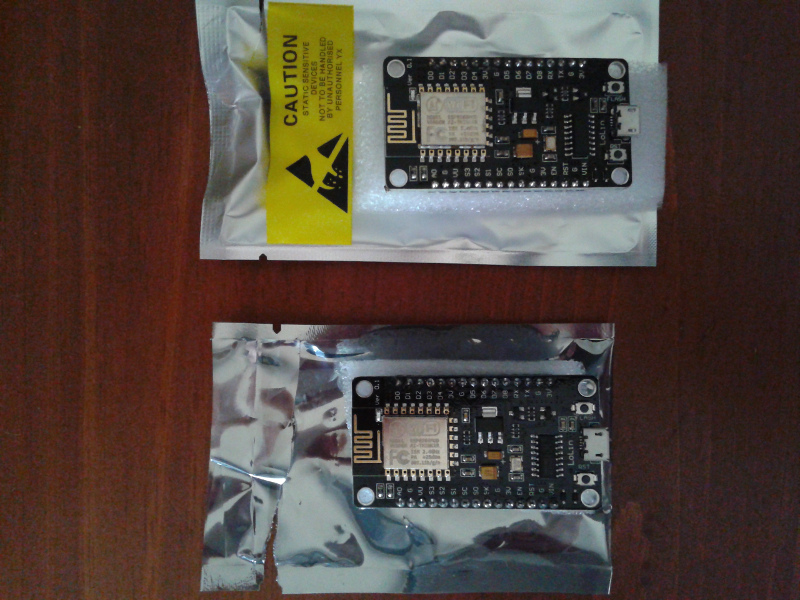
- Top-Works_Bottom-NoWorkie.jpg (248.47 KiB) Viewed 799 times
Serial.println(String(ESP.getFlashChipId(), HEX));
Serial.println(String(ESP.getFlashChipId(), HEX));
My modules finally came today
I’ve only tried 2 of the 3 but I can only get them to upload if I select NodeMCU as the board type.
I’ll need to take a look at boards.txt in the esp8266 core to see what this board type actually does.
Because unless its a quirk of using the CH340G, I can’t see why I should not be able to upload as a generic board.
Once I upload as NodeMCU the code seems to run OK. (but I’ve only had time to take a cursory look)
I’ve only tried 2 of the 3 but I can only get them to upload if I select NodeMCU as the board type.
I’ll need to take a look at boards.txt in the esp8266 core to see what this board type actually does.
Because unless its a quirk of using the CH340G, I can’t see why I should not be able to upload as a generic board.
Once I upload as NodeMCU the code seems to run OK. (but I’ve only had time to take a cursory look)
I didn’t realize there was a menu to select the Reset method.
I’ll change it and see if the upload works.
Edit
Thanks
Changing the reset method seems to fix it!
I plan to do a educational board using the NodeMCU and those commonly used 2.2″ TFT ILI9341 ..
After getting the modified ESP8266 ILI9341 library from https://github.com/InsanityMoose/ILI9341_ESP8266
Changed the DC and CS pins and it uploaded and running … BUT …. it crashes with a “Soft WDT reset” like this URL below…
http://www.nihamkin.com/2016/03/04/conn … t-display/
I tried to disable WDT, change WDT timeout longer than 1 sec or runs on 160Mhz instead of 80Mhz … nothing seems to work… still does a Soft WDT reset all the time …
To rule out a faulty flash/memory, I loaded the same to a WeMos D1 mini ( only US$4.00 ) … same crashes/resets …
http://www.aliexpress.com/item/D1-mini- … 01036.html
My questions, is this board/IC doing TOO MUCH to drive a wifi in the background and driving a SPI TFT in the foreground ??
Doing simple wifi client requests with simple display of TFT.print() seems to work fine without any crashes…
Doing simple wifi client requests with simple display of TFT.print() seems to work fine without any crashes…
You have a loop somewhere that’s taking too much time. Go through your sketch and add calls to
CODE: SELECT ALL
yield();
in there and you’ll see the issue go away.
Thanks… will read up on yield() n try it out …
I am loading BMP-files from an SD-card and showing them on the display, then I run the benchmark, and it’s all about using yield() at appropriate times, like e.g. when loading a BMP-file to the display — it takes so long that it’d trigger the watchdog many times over, so I had to add calls to yield() in the loop.
Thanks!!!
I just received my NodeMCU V3 board.
I can see the WIFi AP AI-Thinker…
Now, there are 1001 sites on the net about how to start, but all of them start with flashing.
But…
I DON’T want to flash!
I just simply want to toggle a pin, over a serial command, or WiFi AP, or LUA script.
How can I do this the easiest/fastest way without flashing the board?
How can I connect to web IF via WiFi AP? Over which IP address?
Any quick hint is highly appreciated.
EDIT
The serial (USB-SERIAL CH340) port (COM4) is only enumerated under hidden USB devices by win10.
An additional USB-serial adapter is connected to Rx-Tx.
Attached is the non-sense data I receive at startup at 115k2.
<…>
But…
I DON’T want to flash!
<…>
If you wish to keep Lua firmware you can still do a backup of it using esptool, play a bit with Arduino, and if you’re not satisfied, you can put back the Lua firmware in it.
However, the module does not show anything on the allocated IP address, “Problem loading page”, “Unable to connect”.
And the module is only responding to AT commands, the NodeMCU commands are all replied with “ERROR”.
AT+CIFSR

+CIFSR:APIP,"192.168.4.1"

+CIFSR:APMAC,"5e:cf:7f:1b:72:13"

+CIFSR:STAIP,"192.168.100.72"

+CIFSR:STAMAC,"5c:cf:7f:1b:72:13"

OK

AT+CIPSERVER=1,80

ERROR

AT+CIPSTATUS

STATUS:2

OK

AT+CIPSTO?

+CIPSTO:180

OK

print(node.chipid())

ERROR

print(node.heap())

ERROR

import network;nic = network.WLAN(network.STA_IF);nic.scan()

ERROR

tmr.stop(0)

ERROR
And the module is only responding to AT commands, the NodeMCU commands are all replied with “ERROR”.
thank you for the many precious hints, I managed to flash a NodeMCU with a cloud-build firmware (with ESP flasher).
Now I can see “Hello world!” from init.lua over the serial connection

And I could set up a simple HTTP server…
But most important and difficult thing, I managed to toggle a pin!
That’s all I wanted and now I am very happy
I guess I should look at Lua againa, but I thought the Lua on the ESP8266 was buggy, so I stuck with using the Arduino IDE, as there is a massive community behind the Arduino core