
[…] /home/xxx/Arduino/hardware/Arduino_STM32/tools/linux/stlink_upload ttyUSB0 {upload.altID} {upload.usbID} /tmp/arduino_build_430462/Blink.ino.bin
/home/xxx/Arduino/hardware/Arduino_STM32/tools/linux/stlink/st-flash: error while loading shared libraries: libusb-1.0.so.0: cannot open shared object file: No such file or directory
$ locate libusb-1.0.so.0
/lib/x86_64-linux-gnu/libusb-1.0.so.0
/lib/x86_64-linux-gnu/libusb-1.0.so.0.1.0
?
Don’t see anything about this… How can I add folders to INClude? Is that what is wrong?
What is additionally strange is that the path above is for …/tools/linux/… and not …/tools/linux64/… So I ran the install.sh in the linux (32) directory, but no difference.
Linux wopr 4.4.0-104-generic #127-Ubuntu SMP Mon Dec 11 12:16:42 UTC 2017 x86_64 x86_64 x86_64 GNU/Linux
Arduino IDE 1.8.5
Install works for ATMel
ST Link v2
STM32F103C8T6 blue pill…
Any thoughts?
TIA!
I got upload (compile always worked) to get past the above error with one command:
xxx@wopr:~$ sudo apt install libusb-1.0.0:i386
Reading package lists... Done

Building dependency tree

Reading state information... Done

Note, selecting 'libusb-1.0-0:i386' for regex 'libusb-1.0.0'

Note, selecting 'libusb-1.0-0-dbg:i386' for regex 'libusb-1.0.0'

Note, selecting 'libusb-1.0-0-dev:i386' for regex 'libusb-1.0.0'

The following additional packages will be installed:

libudev1:i386

Recommended packages:

libusb-1.0-doc:i386

The following NEW packages will be installed:

libudev1:i386 libusb-1.0-0:i386 libusb-1.0-0-dbg:i386 libusb-1.0-0-dev:i386

0 upgraded, 4 newly installed, 0 to remove and 0 not upgraded.

Need to get 246 kB of archives.

After this operation, 690 kB of additional disk space will be used.

Do you want to continue? [Y/n]
Get:1 http://us.archive.ubuntu.com/ubuntu xenial-updates/main i386 libudev1 i386 229-4ubuntu21 [57.8 kB]
Get:2 http://us.archive.ubuntu.com/ubuntu xenial/main i386 libusb-1.0-0 i386 2:1.0.20-1 [46.0 kB]
Get:3 http://us.archive.ubuntu.com/ubuntu xenial/main i386 libusb-1.0-0-dev i386 2:1.0.20-1 [60.1 kB]
Get:4 http://us.archive.ubuntu.com/ubuntu xenial/main i386 libusb-1.0-0-dbg i386 2:1.0.20-1 [82.5 kB]
Fetched 246 kB in 0s (1,290 kB/s)

Selecting previously unselected package libudev1:i386.

(Reading database ... 446321 files and directories currently installed.)

Preparing to unpack .../libudev1_229-4ubuntu21_i386.deb ...

Unpacking libudev1:i386 (229-4ubuntu21) ...

Selecting previously unselected package libusb-1.0-0:i386.

Preparing to unpack .../libusb-1.0-0_2%3a1.0.20-1_i386.deb ...

Unpacking libusb-1.0-0:i386 (2:1.0.20-1) ...

Selecting previously unselected package libusb-1.0-0-dev:i386.

Preparing to unpack .../libusb-1.0-0-dev_2%3a1.0.20-1_i386.deb ...

Unpacking libusb-1.0-0-dev:i386 (2:1.0.20-1) ...

Selecting previously unselected package libusb-1.0-0-dbg:i386.

Preparing to unpack .../libusb-1.0-0-dbg_2%3a1.0.20-1_i386.deb ...

Unpacking libusb-1.0-0-dbg:i386 (2:1.0.20-1) ...

Processing triggers for libc-bin (2.23-0ubuntu9) ...

Setting up libudev1:i386 (229-4ubuntu21) ...

Setting up libusb-1.0-0:i386 (2:1.0.20-1) ...

Setting up libusb-1.0-0-dev:i386 (2:1.0.20-1) ...

Setting up libusb-1.0-0-dbg:i386 (2:1.0.20-1) ...

Processing triggers for libc-bin (2.23-0ubuntu9) ...

xxx@wopr:~$
Sketch working after a RESET?
If so, please add [SOLVED] prefix to title. (by editing the 1st post)
Ray
What is Lorem Ipsum?
Lorem Ipsum is simply dummy text of the printing and typesetting industry. Lorem Ipsum has been the industry’s standard dummy text ever since the 1500s, when an unknown printer took a galley of type and scrambled it to make a type specimen book. It has survived not only five centuries, but also the leap into electronic typesetting, remaining essentially unchanged. It was popularised in the 1960s with the release of Letraset sheets containing Lorem Ipsum passages, and more recently with desktop publishing software like Aldus PageMaker including versions of Lorem Ipsum.

[mrburnette – Wed Dec 27, 2017 5:21 pm] –
13/13 pages written2017-12-26T18:00:37 INFO src/stlink-common.c: Flash written and verified! jolly good!Sketch working after a RESET?
If so, please add [SOLVED] prefix to title. (by editing the 1st post)
Ray
so why is it now working ?
1. you’ve managed to incorporate i386 architecture, so the files in tools/linux are now quite happy
2. you’ve copied the 64bit files from tools/linux64 to tools/linux
1 is the most likely given the copious amounts of i386 in the listing
seriously try running file * in each of the tools/linux* directories and post
mine have
stephen@i71:~/sketchbook/hardware/Arduino_STM32/tools$ file linux/*

linux/45-maple.rules:      ASCII text

linux/49-stlinkv1.rules:   ASCII text

linux/49-stlinkv2-1.rules: ASCII text

linux/49-stlinkv2.rules:   ASCII text

linux/dfu-util:            directory

linux/install.sh:          POSIX shell script, ASCII text executable

linux/jlink_upload:        Bourne-Again shell script, ASCII text executable

linux/maple_upload:        Bourne-Again shell script, ASCII text executable

linux/readme.txt:          ASCII text, with no line terminators

linux/serial_upload:       Bourne-Again shell script, ASCII text executable

linux/src:                 directory

linux/stlink:              directory

linux/stlink_upload:       Bourne-Again shell script, ASCII text executable

linux/stm32flash:          directory

linux/upload-reset:        ELF 32-bit LSB executable, Intel 80386, version 1 (SYSV), dynamically linked, interpreter /lib/ld-linux.so.2, for GNU/Linux 2.6.24, BuildID[sha1]=dc8dc5ad6de94179a9d534b1a34aeb6d906640b1, not stripped

linux/upload_router:       Bourne-Again shell script, ASCII text executable

stephen@i71:~/sketchbook/hardware/Arduino_STM32/tools$ file linux64/*

linux64/45-maple.rules:      ASCII text

linux64/49-stlinkv1.rules:   ASCII text

linux64/49-stlinkv2-1.rules: ASCII text

linux64/49-stlinkv2.rules:   ASCII text

linux64/dfu-util:            directory

linux64/install.sh:          POSIX shell script, ASCII text executable

linux64/maple_upload:        Bourne-Again shell script, ASCII text executable

linux64/readme.txt:          ASCII text, with no line terminators

linux64/serial_upload:       Bourne-Again shell script, ASCII text executable

linux64/src:                 directory

linux64/stlink:              directory

linux64/stlink_upload:       Bourne-Again shell script, ASCII text executable

linux64/stm32flash:          directory

linux64/upload-reset:        ELF 32-bit LSB executable, Intel 80386, version 1 (SYSV), dynamically linked, interpreter /lib/ld-linux.so.2, for GNU/Linux 2.6.24, BuildID[sha1]=dc8dc5ad6de94179a9d534b1a34aeb6d906640b1, not stripped

linux64/upload_router:       Bourne-Again shell script, ASCII text executable
xxx@wopr:~/Arduino/hardware/Arduino_STM32/tools$ file linux/*

linux/45-maple.rules:      ASCII text

linux/49-stlinkv1.rules:   ASCII text

linux/49-stlinkv2-1.rules: ASCII text

linux/49-stlinkv2.rules:   ASCII text

linux/dfu-util:            directory

linux/install.sh:          POSIX shell script, ASCII text executable

linux/jlink_upload:        Bourne-Again shell script, ASCII text executable

linux/maple_upload:        Bourne-Again shell script, ASCII text executable

linux/readme.txt:          ASCII text, with no line terminators

linux/serial_upload:       Bourne-Again shell script, ASCII text executable

linux/src:                 directory

linux/stlink:              directory

linux/stlink_upload:       Bourne-Again shell script, ASCII text executable

linux/stm32flash:          directory

linux/upload-reset:        ELF 32-bit LSB executable, Intel 80386, version 1 (SYSV), dynamically linked, interpreter /lib/ld-linux.so.2, for GNU/Linux 2.6.24, BuildID[sha1]=dc8dc5ad6de94179a9d534b1a34aeb6d906640b1, not stripped

linux/upload_router:       Bourne-Again shell script, ASCII text executable
xxx@wopr:~/Arduino/hardware/Arduino_STM32/tools$ file linux64/*
linux64/45-maple.rules: ASCII text
linux64/49-stlinkv1.rules: ASCII text
linux64/49-stlinkv2-1.rules: ASCII text
linux64/49-stlinkv2.rules: ASCII text
linux64/dfu-util: directory
linux64/install.sh: POSIX shell script, ASCII text executable
linux64/maple_upload: Bourne-Again shell script, ASCII text executable
linux64/readme.txt: ASCII text, with no line terminators
linux64/serial_upload: Bourne-Again shell script, ASCII text executable
linux64/src: directory
linux64/stlink: directory
linux64/stlink_upload: Bourne-Again shell script, ASCII text executable
linux64/stm32flash: directory
linux64/upload-reset: ELF 32-bit LSB executable, Intel 80386, version 1 (SYSV), dynamically linked, interpreter /lib/ld-linux.so.2, for GNU/Linux 2.6.24, BuildID[sha1]=dc8dc5ad6de94179a9d534b1a34aeb6d906640b1, not stripped
linux64/upload_router: Bourne-Again shell script, ASCII text executable
xxx@wopr:~/Arduino/hardware/Arduino_STM32/tools$

what you can do though is compile the sources for yourself, if only as a learning exercise, we all go through it 
my first kernel compile took 3.5hrs on an i386sx16 overclocked to 20MHz. 1994’ish
worse is that i was on the phone long distance in the UK for it for guidance.
last time was under 5mins and the code was orders of magnitudes larger, funny how it turns out!
and that’s a decade ago. 
i get the feeling you’re running a linux system, which one btw ?
if it’s debian originated, there is plenty of help/howto’s etc available; similarly if it’s derived from redhat etc, others arch, mandrivia etc unknown.
it’s a case of read and adapt, i don’t think any help is totally distribution agnostic, they all need to be interpreted in some way. the trick is to spot how to massage them.
when i was at uni many decades node, i once took 6 books on theoretical mechanics out of the library looking to understand Coriolis forces, i read the 5th one on the topic & it just clicked.
one thing i understood was that it’s how to find the info and or direction to look is what you learn at uni.
some one, some where, might just have written about it
stephen
my first kernel compile took 3.5hrs on an i386sx16 overclocked to 20MHz. 1994’ish
I can’t decide if being old these days give me street cred, or sheepish embarrassment!
<nostalgiaMode>
I remember only compiling src & kernels! I came to Amiga, Tom Dell’s Waffle, uucico, dial-up *gasp!*, fidonet/netmail (paying for analog calls to haul news/mail!), and a host of BBS’ from the bench electronics world (civilian & usn as NavET). I remember spending hours modifying fossil drivers! Now, I help businesses with IT in a MSP role-where the most technical user knows how to repower a closet via power strip!
When programs were small, computers were slow, and transfer mediums (telco, isdn, T1/3, DS1, fiber, etc.) were slow. As time went on, all 3 of these aspects were (and are) in constant battle with each other. And don’t even get me started on storage (RAM/HDD, etc.) costs!  How many out there cannot bring themselves to throw out some ancient/outdated thing that you remember paying serious coin for? My CRAY modems & “hard drives”? Nope. My $100/Mb “video RAM”? Never! My first Amiga HDD-80Mb for $1,000? Bury me with it!
I was a slackware fanatic, as it was so easy to compile on. Nowadays, though, I came back to electronics absolutely astonished at how user-friendly it has become. Sure, there are the ‘camps’, but a regular person just needs interest to be a dang good developer, as all the resources out there are free, thoughtful and informative. And let’s face it, there are a lot of ‘hobbies’ more expensive.
Before I get off the ‘old timer’ wagon, I do reflect on the reality of the counterposition (or better yet, juxtaposition) of ease of learning with indifference in youth. How can an o-scope and physical computing be of interest to today’s adolescent thumb-jockeys? Living in an instant gratification world is already proving to have… consequences.
Arduino is a worthwhile cause, therefore, if only to make modern, young minds not only imagine, but also mentally scaffold what making it real would look like. My personal thanks to everyone, at any level, that keeps that kind of thinking-and the enthusiasm it fuels-accessible.
</nostalgiaMode>
Wasn’t someone supposed to be playing the national anthem behind this?
dual 3.5″ hard floppy disk drives £750 circa 1980
wire wrap backplanes, blowing away shorts with 5v 100A psu
bigger than s100 sized pcb’s with 4116’s cheek by jowel, trading in 16k sets for other devices, optical paper tape reader, paper tape punch,, teletype, 8″ floppys
modifying nascom floppy disk control board to read 8″ disks, adding chips on their backs, resetting the chip to change clock frequency, synchronising the clock edge to switch 1MHz to 2MHz. oh btw it’s not in the 1771spec, actually a no-no hence the reset.
generating double ended wiring schedules for my board adapters for work.
writing isa/pci linux device drivers
bending large lumps of metal in RT, waggling wings off aircraft, an official installation of linux on the intra-net
tangerine microtan 6502, nascom3 z80 asm, bbc micro, macro11, c, c++, ada, perl5, assorted other bits specific to task
and that’s only a part of the fun i’ve had in 40+yrs
oh yes, never addressed anyone as sir, a few misters though when being insulting
stephen
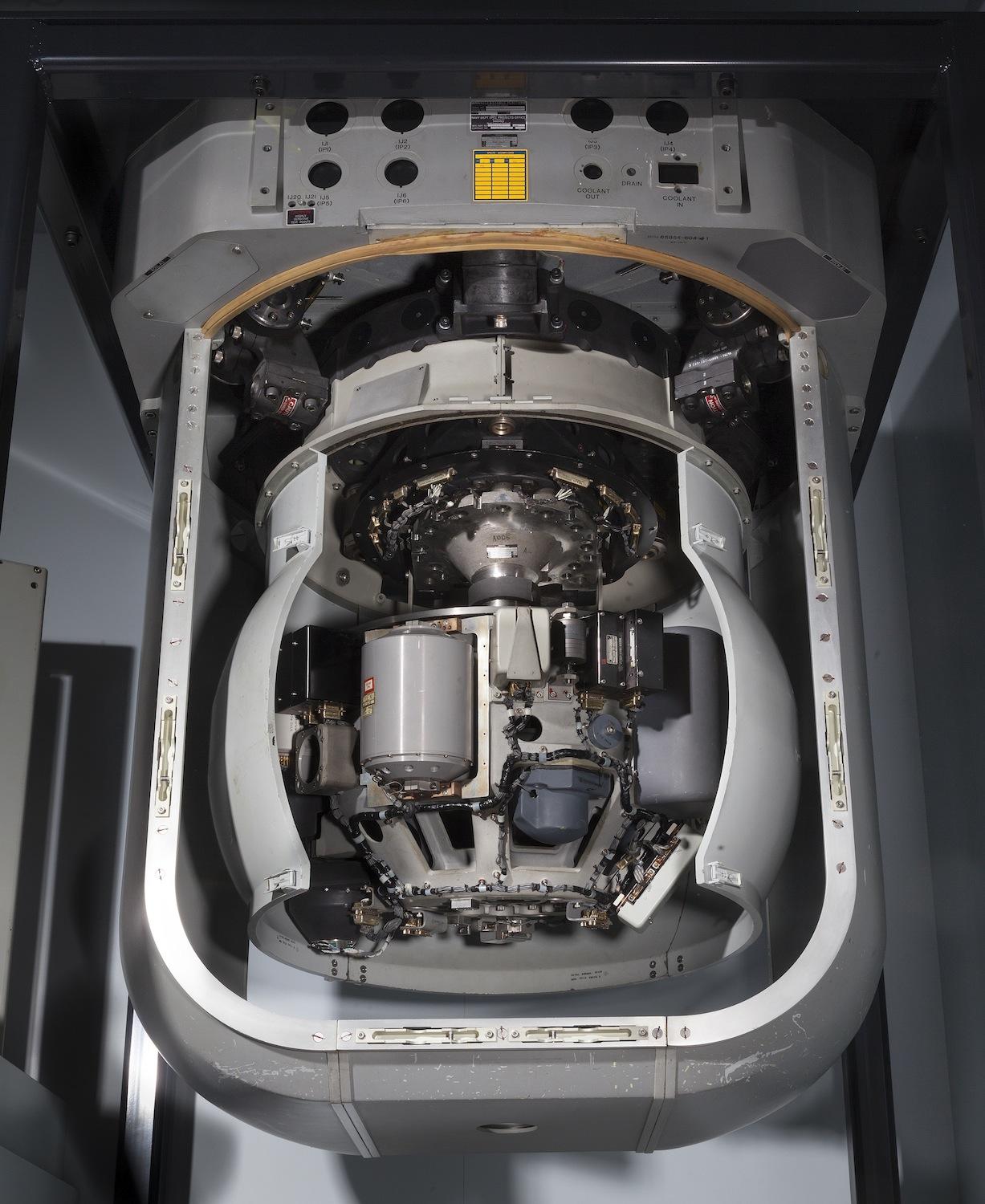
Yeah, if only the folks back home knew the nukes we had on board were launched with coordinates calculated by an 80Mb beryllium “coated” hard drive that was loaded (programs) with these funky cardboard boxes that had ‘fan fold’ black ‘tape’ (paper) with holes in it. Splicing was a dream, though! I wonder if I could find a pic of one of these ‘boxes’ we used to load the SINS with… Well, I can’t seem to find a shot of the tape boxes or the SINS computer, but the business end of it was this (pre-ESGM, mind you):
So… we’re officially off-topic now, right? 🙂


