I’d like to set up my generic blue pill clone to act as a USB HID keyboard. I’ve followed the installation instructions at https://github.com/rogerclarkmelbourne/ … stallation , flashed the bootloader with the ‘hello world’ message over serial, and got the ‘blink’ example code to upload over USB too. it’s working. However, I can’t get any HID keyboard code working. ‘simplekeyboard’ in the ‘examples for generic STM32F103C series’ example sketches uploads, but doesn’t seem to do anything – the board still shows up in USBTreeViewer as ‘COM10 Maple Mini’, other suggestions I’ve found around the forum fail to compile due to not being able to find the libraries/me not being able to install the libraries properly.
Can anyone help? I’ve done a little bit of 8-bit AVR programming in Arduino before, and some python and other interpreted languages, but I’m lost when it comes to makefiles and what seems to be a whole different ball game when using libraries for the STM32.
Andy.
USB HID / MIDI / Mass Storage as a library
viewtopic.php?f=13&p=43847#p43847
my guess is take some 74hc595 + 74hc165 it may be possible to put together a 64 keys keyboard and 2 of 74hc595 + 1 of 74hc165 you may be able to stretch it to 128 keys
the trouble is with super cheap 100 keys keyboards going for as little as us $10-20 these days, it may be simply too convenient compared to making a keyboard oneself

oh i figured out something, yup there is still an incentive to build a ‘bluepill keyboard’, the entire keyboard become fully ‘programmable’
https://youtu.be/xFs2aE1NKEg
once you have a bluepill sitting between the ‘dumb’ keys and the usb port, the stm32 can remap any keys and do all sorts of tricks like single key macros and even all sorts of automation, e.g. double up as both a mouse & keyboard
my guess is that it can even do go the extreme of key automations like remember a whole sequence of key presses and mouse clicks and play them to the computer
There are so many things you can plug in, to Windoze XXX (substitute value greater than six and less than 95) that don’t have valid drivers, but could be made to work, if you pretend they are a keyboard. HID keyboard emulation is the answer to pretty much everything that Windoze doesn’t want to talk to (which is pretty much everything made before 2012).
However this doesn’t answer the OP’s question.. does it actually work? Since I am the best part of 4,500 miles from any of my STM32 boards, I’m going to have to let someone else answer that.
You don’t need shift register chips to scan a large amount of keys – connect the keys via rows and columns and you can already read 64 keys with 8+8 pins.
The forum thread about arpruss’ USB library (referenced by ag123 above) is the right place to start.
My prototype is still using libarra’s core but I’m going to switch to arpruss’ lib now that it’s included in Roger’s core.
Edit: take a look here, especially the README and the examples folder: https://github.com/rogerclarkmelbourne/ … BComposite .
The Pro Micro is very cheap on AliExpress as well, but it does not have enough IOs for a full-size keyboard. It’s often used in ‘half” (split) keyboards, numeric pads, or downsized keyboards (e.g. lacking numeric pad and/or F-keys).
The Teensy boards on the other are (relatively) expensive.
I think keyboard manufacturers would be very wise to offer reprogrammability — firmware like the QMK project has lots of interesting features that they could offer for free. https://github.com/qmk/qmk_firmware/
The problem with current mass-market keyboards is that they don’t have a bootloader nor exposed programming pins.
https://kotaku.com/how-to-build-your-ow … 1797070430
for sure it turns out very pricy vs the today’s internally silicone membrane style keyboards
then following the clues i did some searches on aliexpress
and run into things like
https://www.aliexpress.com/w/wholesale- … d-pcb.html
^^ has various diy keyboard pcbs for gateron / cherry switches, but the controllers aren’t stm32, didn’t seem to find any !
https://www.aliexpress.com/wholesale?Se … rry+switch
^^ the keyboard switches
https://www.aliexpress.com/wholesale?Se … ps+gateron
then the keycaps – apparently this turns up some keyboard switches as well
and some pretty good clues stumbled upon while googling
https://www.reddit.com/r/MechanicalKeyb … b/cs9hnzx/
https://deskthority.net/workshop-f7/bro … t6050.html
i’m wondering if it may be easier / cheaper to hack an existing keyboard and pull wires to the bluepill/maple mini headers
https://media.digikey.com/pdf/Data%20Sh … S-3050.pdf
so it become a 3 in 1 or even many in 1 device (keyboard, usb-mass storage, mouse)

[ag123 – Sat Apr 28, 2018 5:54 pm] –
come to think of it blue pill / maple mini (stm32f103) is an *ideal* keyboard controller,
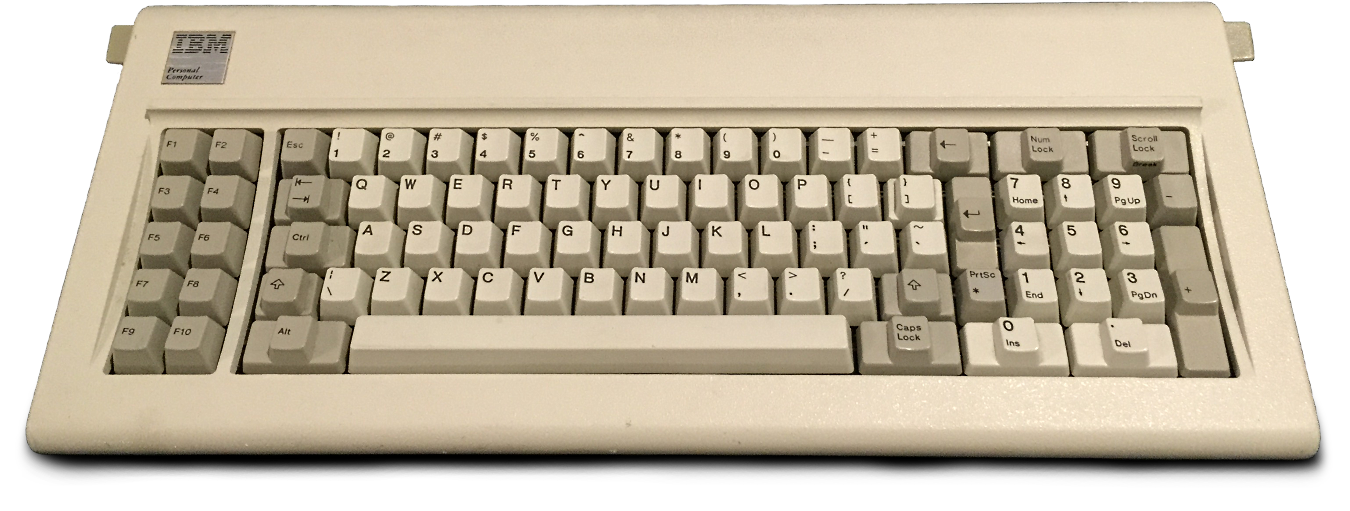
I agree, but combined with one of the best keyboards ever made (I really still missing it):
https://hackadaycom.files.wordpress.com … l_f_xt.png
One obvious oddity is that it continues to show up as ‘maple serial’ even though the example code I used is supposed to not do that. A fix that has been suggested is to delete all knowledge of ‘maple serial’ from Windows and hope when it autodetects again that it gets it right. I haven’t tried that yet though.
The physical keyboard is already made – I’m using the keyboard and membrane from a Cherry MY series ex cash-register type keyboard that uses to have a built-in magnetic stripe card reader. I’ve gutted it, extended the sides up to give more room for a raspberry pi, soundcard, and dc-dc power supply converter. I’m going to put a few knobs and a hd44780 screen in the top, and a couple of MIDI sockets in the back, and it’ll eventually be some sort of programmable musical instrument.
I killed the keyboard controller PCB by accident though, hence the need for a replacement. It’s a 19×8 matrix, and the arduino pro micro doesn’t have enough pins, and my bit of prototype PCB with shift registers on it was looking a mess. So I thought I’d try this.
Thanks for the replies so far. They have been helpful!
Andy.
[taxibunny – Mon Apr 30, 2018 10:32 pm] –
I think the HID library is working, sortof. it’s just that Windows won’t pick it up, on either of my laptops. Some generic error, apparently. Wasn’t much help. The HID storage *is* picked up by something, as it gives the ‘can’t boot from this disk, please try another one’ type message. Next step, I suppose, is to install Linux on a USB stick, and see what that makes of it. Either that or dig around the forums again to see if I can get it working 100%.One obvious oddity is that it continues to show up as ‘maple serial’ even though the example code I used is supposed to not do that. A fix that has been suggested is to delete all knowledge of ‘maple serial’ from Windows and hope when it autodetects again that it gets it right. I haven’t tried that yet though.
Andy.
Hm. I also played with USB HID (more MIDI stuff) in the past and I went to eliminate the bootloader (the bootloader does “Serial.begin()” for the “magic sequence”!) and I only used a ST-Link for uploading getting rid of any unwanted maple-serial stuff. Maybe a simple
Serial.end();
You might try changing the product ID if you’re having trouble getting the keyboard recognized. Just call USBComposite.setProductId() before calling the other setup functions.
[arpruss – Wed May 02, 2018 1:50 am] –
Does the SimpleKeyboard example work?You might try changing the product ID if you’re having trouble getting the keyboard recognized. Just call USBComposite.setProductId() before calling the other setup functions.
Well, following this suggestion, and the ‘serial.end()’ suggestion, things have maybe improved. It’s still not working, but there are less errors reported in USB Device Tree Viewer. I did your thing setProductId() and put a USB keyboard product ID hex value in that I got from this page: https://github.com/obdev/v-usb/blob/mas … r-free.txt . I also added a line to set vendor ID, just in case. I guess at this point I’ll post the code. It’s the SimpleKeyboard example, with the suggested tweaks:
#include <USBComposite.h>
void setup() {
Serial.end();
USBComposite.setProductId(0x27db);
USBComposite.setVendorId(0x16c0);
USBHID_begin_with_serial(HID_KEYBOARD);
Keyboard.begin(); // useful to detect host capslock state and LEDs
delay(1000);
}
void loop() {
Keyboard.println("Hello world");
delay(10000);
}
Will now reflash the bootloader.
I removed the line Serial.end(), but no change.
Next, I ran Zadig 2.3 winUSB driver installer, creating a new device with the product and vendor ID from the sketch, and gave it the name ‘teensy keyboard’ (which is what the IDs correspond to, I found). I don’t actually think that this helped, I’m just including this info for completeness.
What seemed to do the trick was uninstalling the serial device and deleting drivers, as per this thread from the forum: viewtopic.php?f=13&t=576&start=160&hili … d+keyboard , specifically the part “
To enable the HID device, I removed and deleted the serial driver and then scanned for hardware changes —
in which case the HID keyboard appeared (1EAF 0004 MI_02 Col02).” – though in my case, it shows up in the device manager as ‘USB input device’ in the ‘human interface devices’ section, and ‘USB composite device (COM10)’ in the ‘Ports (COM & LPT)’ section, which seems to mean it’s fully working, although I haven’t tried the serial over USB yet. Uploading the plain unmodified simplekeyboard example sketch without the added product ID/vendor ID works too.
Thanks, arpruss, I see it is your library that I’m using, that you’ve put a lot of work into. I’m very grateful for that and for your input in this thread. Time to mark this one as [SOLVED]
TL;DR for others: Try removing and deleting the serial driver, then resetting the board and letting windows autodetect again, as previously discussed in another thread.
I can confirm that given the above installation, CompositeSerial works fine together with USB HID keyboard.
[taxibunny – Wed May 02, 2018 9:50 pm] –
Thanks, arpruss, I see it is your library that I’m using, that you’ve put a lot of work into. I’m very grateful for that and for your input in this thread.
I second that — very grateful for your (and roger’s, and stevestrong’s, and…) contributions!
See: https://www.ebay.ca/itm/141977600303
There’s a very robust USB library for that chip. So, unless you need the STM32 functionality for something in particular, there’s not much point re-inventing the wheel… 

2 relevant links:
https://www.reddit.com/r/MechanicalKeyb … b/cs9hnzx/
So you want to build a custom keyboard? It’s both easier and harder than you think.
- Use swill’s KB plate builder to get a DXF for your plate
- Open the DXF in a CAD tool, save units as MM
- Send the DXF to bigbluesaw, wait a couple weeks for your plate to get here << my thoughts are you could approach any shops in your city with laser cutting services
- Follow the brownfox guide u/rjmana linked to.
The switches you have will work fine unmodified. PCB mount switches can be used everywhere a plate mount switch can no problem.
https://deskthority.net/workshop-f7/bro … t6050.html
on aliexpress searches for cherry mx and gateron turns things as such up
https://www.aliexpress.com/item/87Pcs-K … 36743.html
and as we define its role over usb, it is much more than a keyboard, literally doubling up as any other usb device
(keyboard + oscilloscope? why not)
i’m thinking however using shift registers 74hc595, 74hc165 would still be useful as that would save lots of pins on the bp / mm leaving those pins available for other purposes
[STMdude – Fri May 04, 2018 4:48 pm] –
To be brutally honest, the Arduino “Leonardo/Micro” clones and mini-boards that use the ATmega 32U4 do exactly what you want, and can be had for peanuts!
They’re about $2 more than the STM32 units. That makes a difference over several projects. There are projects where I wouldn’t think spending $4 is worth it, but $2 is OK.
There’s a very robust USB library for that chip.
My USBComposite library is getting robust, too. You should be able to do things like a monster HID Keyboard+Mouse+2 Gamepads device, and you might even be able to throw a mass storage device into this mix. For games on my PC, I regularly use a black-pill based box that emulates keyboard / mouse / joystick / two joysticks / xbox360 in multiple modes and lets me use some combinations of a Wii Nunchuk, GameCube controller, dance pad and/or exercise machine with a PC.
[arpruss – Sun May 06, 2018 2:06 pm] –[STMdude – Fri May 04, 2018 4:48 pm] –
To be brutally honest, the Arduino “Leonardo/Micro” clones and mini-boards that use the ATmega 32U4 do exactly what you want, and can be had for peanuts!They’re about $2 more than the STM32 units. That makes a difference over several projects. There are projects where I wouldn’t think spending $4 is worth it, but $2 is OK.
There’s a very robust USB library for that chip.
My USBComposite library is getting robust, too. You should be able to do things like a monster HID Keyboard+Mouse+2 Gamepads device, and you might even be able to throw a mass storage device into this mix. For games on my PC, I regularly use a black-pill based box that emulates keyboard / mouse / joystick / two joysticks / xbox360 in multiple modes and lets me use some combinations of a Wii Nunchuk, GameCube controller, dance pad and/or exercise machine with a PC.
+1
I think, just because an older board can do the job, it should not mean we don’t bother to develop a newer and eventually better system.
[ag123 – Sat May 05, 2018 5:29 am] –
i’m thinking however using shift registers 74hc595, 74hc165 would still be useful as that would save lots of pins on the bp / mm leaving those pins available for other purposes
You can combine the input and output pins on a single chip by using an I2C GPIO IC. These even have integrated pull-up resistors which the shift registers don’t have.
E.g. PCF8575 is available an AliExpress as a breakout board.
Or SX1509 which even can do the matrix scanning for you.
Special-purpose keypad controllers with more than 16 IOs exist as well, e.g. LM8330 – but these are not breadboard-friendly nor easy to solder manually.
[florisla – Mon May 07, 2018 7:01 am] –
You can combine the input and output pins on a single chip by using an I2C GPIO IC. These even have integrated pull-up resistors which the shift registers don’t have.E.g. PCF8575 is available an AliExpress as a breakout board.
Or SX1509 which even can do the matrix scanning for you.
Special-purpose keypad controllers with more than 16 IOs exist as well, e.g. LM8330 – but these are not breadboard-friendly nor easy to solder manually.
this thread is pretty motivating in the sense that i used to think making an own custom keyboard is ‘impossible’, but the availability of keyboard switches being separately sold as retail items and lots of info from around the web (e.g. as like few post above) and stm32duino (etc) has made all these a reality, i’m thinking this thread could be moved eventually under ‘projects’ as stm32duino keyboards may grow out of it
i’ve some pieces of PCF8575 but i tend to use them for keypads as it takes a single chip to run a 4×4 keypad vs the shift registers. However, if one decides to do a 104-110 keys keyboard (you can never have enough keys, and keys are always in the ‘wrong’ places ) the incentive completely change and shift registers make sense as each of 74hc595 and 74hc165 address 8 pins, hence 2x74hc595 + 74hc165 makes for a 16 x 8 ~ 128 keys keyboard matrix and they are cheap too
i’d imagine throw more 74hc595 at it you could even run the rgb leds independently
and using shift registers and or io expander or ‘helper’ ICs would save lots of pins on a blue pill / maple mini, those pins can be pulled out to headers say at the keyboard enclosure so that additional uses such as sd cards and /or even usb-serial/spi/ic2c/adc can be made from a single ‘keyboard’, literally making it a ‘multi-use’ device

imgur url: https://imgur.com/9ti3rtB
actually i’d only need 2x74hc595 + 74hc165, but i’m not sure how difficult it may be to handwire a keyboard so that it fits 16 x 8 matrix
normally keyboards has about 5-6 rows of keys, throwing in an extra 74hc595 may make it easier to handwire the keyboard, in effect i’m ‘wasting’ 2 pins on the 74hc165 and wasting a few pins on the 3rd 74hc595
It’s worth it if you’re designing a pcb, but for handwiring it’s definitely better to stick to ‘columns are vertical, rows are horizontal’.
That also allows good build quality (nice looking and sturdy) like here https://geekhack.org/index.php?topic=87689.0 .
making a custom keyboard has various (difficult) challenges not related to electronics (even for that matter stm32), among them is making the plate which has lots of considerations as the snap-in groove that cherry mx (and clones) switches allows is only 1.5mm, this give a big problem if one intends to use thick (3-5mm) acrylic plates rather than aluminium plates, then there is handwire vs pcb etc. i’d most likely start a thread on deskority forum for the fabrication parts of it and make a ref-link from here (perhaps cross posting the most interesting parts of it here if it help to complete the picture)
there is apparently quite a lot of interest in making (custom) mechanical keyboards, one of those switches i’ve recently found on aliexpress is from kailh ( a manufacturer based in china)
https://www.aliexpress.com/wholesale?Se … ilh+switch
https://www.aliexpress.com/item/kbdfans … 79716.html
http://www.kailh.com/en/Products/Ks/BOXS/
http://www.kailhswitch.com/mechanical-k … -switches/
there are various youtube videos featuring them, searching for kailh would find them
i noted that recently after checking the prices, the prices actually went up on aliexpress. i’d guess this in part due to demand from buyers wanting to make custom keyboards and based on my google searches, quite a number of commercially sold mechanical keyboards uses kailh switches, i’d guess the parallel demand chased up prices
i think in the early days keyboards is simply ‘a bunch of switches’, the electronics are probably some ‘simple’ logics rather than mcu driven. since the advent of mcus, usb and hid use in keyboards. it become pretty much a necessity to use mcus as keyboards shift to using usb. the good thing is hid is merely a usb protocol and now with better mcus like stm32 f1xx,f4xx, the mcu (stm32) makes that keyboard more than simply a ‘keyboard’
the other thing is with this notion of custom (mechanical) keyboards, keyboard layouts become ‘fluid’, one can re-arrange all the keys to one’s desire e.g. if 1 dislike a qwerty keyboard one could have them lined a-z instead. the trouble is that the moment one makes a detour away from ‘standard’ keyboards, all the pcb kits that one can find to build ‘custom’ mechanical keyboards simply ‘disappear’, u’d either have to decide on making your own pcb or hand-wire it and the plate becomes the keyboard. the plate can be laser cut on acrylic or preferably aluminium. laser cutting allows literally every keyboard to be different customised to one’s desire
https://makezine.com/2017/07/12/making- … -keyboard/
i won’t need a big keyboard, a ‘shortcut’ keyboard that supplements the main keyboard would solve most of my problems and satisfies my fancies
now i’d think a blue pill or maple mini is pretty much adequate to drive that ‘shortcut’ keyboard
I’m a bit intrigued by the subject and am thinking of modifying my existing mechanical keyboard with an STM32 chip. The keyboard is a Tesoro Durandal G1N.
I noticed there is a separate small PCB to expose the leds to the top of the keyboard and ports to the back (unused for the model I am using). See images below:


I’m thinking of creating a replacement PCB with an STM32F103RBT6 on it (51 IO pins) and connecting the keyboard matrix to that chip. I already (painstakingly) mapped the whole keyboard, there are 8 rows and 18 columns, so 26 pins needed.
Concerns so far are that the actual keyboard PCB looks rather fragile. I already needed to retouch the solder points connecting the usb cable to the board and those traces came lose. So great care will need to be taken to remove the original controller and connect the traces to the new PCB.