
Thanks for answers
MG
The USB serial is compiled into the Arduino sketch by the “core”
@jcw is working on a new bootloader that uses AVRDude to upload rather than DFU-Util, and is jut a serial port (not a DFU device) – see his thread about this.
However his bootloader is only at Alpha stage of development, and I’m not sure whether he has implemented the USB serial within the Sketch yet.
If you want to build using em:blocks, you should consider using files generated by the STM32Cube as it has a virtual serial device, or look at using libopnecm3 as the base of your programs
However neither of these provide a bootloader, so I suggest your best bet is to buy a STLink adaptor and use that for upload, as it does not require you to press any buttons to reset the board etc prior to uploading.
to stevech – I’m using em::blocks because it is very simple make a new project (all is preconfigured). I don’t must make anything (just a few mouse clicks) and I have new project which is ready to using (including SPL too). For example Code Blocks is only IDE and it is hard make first setting. Bud when you advise me how to set it, I will be glad. Thanks
Alternatively using the STMCube to generate code then using Eclipse etc as the IDE is also an option.
But if Em:Blocks works for you, then you may as well stick with it, even if its not been updated for a year or more.
to stevech – I’m using em::blocks because it is very simple make a new project (all is preconfigured). I don’t must make anything (just a few mouse clicks) and I have new project which is ready to using (including SPL too). For example Code Blocks is only IDE and it is hard make first setting. Bud when you advise me how to set it, I will be glad. Thanks
to stevech – I’m using em::blocks because it is very simple make a new project (all is preconfigured). I don’t must make anything (just a few mouse clicks) and I have new project which is ready to using (including SPL too). For example Code Blocks is only IDE and it is hard make first setting. Bud when you advise me how to set it, I will be glad. Thanks
Eclipse+GCC is a hard road but doable
http://gnuarmeclipse.github.io/install/
i setup eclipse both luna & mars with gnuarmeclipse by simply following the instructions.
this was so i could do something with cubemx output files.
i’d rate myself as an only slightly informed linux user, but maybe i’m better at this than i thought 
currently lenovo i7 laptop with debian jessie
stephen
Eclipse+GCC is a hard road but doable
http://gnuarmeclipse.github.io/install/
i setup eclipse both luna & mars with gnuarmeclipse by simply following the instructions.
this was so i could do something with cubemx output files.
i’d rate myself as an only slightly informed linux user, but maybe i’m better at this than i thought
currently lenovo i7 laptop with debian jessie
stephen
srp
I dont know why you need to completely erase the chip.
I thought the OP said they already programmed using emBlocks. It seems strange the OP needs to know how to erase.
We don’t flash with write protection.
I’d not noticed an option to flash and write protect sectors, but I’ll look again at the STM tools.
I am pretty sure the bootloader can write protect its self as thats what STM’s STlink code does, but we’ve not put that code into our bootloader
(though I agree it may be worth considering)
And a number of others.
Enclosed is a screen grab from one of ST-Link’s menus.
Erase Chip does that then resets the protection option bits for the blank chip.
See other options. Options not available on a given MCU (target) are greyed-out.
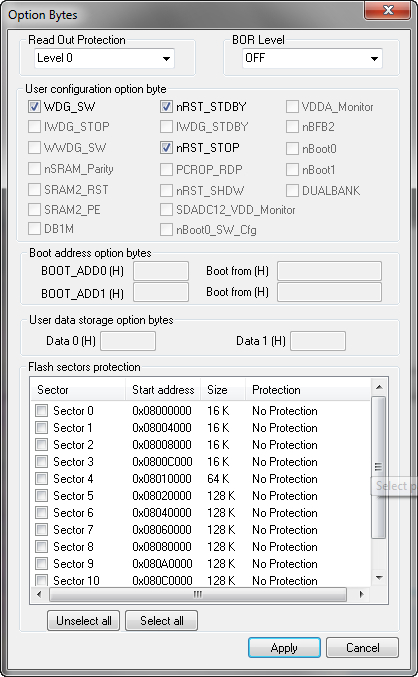
- 2015-12-08_214938.jpg (153.5 KiB) Viewed 400 times

