
our Generic board is a prototype , we added directly
usb- pa11
usb+ pa12
Nothng else into the usb data ports , ofcourse when i connect that into the PC i get a “dont recognise device” message from Windows.
i do not have any BOOT 0 Button or jumper into the board and not even a pull-up resistor of around 1.5k to PA12
PC14 is not used in my board PC12 either
i have a LED in pa2
I am reading about the bootloaders From Roger https://github.com/rogerclarkmelbourne/ … bootloader
http://wiki.stm32duino.com/index.php?ti … bootloader
and i have some questions. First of all i need to upload the bootloader, the second question is wich bootloader.
My main target is when the user plugs in the USB i want the MCU to recognise that is connected to the PC first of all and Serial the data out of it ,
and from a Windows program to set the board into DFU mode and upload a firwmare.
So I am looking for a guide or something guys , for my particular hardware , any help or comment will be much much apreciated
usb- pa11
usb+ pa12
Nothng else into the usb data ports ,
It is a bit more complicated to force the PC to enumerate.
I would recommend reading this about the Blue Pill:
http://wiki.stm32duino.com/index.php?title=Blue_Pill
Bootloaders are stored here: https://github.com/rogerclarkmelbourne/ … bootloader
Specifically:
Hardware installation
BluePillUsbResistor.jpg
The USB standard requires a 1.5 kΩ pullup resistor on D+, but this board is known to have a wrong value (R10 on the board). It ships with either a 10 kΩ resistor or a 4.7 kΩ resistor, but it should be replaced with a 1.5 kΩ resistor, or put an appropriate resistor value (e.g 1.8 kΩ) in between PA12 and 3.3V. It is also true that some PCs are tolerant of incorrect value so, before you change the resistance, you can try if it works in your case.
When I used to play around with V-USB, I always used small value series resistors … like the schematic below:
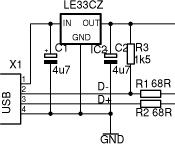
While some STM32 boards do not utilize the series resistors, they are just a decent safety net to avoid the release of Magic Smoke should something go wrong.
Ray
suppose i have added the circuit and everything is solid and working good
do you propose to add a BOOT 0 pin?
[alexandros – Fri Jan 26, 2018 1:48 pm] –
Thanks a lot for your answer i apreciatedsuppose i have added the circuit and everything is solid and working good
do you propose to add a BOOT 0 pin?
Ah, that’s a trick question, is it not?
Seriously, read this: https://www.eevblog.com/forum/microcont … boot-pins/
All will be revealed … 
Hint for all those not wanting to ferret out the details of a long post:
boot0 and boot1 are sampled on reset, <…>”The values on the BOOT pins are latched on the 4th rising edge of SYSCLK after a reset. It is up to the user to set the BOOT1 and BOOT0 pins after reset to select the required boot mode.”
seems i made a mistake there is a 1.5k in usb , and everything is Fine.
Further digging ,
I think i made it work….
- i uploaded the generic_boot20_pb12.bin with st-link ,
- Install the drivers from Arduino\hardware\Arduino_STM32-master\drivers\win
- with the USB attached and now recognised from the PC i Upload from Arduinio ide the BLINK sketch..
Everything worked the board went into DFU (upload method stm32Duino Bootloader) and went into normal mode after reeboot itself.
Now i upload my sketch larger that BLINK sketch  Uploaded suscesfully
When i tried to Re-upload my project the Arduino IDE got stuck here
maple_loader v0.1
Resetting to bootloader via DTR pulse
Searching for DFU device [1EAF:0003]…
ONLY if i unplug and re-plug the USB the Sketch will be uploaded .. its like cant get reboot…
Only on lighter sketches the upload procedure is smooth like the blink scetch ,
Do i have to add something in my project ?
Here is the Google if you wish to research more
Honestly, I think for most people the development on Maple Mini and final burn to Blue is the easy fix… or custom board in your case. I do remember several reset circuits that have been suggested, so maybe you can implement in your own design.
Ray
So the upload only works if you use Serial (USB serial) in your actually running code.
If you don’t have USB serial in your code, the resetting must be done manually (or by un-plug->re-plug the USB cable, or power cycle).
[stevestrong – Sat Jan 27, 2018 5:55 pm] –
In order to reset the STM32 board and go to DFU mode the PC send a magic sequence over USB serial.
So the upload only works if you use Serial (USB serial) in your actually running code.
If you don’t have USB serial in your code, the resetting must be done manually (or by un-plug->re-plug the USB cable, or power cycle).
What do you mean?
like Serial.begin(…. ? i know that Serial is for the USB.. If yes , i already did a Serial.begin(115200) but diidnt work
Sorry for my ignorence
You don’t actually need to call Serial.begin yourself, and your call to Serial.begin(xxx) is ignored by the Core because, USB Serial has already been started.
BTW. The baud rate setting in Serial.begin is redundant for USB Serial, because the transfer is not really done in the same way as hardware Serial . The actual data rate is much higher. ( There are various posts on the forum where people have investigated the USB Serial data rate, as it varies depending on the length of the data string you send to Serial.write() )
Getting back to the upload sequence…
The bootloader handles the upload, it’s a separate program that only runs when the processor is rebooted.
After the bootloader has handled the upload, it terminates and frees all its resources ( gives back 3k of RAM it was using)
So to start an upload, the Core has to reboot the processor.
The IDE needs some way to tell the Core that it wants to upload a new sketch ( binary) and the way this is done, is a special sequence of control lines changing and a Magic Number ( sequence of characters) is sent by the IDE via USB Serial to the Core.
The Core constantly checks any incoming USB Serial for this sequence and if its received, the Core reboots the processor
Yes Roger , eveyrything understood ,
Now accroding to this part
The IDE needs some way to tell the Core that it wants to upload a new sketch ( binary) and the way this is done, is a special sequence of control lines changing and a Magic Number ( sequence of characters) is sent by the IDE via USB Serial to the Core.
The Core constantly checks any incoming USB Serial for this sequence and if its received, the Core reboots the processor
With a simple sketch like the Blink project the Core gets the Sequence and Reboots the processor , and the program uploads just perfect.
Now For some reason my project wont get that sequense (have to un-replug) , as soos as the IDE sends the command the project stack , and dont reboot , i have to investigate further maybe a library or something causes the problem.
I have to mention something , i dont know how express that i ll give it a try , in order the IDE to send correctly the sequensy , the skecth have to run inside the void loop() from top to bottom , and not inside a child loop or while() ? if you know what i mean
EDIT: No thats not the case this also reboot and upload just fine
void loop() {

digitalWrite(PB9, HIGH);   // turn the LED on (HIGH is the voltage level)

delay(1000);              // wait for a second

digitalWrite(PB9, LOW);    // turn the LED off by making the voltage LOW

delay(1000);
do { }while (1==1);
}
Have a look in the tools folder (for your operating system)
Also take a look in platform.txt and the maple upload scripts to see what params are needed
[alexandros – Tue Jan 30, 2018 11:49 pm] –
is there another program besides the arduino ide that can upload a bin file with upload method of “STM32duino Bootloader”?
Generally speaking, multiple questions running through an inquiry makes for a long post with many tidbits of inquiry and answers.. Members utilize valuable time to answer posts and provide accurate and targeted responses. When a question is answered, mark the thread [SOLVED] and if one question leads to another, attempt to resolve the second one yourself rather than just tossing out another question. Chained questions makes finding valuable answers in a long post very difficult.
As this post has been answered, I am marking it [SOLVED].
Ray

