
Before I go on trying that I would like to know has anybody tried it ? Being much more lightweight IDE than Eclipse I’d like to try if I get SWD Debugging working with STM32F103. This would anyway still mean that compiling would be done in Arduino IDE but CodeBlocks would use the output directory that has binaries and symbol files, etc. Thanks.
The setup of building system and debugging is a bit complex but it is possible. I plan to write a full guide for this…
For now you can see the building system for stm32 for halmx applications from my repo, and to use it as a template : http://www.stm32duino.com/viewtopic.php?f=46&t=1267
There is also a guide in polish (i dont know polish but it is pretty illustrated) for gdb/openocd : https://www.google.gr/url?sa=t&rct=j&q= … 3897,d.d2s
Take a look also here : http://www.hackvandedam.nl/blog/?p=707
 Ok.. you have full building in that CodeBlock. So a bit different what I’m using now.
The thing is .. with Eclipse it is very easy to set up debugging since there are OpenOCD plugins. I still compile with Arduino IDE though but in Eclipse you only need to create debugging project once and after that you just compile in Arduino IDE and then in Eclipse start debugging.. quite easy and painless.
So is there any “ready-made” OpenOCD plugin for CodeBlocks ? I couldn’t find any..
Thanks.
http://forums.codeblocks.org/index.php?topic=11359.0
http://www.codeblocks.org/cbplugins
ok fairly old, but …
if you register with the first and search openocd, there’s quite a bit more
srp
1. First, I assume that the arm compiler is correctly defined and you can build the binary (always with -O0 for debugging).
2. It is important to set up correctly the debugger. In the Settings>Debugger define a new debugger (let’s call it ‘OpenOCD’) you have to define the executable to your arm-none-eabi-gdb and some settings (look screenshot).
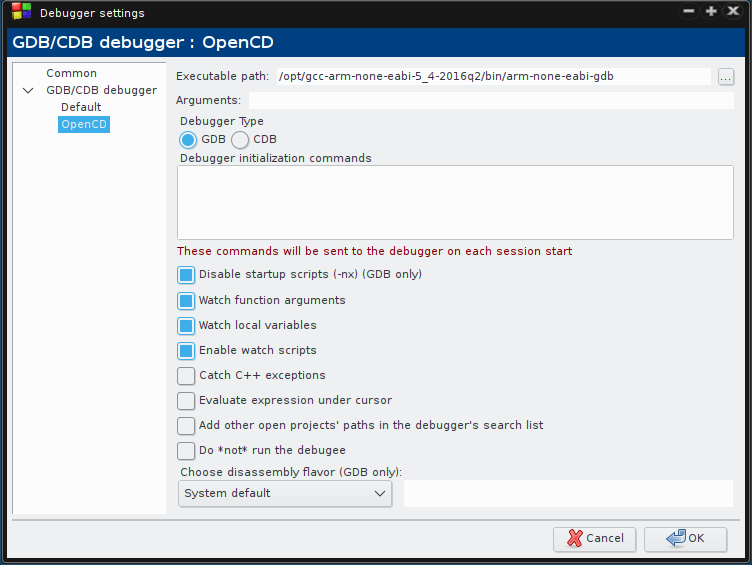
- debugger-settings.png (50.18 KiB) Viewed 3030 times
The plain codeblocks is not dedicated to stm32 development but it can do the job as it is using the gdb. Emblokcs/Embiz is a fork of Codeblocks dedicated to embedded development and it offers more debug windows with register views of peripherals etc, but it is available only for Windows.
Actually, I am using codeblocks for many years as my professional development IDE for developing linux embedded systems (same sources, different architectures), and I am very familiar with it, this is the main reason for me, to use it for stm32 development.
Codeblocks is small and fast, with very good editor (code completion, symbol browser etc) and a versatile build system. Except from its own build system supports plain makefiles. I tried eclipse, but it is very slow in my machines….
FYI, Here are the links for programs used:
Arm toolchains : https://launchpad.net/gcc-arm-embedded
Code::Blocks : http://www.codeblocks.org/downloads/binaries
OpenOCD : https://sourceforge.net/projects/openoc … rce=navbar
STM32 Codeblocks library project and Templates for halmx/mbed (I will try to make one for arduino_stm32) : https://github.com/evark/cbp-mbed & https://github.com/evark/cbp-halmx

change the executable names from arm-elf-xyz to arm-none-eabi-xyz
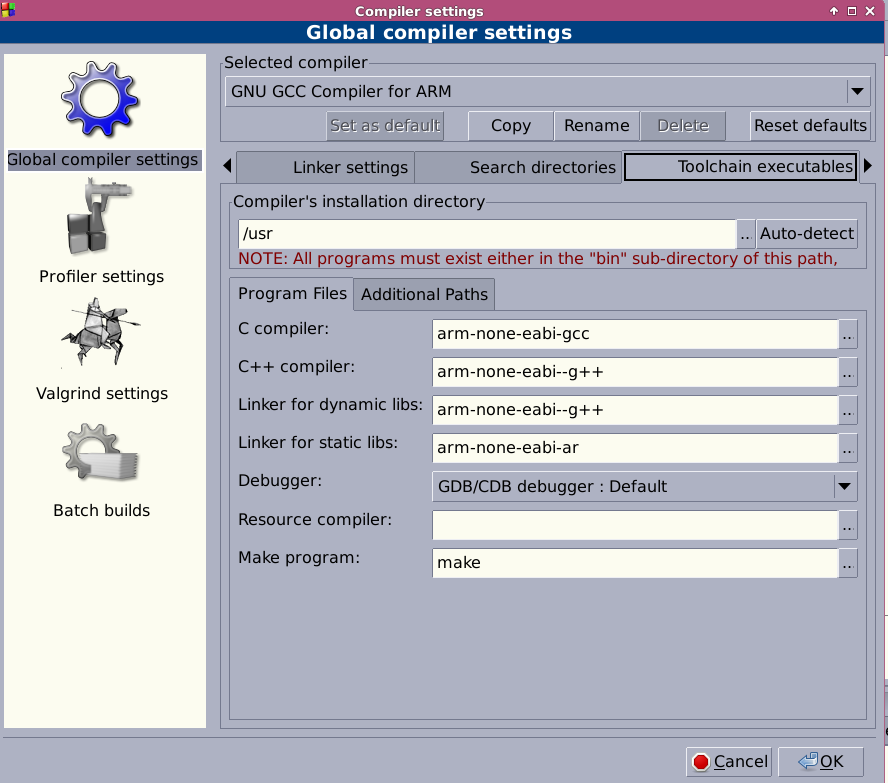
- cb-setup.png (105.94 KiB) Viewed 1272 times
USB Driver should be installed for ST Link V2-1 under windows.
C:\Program Files (x86)\STMicroelectronics\STM32 ST-LINK Utility\ST-LINK Utility>ST-LINK_CLI.exe -c

STM32 ST-LINK CLI v2.5.0

STM32 ST-LINK Command Line Interface
ST-LINK SN : 0671FF485452785087212719

ST-LINK Firmware version : V2J27M15

Connected via SWD.

SWD Frequency = 4000K.

Target voltage = 3.2 V.

Connection mode : Normal.

Device ID:0x410

Device flash Size : 128 Kbytes

Device family :STM32F10xx Medium-density
PS: probably you are already using these binaries….
PS: probably you are already using these binaries….
PS: probably you are already using these binaries….
EDIT: seems to work okay! Couldn’t find global variables though..
Anyway. I added these in ‘Additional GDB commands’
load <file.elf>
symbol-file <file.elf>
And in debuuger search dirs I added build folder from Arduino IDE and some folder from STM32F1/cores
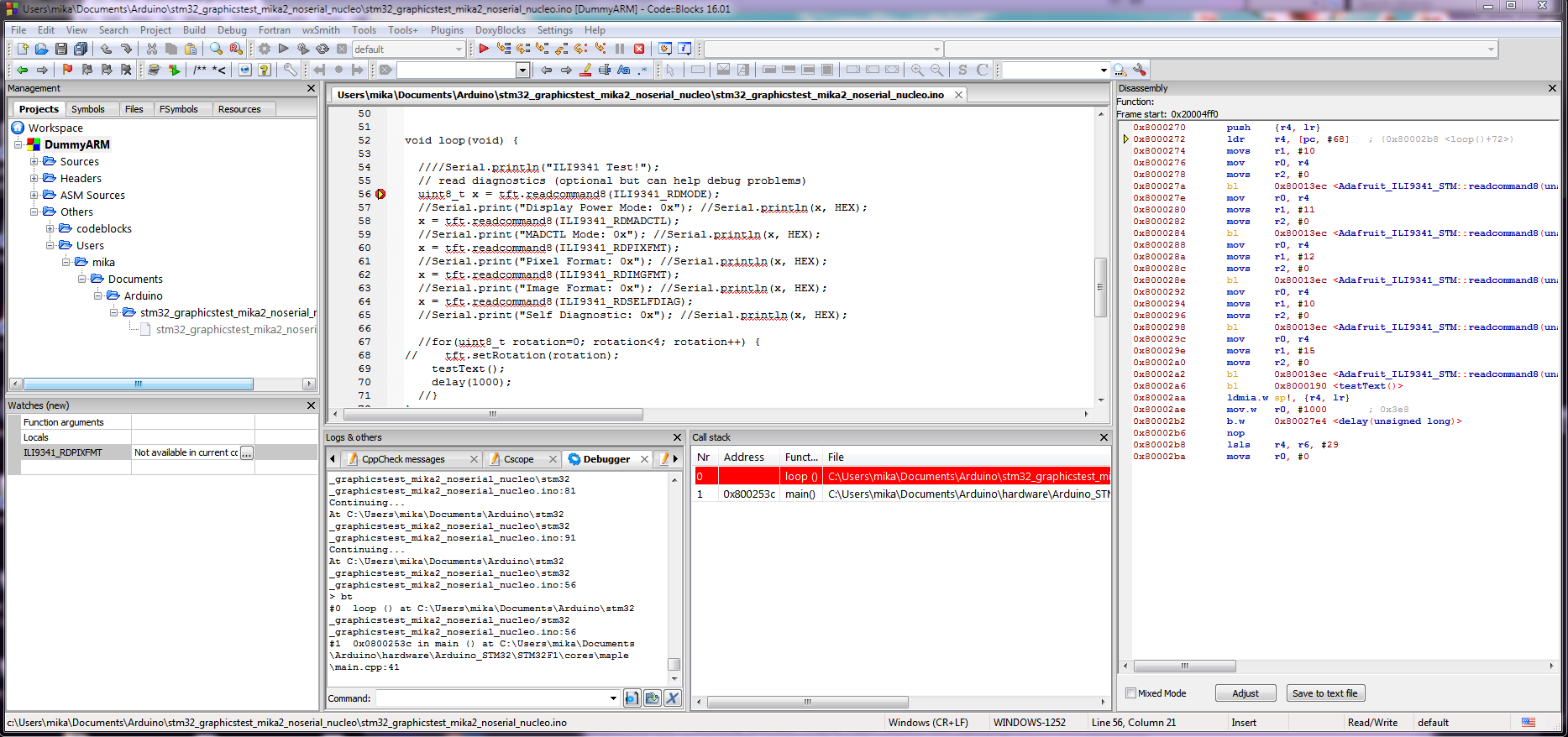
PS: I compile the sources with -ggdb flag, I think this helps because the debug info are oprimised for gdb…. (use also -Og optimization for better debug experience)
PS: I compile the sources with -ggdb flag, I think this helps because the debug info are oprimised for gdb…. (use also -Og optimization for better debug experience)
You can change the flag on platform.txt inside STM32F1 directory from -Os to -Og for better results.
You can change the flag on platform.txt inside STM32F1 directory from -Os to -Og for better results.
Now the IDE wants to compile my program first which returns an error and does not let the debugging start. I’m using Arduino IDE for compiling.


