
 this is what I see as the issue:
.
1. When you create a new Project with “a board”, then while uploading via standard maple uploader you get a Sloeber error message
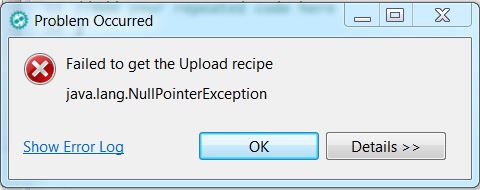
- Sloeber Upload Problem.JPG (23.96 KiB) Viewed 730 times
As far as I can see, Sloeber generates many problems, I would not rely on it.
Try Platformio, and all your problems will be gone.
[stevestrong – Fri Sep 01, 2017 12:50 pm] –
As far as I can see, Sloeber generates many problems, I would not rely on it.
Steve, nobody is forcing you to use it
I believe it started for me when the new optimization options where added. The generic boards have more dropdown boxes than the maple ones, I suspect Sloeber may not be managing that too well.
But I haven’t had the time to look at boards.txt to see if something looks different, other than extra options.
Most of the time I load the elf to Ozone for debugging purposes, so I just upload using Ozone, but is annoying that the automatic upload doesn’t work.
If I get to find anything I’ll post in this thread.
Not just for me, but for everyone working on that, every few days there is a post about someone that had to remove it and start clean again because somethign broke, with an update, when adding something, out of the blue…
Add this into the boards.txt for each variant with ERROR (those are all the “genericSTM32F103x” – so add with proper x variant suffix) before the “menu” items start:
..

genericSTM32F103C.upload.tool=maple_upload

genericSTM32F103C.upload.protocol=maple_dfu

..
[Pito – Fri Sep 01, 2017 1:38 pm] –
@Victor: could you test there plz?
Thanks for the solution, I’ll test it later today and let you know.
@Pito, my arduino IDE is a mess, if yours is working can you confirm adding those settings does not impact negatively in the arduino IDE when trying to upload with other methods such as stlink to one of those boards?
).I consider it solved..

