
 I thought not.
I spent some time messing around with the ESP-32 under Arduino. I got the < $5 Wemos Lite board in from AliExpress and I can remember when the Maple Minis were this price just a few years ago.
So, my playtime (limited on weekends) was devoted to reading about Espressif’s implemation of FreeRTOS with their Arduino core. I watched a couple of YouTube videos. I read one too many articles. I tried several examples. My head started to hurt because this is such a simple concept and existing Arduino examples were really poor. Worst, some were missing the fact that the Arduino code creates a default task; that is, in standard mode, Arduino runs on one core and the RF native side runs on one core.
Said another way, one can cycle-steal from the RF “dedicated” core since the Arduino side already has a dedicated core.
I created a multi-tab Arduino project to easily demonstrate how simple the overall process can be. The code is available as a ZIP from my project page:
https://www.hackster.io/rayburne/esp32- … res-8dd948
Enjoy.
Ray
The three user's task: 0, 1, 2:

__task__                  __core__

Task 1 complete running on Core 0 Time = 2 mS

Task 2 complete running on Core 1 Time = 1 mS

Task 0 complete running on Core 1 Time = 1 mS

Task 1 complete running on Core 0 Time = 1 mS

Task 2 complete running on Core 1 Time = 2 mS

Task 0 complete running on Core 1 Time = 2 mS

Task 1 complete running on Core 0 Time = 2 mS

Task 2 complete running on Core 1 Time = 2 mS

Task 0 complete running on Core 1 Time = 2 mS

Task 1 complete running on Core 0 Time = 2 mS

Task 2 complete running on Core 1 Time = 2 mS

Task 0 complete running on Core 1 Time = 2 mS

Task 1 complete running on Core 0 Time = 2 mS

Task 2 complete running on Core 1 Time = 1 mS

Task 0 complete running on Core 1 Time = 1 mS

Task 1 complete running on Core 0 Time = 1 mS

Task 2 complete running on Core 1 Time = 1 mS

Task 0 complete running on Core 1 Time = 2 mS
I like the idea of being able to use both cores.
I think it would definitely outperforms stm32f4 even on computationally intensive applications.
The ESP32 is really a very powerfull device for the price. Even without Wifi/Bluetooth capabilities is a very cost effective chip.
[Slammer – Mon Feb 12, 2018 11:52 am] –
Andreas Spiess has released a great video about using the 2 cores of ESP32. It is here: https://youtu.be/k_D_Qu0cgu8
The ESP32 is really a very powerfull device for the price. Even without Wifi/Bluetooth capabilities is a very cost effective chip.
The “basics of the code example” was from watching the Spiess video. But his example was convoluted, IMO. I kept his “workload” and reworked much of the format, etc. Andreas was only alternating core 0, 1 but the ZIP example actually makes use of the loop() to show that time slicing is also allocated to that task too.
So, to summarize, if you add 2 tasks, one to Core0 and one to Core1, then there are 4 tasks running:
- RF and protocols on core0
- User loop() on core1
- User added task on core0
- User added task on core1
The above are properly handled in my reworking of Andreas’s example code… Additionally, I corrected the over use of global variables and properly moved the functions outside the main sketch into their own tabs with proper prototyping.
Ray
TAB DualCore
/*

This sketch runs the same load on both cores of the ESP32

ArduinoIDE 1.8.5

Linux Mint 18.3

Sketch uses 162569 bytes (12%) of program storage space. Maximum is 1310720 bytes.

Global variables use 11068 bytes (3%) of dynamic memory, leaving 283844 bytes for local variables. Maximum is 294912 bytes.

*/
#include <Streaming.h> // Ref: http://arduiniana.org/libraries/streaming/
#include "Workload.h"
#include "Task1.h"
#include "Task2.h"
TaskHandle_t TaskA, TaskB;
void setup() {
Serial.begin(115200);
delay(500); // small delay
// Ref: http://esp32.info/docs/esp_idf/html/db/da4/task_8h.html#a25b035ac6b7809ff16c828be270e1431
xTaskCreatePinnedToCore(
Task1, /* pvTaskCode */
"Workload1", /* pcName */
1000, /* usStackDepth */
NULL, /* pvParameters */
1, /* uxPriority */
&TaskA, /* pxCreatedTask */
0); /* xCoreID */
xTaskCreatePinnedToCore(
Task2,
"Workload2",
1000,
NULL,
1,
&TaskB,
1);
}
void loop() {
// This task will run in the ESP32 Arduino default context
unsigned long start = millis();
Serial << "Task 0 complete running on Core " << (xPortGetCoreID()) << " Time = " << (millis() - start) << " mS" << endl ;;
delay(10) ;
}
i’ve got both the idf and sketchbook/hardware routes to compile, link and flash.
relatively painlessly as well.
i was actually thinking about asking for a zip from anyone with a working arduino, ~/sketchbook/hardware esp32 install.
i’m also thinking that the peripherals won’t be as easy as on arduino, they don’t seem to have a i2c scanner either 
for breadboarding, have a look at my managing width post, viewtopic.php?f=17&t=3224
stephen
[zmemw16 – Mon Feb 12, 2018 1:55 pm] –
which route of software installation ?
i’ve got both the idf and sketchbook/hardware routes to compile, link and flash.
relatively painlessly as well.
i was actually thinking about asking for a zip from anyone with a working arduino, ~/sketchbook/hardware esp32 install.i’m also thinking that the peripherals won’t be as easy as on arduino, they don’t seem to have a i2c scanner either
for breadboarding, have a look at my managing width post, viewtopic.php?f=17&t=3224
stephen
The ESP32 core installation is straightforward. Follow directions.
The Lite board shipped with header pins… fits a breadboard perfectly… no adapter required. CH340C dedicate USB. Resets correctly from IDE.
There are many ESP32 examples once you get the core installed.
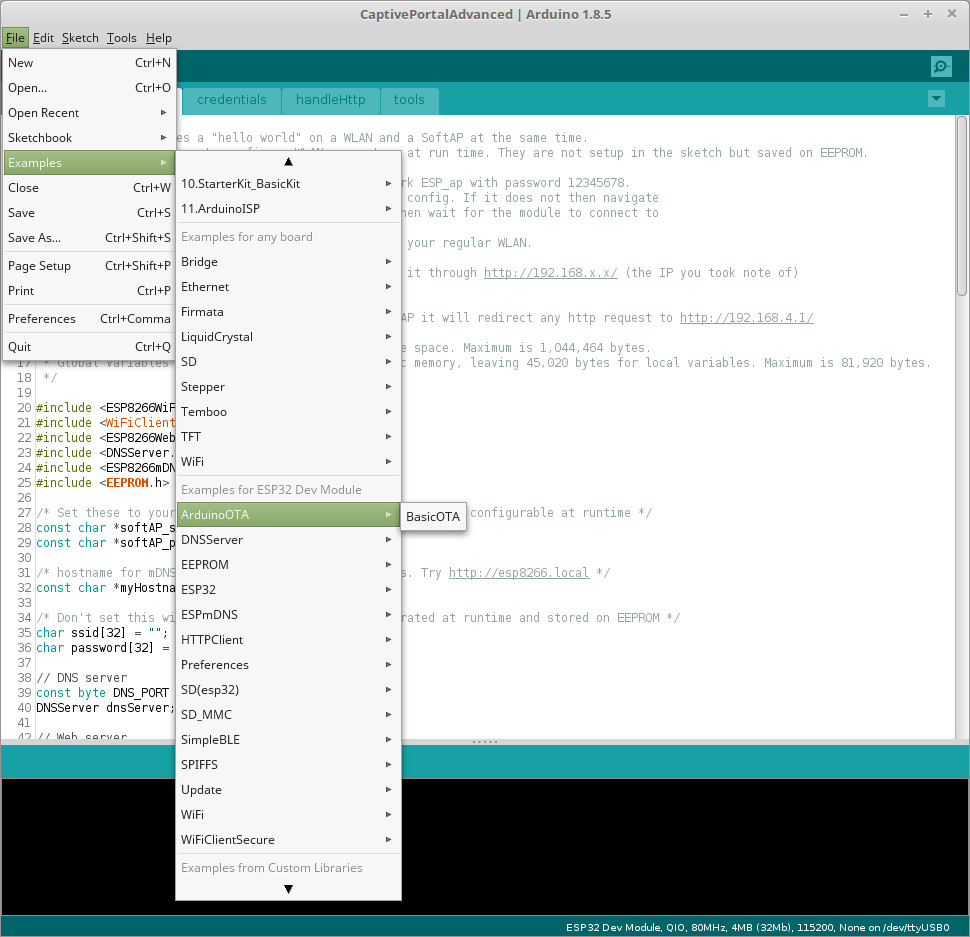
- ESP32 Examples.jpg (144.66 KiB) Viewed 1188 times
have you tried the idf version ?
it brought back many memories of kernel configuring with it using ‘make menuconfig’, that started over quarter of a century ago
idf example hello world works a treat.
one thing i noticed was it needed a press on the reset button, even though the messages say it did a hard reset.
i had a quick ‘look’ at the i2c and spi examples, hence my comment.
stephen
I have probably 5 different varieties of ESP32 modules. All reset after uploading using Linux Mint 18.3. … have not tried under Windows.
Ray
Quick question, can you have a task run in both core alternatively whenever one of them is available?
EDIT: Found my ESP32, is an ESP-WROOM with 4MB of extra RAM pretty nice for like $6-7.
[mrburnette – Tue Feb 13, 2018 7:44 pm] –
Have not worked directly in the IDF. Have used those function calls from within Arduino.I have probably 5 different varieties of ESP32 modules. All reset after uploading using Linux Mint 18.3. … have not tried under Windows.
Ray
have not tried under Windows.
@Ray them there is fighting words – if you’re suggesting i’m a windows user – Linux since 1994  OK xp in a virtualbox session, not even sure when i last used it
I’ll try it (idf hello world) again, maybe it was just because i used the idf rather than arduino ide, remembered i used Cutecom and it came up with an invalid baud rate ( 0 ).
for the spi and i2c i was referring to the idf examples, certainly not arduino style, in appearance source is more like hal/spl with its data structures.
stephen


